
Vovsoft Website File Collector Giveaway

Vovsoft Website File Collector
Finds and downloads files
- Product
- Vovsoft Website File Collector
- Product website
- vovsoft.com
- License
- Lifetime
- Platform
- Windows 11 to Vista
- Usage
- Non-commercial only
- Updates
- No future upgrades
- Support
- No support
Continue on vovsoft.com
The publisher handles registration and license delivery on its official website.
30% Off Vovsoft Website File Collector Coupon Code
Vovsoft Website File Collector Discount Codes Oct 2026

Vovsoft Universal License
115+ programs | Lifetime license | All future updates
Is this Website File Collector giveaway legit?
Yes. The key is a genuine Vovsoft license, and you activate it inside the official app.
No crack or keygen
You run Vovsoft’s own build and register it through the built-in “Enter License Key” screen. Nothing is patched or repackaged.
Straight from the publisher
The software downloads from vovsoft.com, and paid licenses are sold through Vovsoft’s own purchase page, not a key reseller.
Secure checkout
If you buy with the coupon, payment runs on Vovsoft’s payment partner, PayPro Global, over an encrypted connection. Your card details never touch WinningPC.
Try before you pay
Vovsoft offers a free trial download and publishes a refund policy, so you can test the tool on your own sites before spending anything.
Vovsoft Website File Collector License Key Free
- Download either the installer or the portable version of Website File Collector from the download link above. The portable build runs without installing, which is handy on a USB stick.
- Copy the license key from the giveaway box on this page.
- Open the app and click the “Enter License Key” button.
- Paste the key to finish registration. Your copy of Vovsoft Website File Collector is now licensed for life.

Vovsoft Website File Collector Review & Features
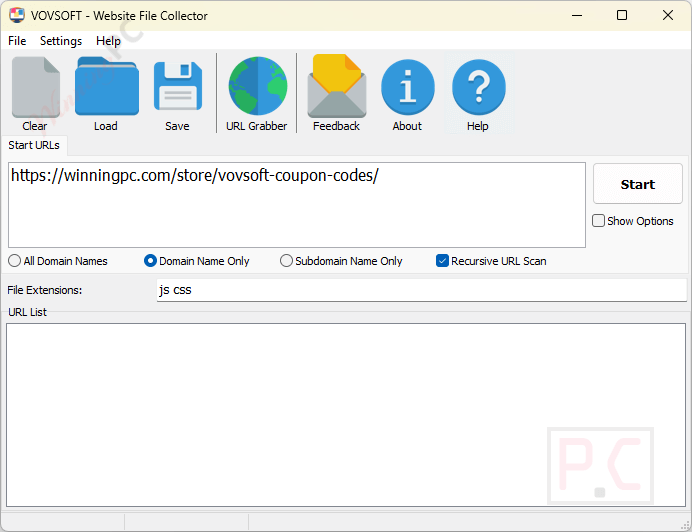
Vovsoft Website File Collector‘s best feature is the review step. Instead of blindly dumping files onto your drive, the app scans the site first and shows you the full list of matching URLs, so you can export that list and pick what you actually want. Filtering by extension is also more flexible than it sounds: you aren’t stuck with a preset menu, you can type any extension, from pdf and docx to css, js or mp4. The flip side is that it’s a one-job tool. Vovsoft’s documentation doesn’t mention crawl-depth limits or filters beyond file type, so on a very large site you may get more than you bargained for. For pulling every document off a course page or every image off a portfolio, though, it’s quick to set up and hard to get wrong.
Key features
- Targeted File Search: specify file extensions such as PDF, DOC, JPG, CSS, JS, MP4, or custom formats to find only the files you need.
- Comprehensive URL Listing: scan websites and view a list of matching file URLs before downloading, with checkboxes to select the files you want.
- Batch Downloading: download multiple files in one operation, monitor download progress, or export the collected URL list for later use.
- Time-Saving Efficiency: automatically find downloadable files across websites without manually browsing individual pages and downloading each file.
- Customizable Settings: choose a download folder, filter files by extension, and select or remove individual files from the download list.
- Multiple Website Scanning: enter multiple website URLs, one per line, to collect files from different websites in a single scanning task.
- File Size Preview: retrieve and view file sizes before downloading to help identify files and manage storage space.
What we think
more Vovsoft Website File Collector screenshorts!


Frequently Asked Questions
How do I specify which file types to download?
Users can enter the desired file extensions (e.g., PDF, DOC, JPG) into Vovsoft Website File Collector’s interface to target specific file types for collection.
Can I download files from multiple websites simultaneously?
Yes, you can input multiple website URLs into the software to scan and download specified file types from all listed sites.
How does the batch downloading feature work?
After scanning the specified websites, the software compiles a list of matching file URLs, allowing you to download all files in one operation or select specific files for download.
Can I preview the list of files before downloading?
Yes, Vovsoft Website File Collector provides a detailed list of downloadable URLs after scanning, enabling you to review and select files before initiating the download.
Can I export the list of file URLs without downloading them?
Yes, the software allows you to export the list of identified file URLs for future reference or manual downloading.
How can I get the best discount from Vovsoft Website File Collector?
During the purchase process, there is an option to enter a coupon code. Enter the WINNINGPC code provided by WinningPC to receive a 30% discount.
System Requirements & Details
| Language Support | English |
| Operating System | Windows 11, 10, 8/8.1, 7, Vista (32-bit & 64-bit) |
| File types it can find | Any extension you enter, e.g. pdf, doc, jpg, png, css, js, mp4 |
| Output | Downloaded files saved to a folder you choose, or an exported list of file URLs |
| Other requirements | An internet connection to scan websites |