WinningPC
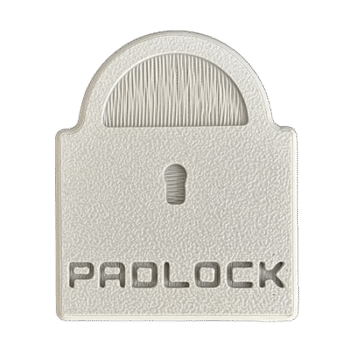
Instead of spending time relaxing, talking with friends, working, or even getting some sleep, I often caught myself just scrolling through TikTok, Instagram, or YouTube. It really held me back; that’s why Padlock App stood out to me. Designed to boost productivity, it can cut through the distractions and give me more careful insight into how you spend your time. Unlike the iOS Screen Time feature that you can bypass with a couple of taps, Padlock works differently. It combines an iPhone app with a small physical device, so the only way to get your blocked apps back is to actually tap the Padlock again.
Padlock App Discount Promo Code
No coupon code exists!
Key Features and Screenshots
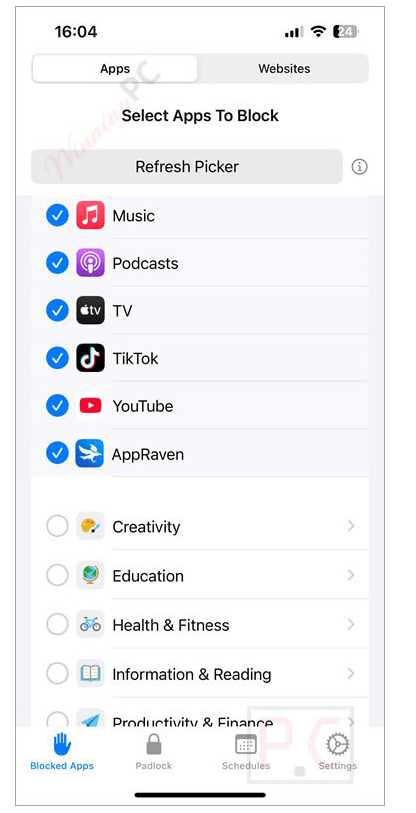
- Physical App Blocking: Instead of just tapping “ignore” on a screen-time warning, Padlock makes you physically scan the device to unlock your distracting apps, no sneaky shortcuts allowed. This extra step breaks the cycle of mindless scrolling.
- Customizable App Selection: Choose which apps waste your time most—like TikTok, Instagram, or YouTube – and block them while leaving essential tools like email, maps, or banking untouched, turning your phone from a temptation machine into a productivity ally.
- Strict Mode with Cooldown: Activate strict mode to prevent instant unlocking. Even if temptation hits, you’ll need to wait through a 12-hour countdown before distractions return.
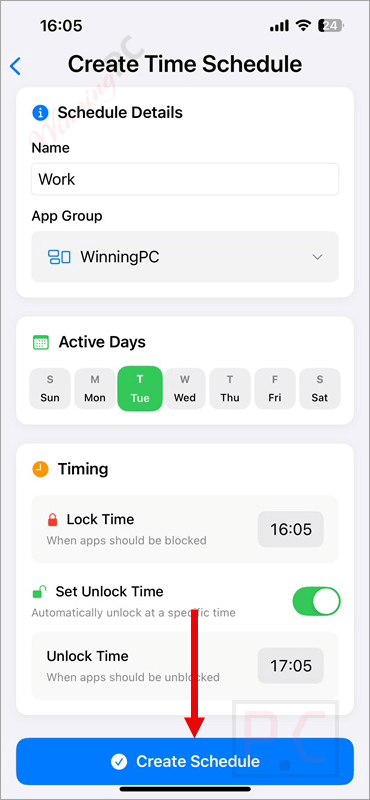
- Scheduling Made Easy: Create time-based rules (like locking at bedtime) or set automatic location-based locks (for the gym, office, or study space), so your focus flows uninterrupted.
- Impossible to Bypass: You can’t delete the Padlock app when it’s active, thanks to Apple-approved security, so there’s no sneaky way out.
- One Device, Many Phones: Padlock isn’t tied to a single iPhone. You can share it with family or friends, or use it across multiple devices.
Padlock App Pros and Cons
Conclusion – Is Padlock App Worth It?
Padlock App honestly feels like such a different kind of tool, and it really helped me take back control of my time. You know how most software limits are so easy to get around? Yeah, I was guilty of doing that too. But Padlock makes it way harder because it’s not just an app – it comes with a little physical device. If I block TikTok, Instagram, or YouTube, the only way to get them back is to actually tap my phone on the Padlock. That extra step makes a huge difference because it gives me a moment to pause before I give in to scrolling. And the cool part? It works with more than one iPhone, so you can even share it with family or friends.
Review by Laura Marano – tech writer and software reviewer at WinningPC
How to Use Padlock App
Step 1: Download and Set Up
Install the Padlock app from the App Store. Pair your iPhone with the physical Padlock device following the on-screen instructions.
Step 2: Choose Distracting Apps
Open the Padlock App. Select the apps you want to block (e.g., TikTok, Instagram, YouTube). Keep essential tools like calls, maps, or banking unblocked.
Step 3: Tap the Padlock Device
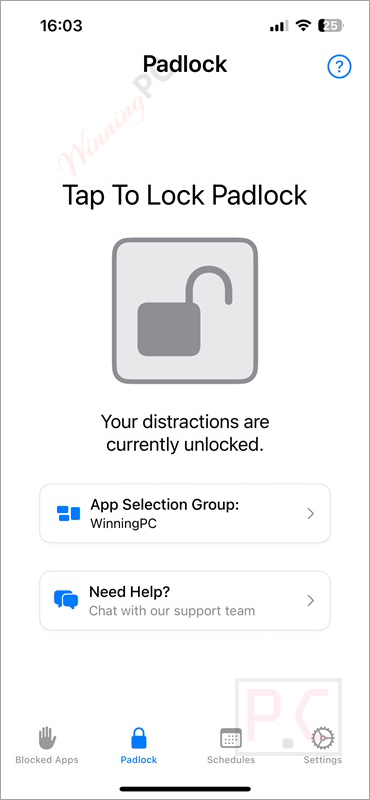
Hold your iPhone near the Padlock device and tap to activate blocking. The chosen apps will disappear from your phone until you unlock them again.
Step 4: Unlock When Needed
To access blocked apps, physically tap your phone to the Padlock device again. If strict mode is enabled, you’ll need to wait for the cooldown timer before apps return.
Frequently Asked Questions
How does it work differently from Apple’s Screen Time?
Unlike Screen Time, you can’t just hit “ignore”. You must physically tap the Padlock device to unlock your blocked apps, making it harder to bypass.
Can I choose which apps to block?
Yes. You decide which apps are distractions and leave important ones (like maps or banking) available.
Can I share Padlock App with other people?
Definitely. One Padlock device can be used across multiple iPhones, so families or roommates can share.
What happens if I lose the Padlock device?
You can still unlock your apps using an emergency option. With strict mode on, there’s a 12-hour countdown before apps unlock.
How can I get a Padlock at the best price?
The regular price is £45.99, but WinningPC provides a coupon for 25% off, making it more affordable.
Why Choose WinningPC
At WinningPC, we are committed to providing 100% valid and verified coupon codes, so you can always shop with confidence.
- If you come across an invalid code or a better offer, please let us know.
- Our team updates all discount information regularly to ensure accuracy.
- Official Authorization: We only share authentic discounts from trusted software developers.
- No Fake Discounts: Unlike some sites, we never use misleading deals. The final price you see is the true discounted price.
- Secure Purchases: All transactions are processed on the official vendor’s website, ensuring authenticity and data protection.
- Extra Support: If you face order or vendor issues, contact us. We’ll liaise with the vendor to help resolve your problem quickly.
Technical Details
| Language Support | English |
| Money Back Guarantee | 60-Day |
| Operating System | iOS 16.0 or later |
| Shipping | Register code will be sent to your email in minutes |
| Subscription | Lifetime |
| Support Services | Email, Live Chat |