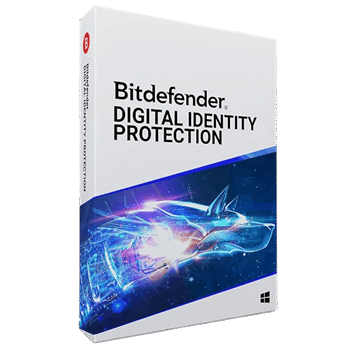
Bitdefender Digital Identity Protection is all about keeping your personal data safe, which honestly feels like the most important thing these days. In my experience, it’s not just another antivirus add-on; it goes way further. It actually scans everything: the public web, your social media, blogs, forums, even data brokers, as well as the deep web and the dark web.
Bitdefender Digital Identity Protection tracks your whole digital footprint and sends you real-time alerts. If your information appears anywhere it shouldn’t, you’ll know right away. That way, we can quickly change passwords or secure our accounts before things get worse, such as losing money or having someone impersonate us online. And the best part? You just sign up, and it’s ready to go. There’s nothing to install!
Bitdefender Digital Identity Protection Coupon Code Oct 2026
Bitdefender Digital Identity Protection 1-Year Plan
24/7 Priority Support | 30-day money-back guarantee
Key Features and Screenshots
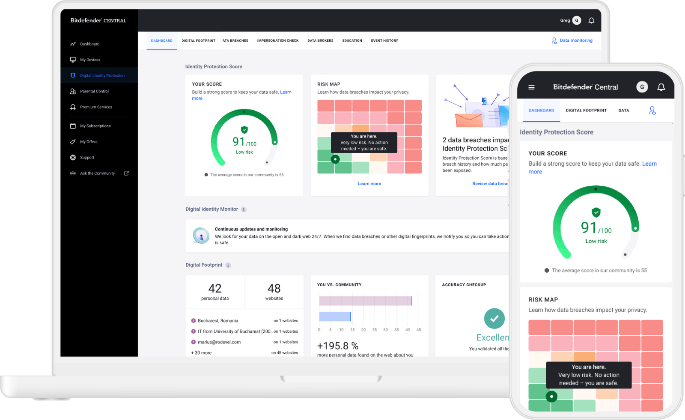
- Full Digital Footprint Tracking: Discover every piece of personal data tied to you, including forgotten accounts and services you no longer use, so you finally know what sensitive data of yours is out there and where.
- Real-Time Breach Monitoring: 24/7/365 scanning of both the public internet and Dark Web, immediately reporting any breaches that put your personal data & identity at risk when they are exposed.
- One-Click Fixes for Leaks: When it detects compromised accounts, it not only warns you but also provides simple, step-by-step actions to secure them immediately.
- Dark Web Surveillance: It even scours hidden marketplaces and databases where stolen data is traded, giving you insights you’d never find alone.
- Fraud Assistance: If you’ve been scammed, it provides simple, actionable steps for quick vulnerability fixes: fraud assistance with step-by-step guidance for scam victims, from contacting banks to securing accounts.
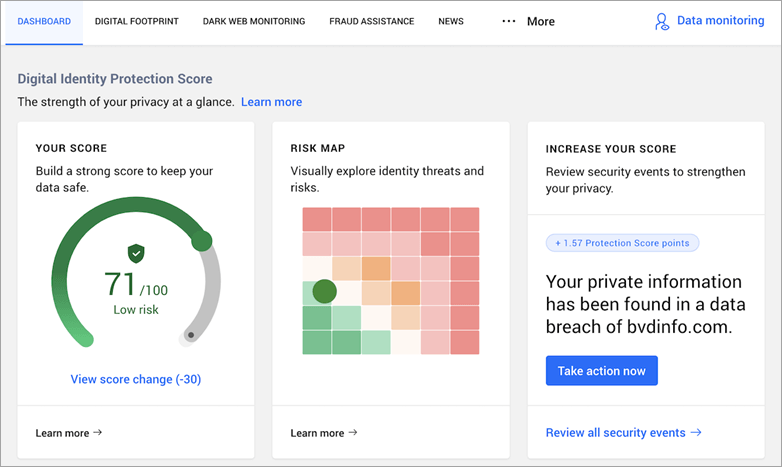
- ID Protection Score: A simple scoring system assesses the state of the user’s digital security, helping you measure the safety of your online identity and track improvements over time.
- Expert Security Updates: Stay ahead of new threats with alerts and advice from Bitdefender’s research team before they hit mainstream news.
- Webmail integration: monitors hundreds of services to keep digital footprint in check.
- No Installation Needed: The tool is cloud-based. You just create your account, log in, and monitoring begins immediately – no software setup required.
more screenshots
Bitdefender Digital Identity Protection Pros and Cons
How to Use (Step-by-Step Guide)
Step 1 – Sign Up for the Service
Go to Bitdefender’s official website. Choose your plan (monthly or yearly) and proceed to checkout.
Step 2 – Create Your Account
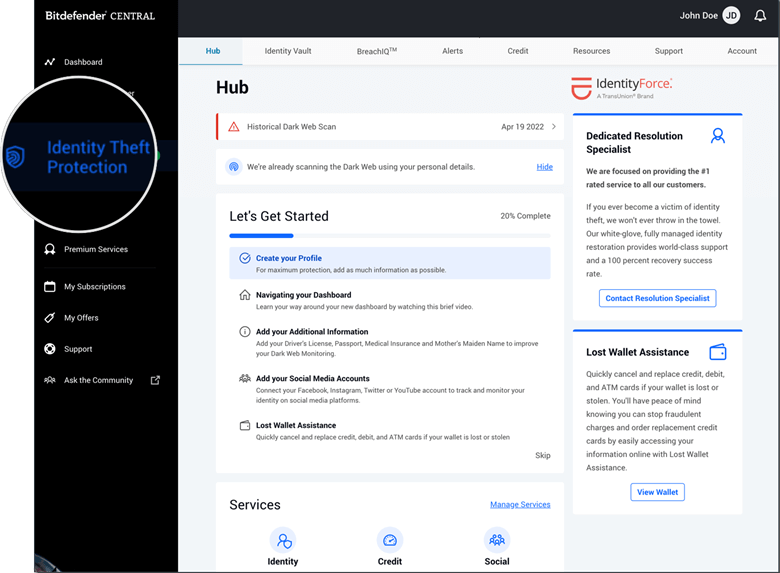
After purchase, you’ll be asked to set up a Bitdefender Central account. This account is your main dashboard for Digital Identity Protection.
Step 3 – Add Your Personal Details
Follow the onboarding steps, where you will input the email addresses, phone numbers, and other personal information you’d like Bitdefender to monitor.
Step 4 – Let Bitdefender Scan the Web & Dark Web
Once activated, the service automatically scans online databases, the public web, and the Dark Web to check if your data is exposed.
Step 5 – Review Your Digital Footprint
Your dashboard will display all accounts, services, and websites connected to your data, including old or forgotten ones.
Step 6 – Monitor Alerts in Real Time
Receive real-time alerts about any exposure, breaches, or risky data found across the web, including the dark web.
Step 7 – Take Recommended Actions
Follow the one-click guidance to secure your accounts, such as changing a password, enabling 2FA, or closing unused accounts.
Step 8 – Track Your ID Protection Score
Check your score in the dashboard to see how well your identity is protected and monitor improvements as you take action.
Step 9 – Use Fraud Assistance if Needed
If you ever fall victim to a scam, the service gives you step-by-step advice on what to do, from securing accounts to reporting fraud.
Step 10 – Stay Informed with Expert Updates
Bitdefender also sends you updates about the latest scams, breaches, and threats so you can act before they affect you.
Frequently Asked Questions
How does it help protect against identity theft?
By scanning for exposed emails, passwords, and personal information in real time, Bitdefender warns you before criminals can exploit your data.
Where does Bitdefender look for my information?
It checks the public internet, databases, and the Dark Web-places where stolen credentials are often traded or sold.
What is the ID Protection Score?
It’s a rating that shows how safe your identity is online, based on the number of breaches and types of exposed data linked to you.
Does Bitdefender help if I fall victim to fraud?
Yes. The service includes fraud assistance, guiding you step by step on how to respond, from securing accounts to contacting authorities.
Is it different from free breach checkers online?
Yes. Unlike free tools, Bitdefender continuously monitors the web and Dark Web, provides actionable fixes, and includes expert support.
Where can I get the best deal?
Visit WinningPC, where you’ll find the coupon giving you 50% off Bitdefender Digital Identity Protection.
Why Choose WinningPC
- Why Trust? We are committed to providing 100% valid and verified coupon codes, so you can always shop with confidence.
- Found an Invalid Coupon or a Better Deal? If you encounter an invalid code or a better offer, please let us know. Our team updates all discount information regularly to ensure accuracy.
- Official Authorization: We only share authentic discounts from trusted software developers.
- No Fake Discounts: Unlike some sites, we never use misleading deals. The final price you see is the true discounted price.
- Secure Purchases: All transactions are processed on the official vendor’s website, ensuring authenticity and data protection.
- Extra Support: If you face order or vendor issues, contact us. We’ll liaise with the vendor to help resolve your problem quickly.
Technical Details
| Language Support | English, German, French, Spanish, Italian, Dutch, Portuguese, and more… |
| Money Back Guarantee | 30-Day |
| Operating System | No installation required – the service is web-based and works on any device (Windows, macOS, Linux, iOS, or Android) through the Bitdefender Central dashboard. |
| Shipping | License details are delivered instantly via email. |
| Subscription | 1-Month, 1-Year |
| Support Services | 24/7 customer support is available via Bitdefender’s support center |