Laura Marano
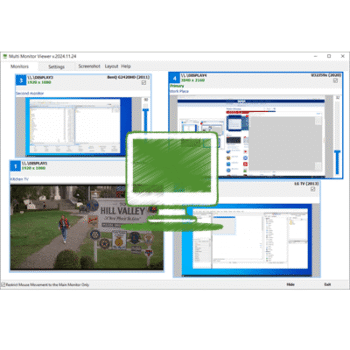
Multi Monitor Viewer is a lightweight and easy-to-use tool designed for anyone working with two or more monitors. Instead of turning your head or walking to another screen, this app lets you view the live content of all connected monitors directly in one window on your main display. Everything updates in real time, including a red dot showing exactly where your mouse cursor is.
Multi Monitor Viewer Coupon Code (100% Working)

Multi Monitor Viewer - Personal License
License for 1 PC (Free updates for 12 months) = $29 (USD)
Giveaway: Multi Monitor Viewer License Code for Free
WinningPC has partnered with AL-Software to give away a 6-month license for Multi Monitor Viewer. Please enter your email address on the giveaway form below to get your free license code.
- Product name: Multi Monitor Viewer v2025.11.30
- Website: https://al-soft.com/multi-monitor-viewer/
- License type: 6-month license
- Platform: Windows
- License code – last updated: Dec 01, 2025
VirusTotal: https://www.virustotal.com/gui/file/92ff33f8d05f….
The giveaway has ended!
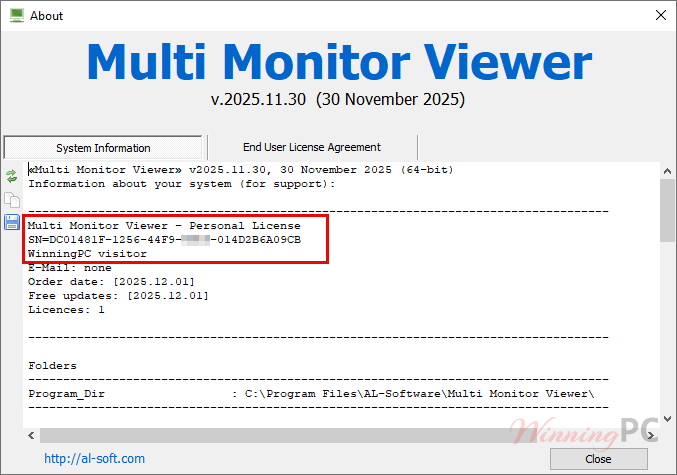
Download and install the software on your computer. Check the text file for the giveaway registration code for Multi Monitor Viewer. Simply paste the code and restart the program:

Enjoy this software for free!
Multi Monitor Viewer main screenshot:

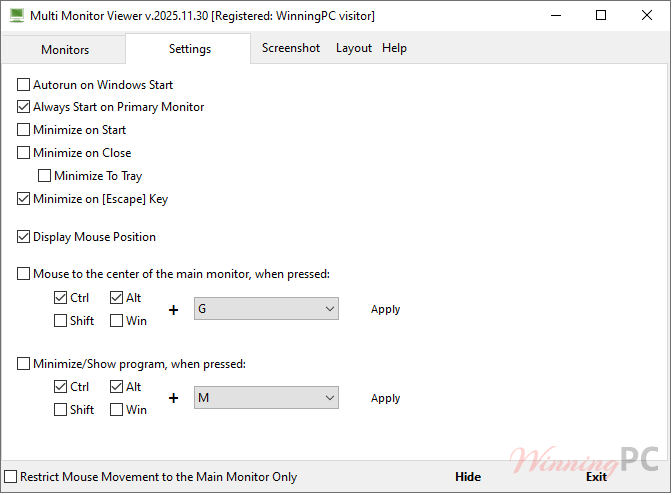
Settings
Main Features
- Real-time monitor preview: See live content from all connected monitors in one central window.
- Full layout customization: Resize, reposition, and arrange each monitor preview however you like.
- Mouse cursor tracking: A red dot shows the exact location of your cursor across all screens.
- No physical access required: View monitors even if they are placed far away or out of sight.
- Simple, clean interface: Easy to use for anyone who works with multi-monitor setups.
Frequently Asked Questions
Who is Multi Monitor Viewer for?
It’s ideal for users who work with two or more monitors or anyone who wants to track multiple displays at once.
Can I customize how the monitors appear?
Yes. You can freely move, resize, and arrange the previews to match your workflow.
Does the program show real-time activity?
Absolutely. The live view updates continuously, and the mouse cursor position is shown with a red dot.
Do I need physical access to the monitors?
No. Even if your secondary monitors are in another room or behind a wall, you can still view their content.
Why Choose WinningPC
- Why Trust? We are committed to providing 100% valid and verified coupon codes, so you can always shop with confidence.
- Found an Invalid Coupon or a Better Deal? If you encounter an invalid code or a better offer, please let us know. Our team updates all discount information regularly to ensure accuracy.
- Official Authorization: We only share authentic discounts from trusted software developers.
- No Fake Discounts: Unlike some sites, we never use misleading deals. The final price you see is the true discounted price.
- Secure Purchases: All transactions are processed on the official vendor’s website, ensuring authenticity and data protection.
- Extra Support: If you face order or vendor issues, contact us. We’ll liaise with the vendor to help resolve your problem quickly.
Technical Details
| Language Support | English |
| Money Back Guarantee | N/A |
| Operating System | Windows 11, Windows 10, Windows 8/8.1, Windows 7 |
| Shipping | The registration code will be sent to your email in minutes |
| Subscription | Lifetime |
| Support Services |