Laura Marano
ArkThinker Screen Recorder is a screen recording tool for capturing video, audio, gameplay, webcam, and even mobile screens on a computer. This ArkThinker coupon offer helps you save up to 50% on selected license options before checkout.
Status: ✅ Active & Verified
Last Checked: September 2026
Offer: 50% Off

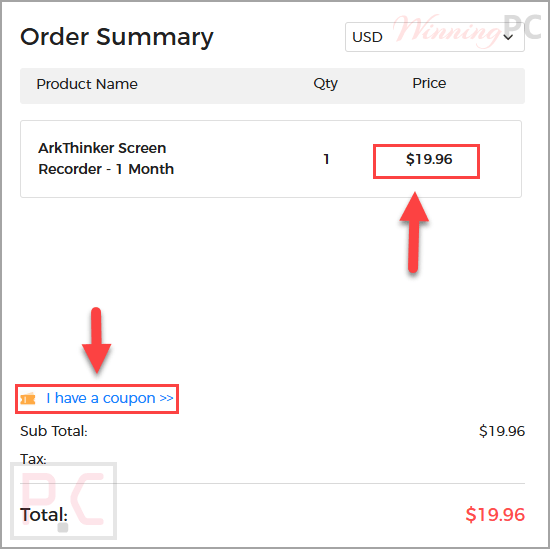
ArkThinker Screen Recorder - 1 Month/ 1 PC
20% discount code: regular price $24.95, discounted price $19.96
ArkThinker Screen Recorder - 1 Year/ 1 PC
50% discount code: regular price $65.0, discounted price $32.50
ArkThinker Screen Recorder - Lifetime/ 1 PC
20% discount code: regular price $74.95, discounted price $59.96
📄 Licensing & Support Details
- 30-day money-back guarantee
- Instant license delivery
- 24/7 tech support
- Secure checkout
- Free updates
- Cancel anytime
📝 How to apply
- Click “Copy Code” to go to the ArkThinker Screen Recorder order page.
- Pick the service plan you want and click “Buy Now.”
- Paste the coupon code into the “I have a coupon” box, if available, then make sure the discount is applied and review your payment details.
What is ArkThinker Screen Recorder?
ArkThinker Screen Recorder is built for recording screen activity, video playback, audio, gameplay, webcam content, and phone screens on a Windows or Mac computer. It may suit users who want to capture online meetings, presentations, films, voice recordings, or gameplay in one place.
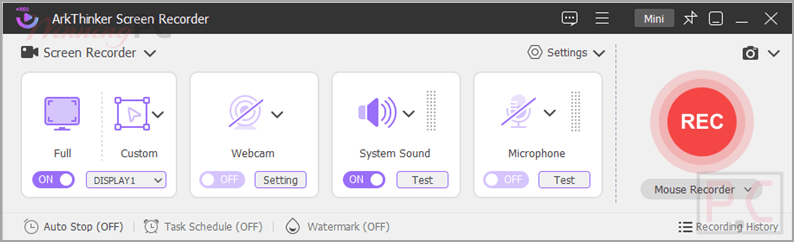
In-Depth Review & Features
- Screen video recording: records screen or video playback with audio on a computer.
- Audio-only recording: captures system sound or microphone input separately.
- Gameplay recording: records a selected gameplay window without delay.
- Webcam capture: records webcam content alone or together with screen recording.
- Phone screen recording: captures iPhone and Android screens on a computer.
- Window Recorder: records only one selected window when multiple windows are open.
- Snapshots: takes screenshots of specific screens, scrolling windows, and pop-up menus.
- Media Metadata Editor: edits exported file details such as ID3 tag, name, cover, album, year, and track.
- File Compressor: reduces file size after recording.
- Video Trimmer: cuts recordings into parts or removes unwanted sections.
- File Merger: combines recorded and local video or audio files.
- File Converter: converts recorded files into other formats.
- Task Schedule: schedules recordings based on computer usage time.
- Add Watermark: adds image or text watermarks to recorded videos.
- Practical Hotkeys: provides shortcuts for easier recording control.
- Record Mouse Cursor: includes the mouse cursor during screen recording.
- Draw on Screen: allows drawing, adding text, and inserting images while recording.
- Hardware Acceleration: helps speed up file editing and exporting.
Pros & Cons
Frequently Asked Questions
What is the best ArkThinker Screen Recorder coupon deal right now?
The biggest listed discount is 50% off on the 1 Year / 1 PC plan, which reduces the price from $65.00 to $32.50.
Where can I find the ArkThinker Screen Recorder coupon code?
WinningPC.com lists the current coupon offers for the available plans. Select the plan you want on the official website and apply the code during checkout if required.
What does it do?
It records screen video, audio, gameplay, webcam content, and phone screens on a computer. It also supports screenshots and includes file editing tools such as trimming, compressing, merging, and format conversion.
Can I use one code for both Windows and Mac?
No. One code cannot support two different systems. If you bought the wrong license version, you can contact the support team for help.
How do I register ArkThinker Screen Recorder?
After purchasing, you will receive a registration code by email. Open the Register window, enter your email address and the received code, then click Register to activate the software.
What recording modes are available?
There are six modes: Video Recorder, Audio Recorder, Game Recorder, Window Recorder, Webcam Recorder, and Phone Recorder.
Where are recorded videos stored?
You can click Recording history on the lower-left corner of the home interface to view recorded videos and audios. Editing tools are also available on the right panel.
Can ArkThinker Screen Recorder record audio only?
Yes. It can record system sound only, microphone sound only, or both depending on your recording needs.
Technical Details
| Operating System | Windows 11, 10, 8, 7; Mac OS X 10.13 or later |
| CPU Requirements | Windows: 1GHz Intel/AMD CPU or above Mac: 1GHz Intel processor and Apple M-series chips |
| RAM Requirements | Windows: 4GB RAM or more Mac: 1GB RAM or more |
| Video Output | Windows: MP4, WMV, MOV, AVI, TS, F4V, M4V, GIF Mac: MP4 |
| Audio Output | Windows: MP3, WMA, AAC, M4A Mac: MP3, WMA, FLAC, OGG |
| Image Output | Windows: PNG, JPG, JPEG, BMP, GIF, TIFF Mac: PNG |