Chris Bruner

Ablebits Sheets Manager for Google Sheets is a Google Sheets add-on built to help you manage multiple tabs faster from one pane.
- Status: ✅ Active & Verified
- Last checked: October 2026
- Offer: 20% Off
- Code: TrSbrExp***rAdns-01

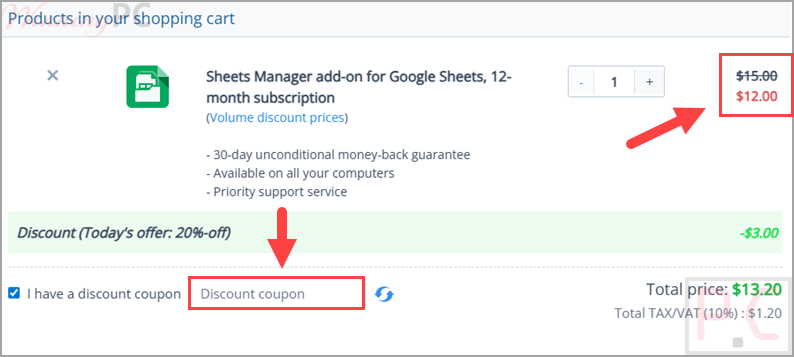
Sheets Manager add-on for Google Sheets, 12-month subscription
20% off coupon code: regular price $15.0, discounted price $12.0
Sheets Manager add-on for Google Sheets, Lifetime subscription
20% off coupon code: regular price $39.95, discounted price $31.96
📄 Licensing & Support Details
- 30-day unconditional money-back guarantee.
- Available on all your computers.
- Priority support service.
- Free support.
- Volume discounts: the more you buy, the less you pay.
📝 How to apply
- Select “Copy code” to keep the code, and you will be sent to the checkout screen.
- Verify the cost and purchase details prior to finalizing payment.
What is Sheets Manager for Google Sheets?
Sheets Manager for Google Sheets is an add-on for handling sheet tabs more efficiently inside a spreadsheet. Instead of working with tabs one by one, it lets you view all sheets in a tree view, spot hidden, colored, protected, and active tabs quickly, and process multiple selected sheets at once. For anyone who regularly works with large Google Sheets files, the coupon can be a practical way to lower the cost of a tool that focuses on sheet organization, navigation, and bulk actions.
In-Depth Review & Features
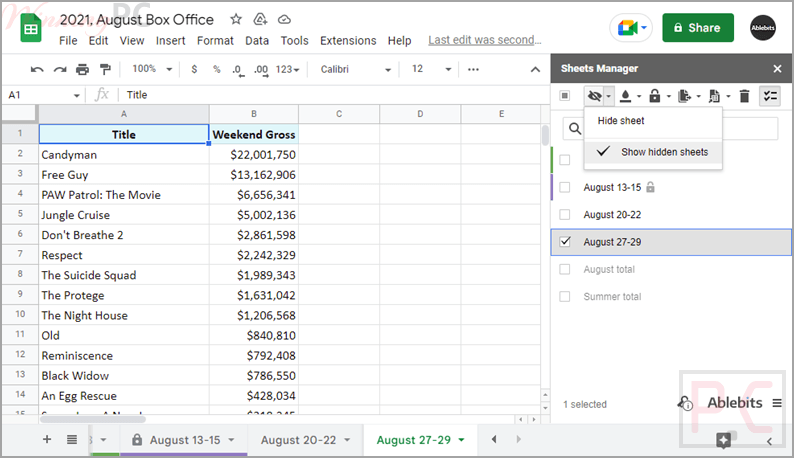
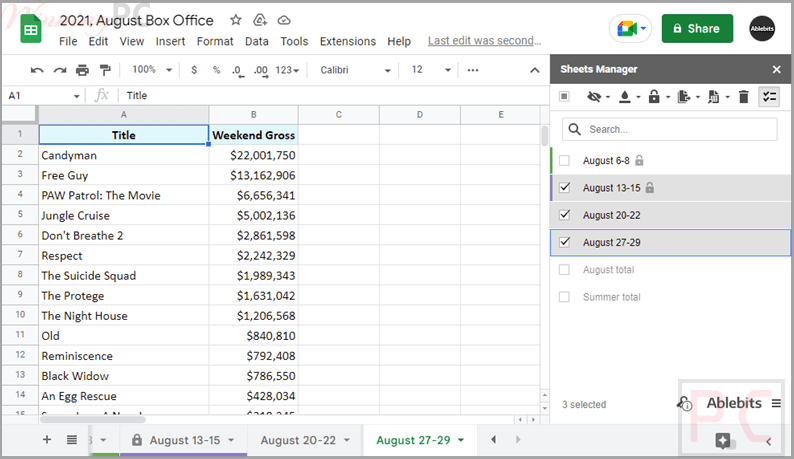
- Tree view for all tabs: lets you see all sheets in one pane and quickly identify protected, hidden, colored, active, and selected tabs.
- Bulk sheet management: helps you hide, unhide, lock, unlock, color, copy, move, and delete multiple selected sheets in one go.
- Move or copy to new spreadsheets: allows each selected sheet to be copied or moved into its own new spreadsheet inside a newly created Drive folder.
- Hidden sheet visibility: shows all hidden sheets in the list when the setting is enabled.
- Flexible selection tools: supports Shift or Ctrl selection and also offers a Selection mode with checkboxes.
- Reordering options: lets you drag and drop sheets or move them up, down, to the top, or to the bottom from the context menu.
- Protection settings: offers two permission settings for protected sheets.
- Sheet count: shows the total number of tabs in the file and how many are currently selected.
- Search by sheet name: makes it easier to find specific tabs when a file contains many sheets.
Pros & Cons
More screenshots
Frequently Asked Questions
What is Sheets Manager for Google Sheets?
It is a Google Sheets add-on that helps you view, organize, reorder, and manage multiple sheet tabs from one add-on pane.
What can I do with this add-on?
You can navigate between tabs, search for sheets by name, hide or unhide sheets, lock or unlock them, color them, reorder them, duplicate, copy, move, and delete selected tabs.
Can Sheets Manager handle multiple tabs at once?
Yes. You can select multiple sheets and process them together using the toolbar or context menu.
Can I copy or move sheets into separate spreadsheets?
Yes. The add-on can copy or move each selected sheet into its own new spreadsheet.
Where are the new spreadsheets saved?
They are placed in a new Drive folder created next to the file you are working with, and the add-on provides a link to open that folder.
Can I reorder sheets with this add-on?
Yes. You can drag and drop sheets inside the add-on pane or use the context menu to move them up, down, to the top, or to the bottom.
Can I rename sheets with Sheets Manager?
Yes, but renaming is done individually. You need to hover over the sheet name and use the pencil icon.
Does the add-on show hidden sheets?
Yes. It can display all hidden sheets in its tree view when that setting is enabled.
What license benefits are included?
The product includes a 30-day money-back guarantee, free support, and volume discounts.
System Requirements & Details
| Feature | Specifications |
|---|---|
| Operating Systems | Windows 10 and up macOS Catalina 10.15.7 and up Chrome OS™ |
| Browsers | Chrome™ Firefox Safari (Mac only) |