Chris Bruner

Review by Chris Bruner – tech writer and software reviewer at WinningPC.
📱 Quick Intro & Features
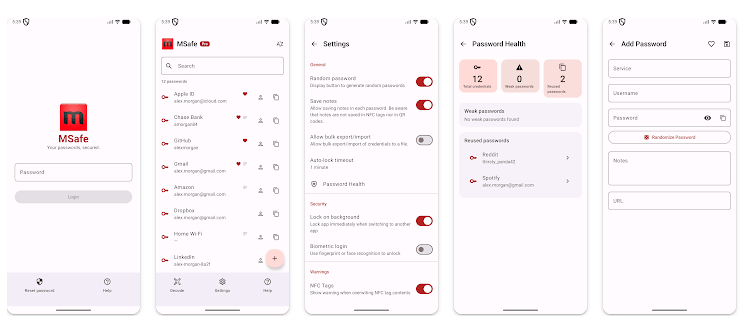
MSafe is a completely offline password manager that secures your login details locally without relying on cloud servers. It gives Android users total control over their data by using strong AES-256 encryption and blocking all internet access.
- 100% offline operation with zero internet permissions required.
- Strong AES-256-GCM encryption for all stored passwords.
- Local backups via encrypted files, QR-code PDFs, or NFC tags.
- Android Autofill support for fast and easy logins.
- Built-in password generator and health dashboard to fix weak passwords.
- Biometric fingerprint access with a master password fallback.
🔓 Giveaway Overview & How to get
- Platform: Android (8.0 and up)
- License: Lifetime
- Download link: Google Play Store
- Promo code: Not required
Step 1: Download and install the app from the official Google Play Store link above.
Step 2: Open the app. The Pro version features are automatically active after installation, giving you unlimited password storage immediately.
❓ Frequently Asked Questions
How long is this promo code valid?
The giveaway is active for a limited time. Install the app now to keep the Pro features forever.
Do I need a rooted device to use these features?
No. MSafe Pro works perfectly on standard, non-rooted Android devices.
Can I update the app via the Play Store during the giveaway period?
Yes. You can safely update the app through the Google Play Store without losing your Pro status.
What happens if I forget my master password?
The app will wipe the vault after ten wrong attempts. There is no password recovery option to ensure maximum security.