
PCDOTS Email Converter Coupons & Pricing
PCDOTS Email Converter - Standard License
For 2 PCs / Laptops | 1 year of free upgrades
PCDOTS Email Converter - Pro License
For 10 PCs / Laptops | Lifetime free upgrades
PCDOTS Email Converter - Enterprise License
For 50 PCs / Laptops | Lifetime free upgrades
How to Use the PCDOTS Email Converter Coupon Code
- Click the Copy button on this page. It copies WINNINGPC15 and opens the PCDOTS checkout in a new tab.
- Choose your tier on the checkout page: Standard, Pro or Enterprise.
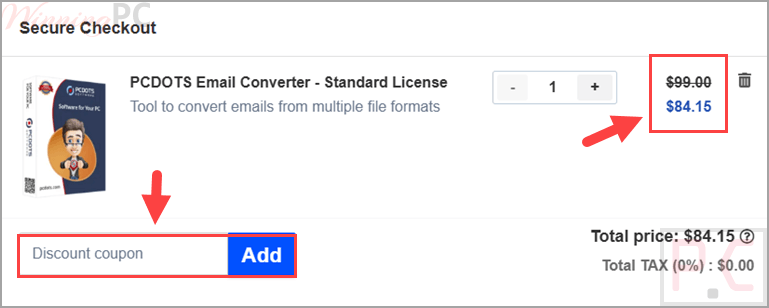
- Paste WINNINGPC15 into the coupon field and apply it.
- Confirm the total has updated before you pay. Standard should read $84.15, Pro $424.15, Enterprise $849.15.
- Complete the payment.
Is this PCDOTS coupon safe to use?
Yes, and here is exactly why, rather than just asking you to take our word for it.
A genuine license, not a crack
You download the publisher’s own installer from pcdots.com and activate with a key PCDOTS issues. Nothing is patched, repackaged, or resold from a grey-market key store.
Nothing uploads during conversion
The software processes mailboxes locally on your PC. Network access is used only if you deliberately pick a cloud destination, and then the data goes straight from your machine to that service.
Payment runs through FastSpring
PCDOTS sells through FastSpring’s checkout, a PCI-DSS Level 1 certified platform, so your card details go there and never touch PCDOTS or WinningPC. PayPal is offered as an alternative.
30 days to change your mind
Every tier carries a 30-day money-back guarantee, refunded through your original payment method.
PCDOTS Email Converter Review & Features
PCDOTS Email Converter is designed for users who need to convert and migrate email data while keeping everything on their own computer. Since all processing happens locally, it is a practical choice for organizations that handle sensitive mailbox data. The built-in preview feature lets you examine emails, headers, and attachments before conversion to confirm that the mailbox has been loaded correctly. A free trial allows you to export a limited number of items from each folder, making it easy to test the software before purchasing. Keep in mind that cloud migration features, including Office 365 and other online services, are reserved for the Pro edition.
Screenshots
Key features
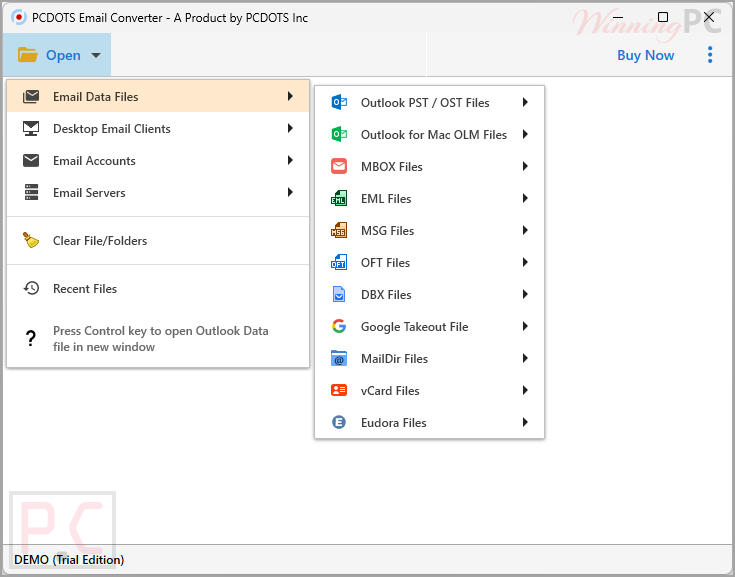
- Reads 8 email file formats (PST, OST, MBOX, EML, MSG, OFT, OLM, DBX) plus 9 desktop clients, 7 cloud accounts and 5 mail servers, so one tool covers a 2006-era Outlook Express DBX file and a live Office 365 mailbox.
- Writes to 13 destinations, including PDF for legal archiving, CSV for spreadsheet analysis, vCard for contacts and ICS for calendar entries.
- Filters before it converts: select individual folders, set a date range, filter by sender or subject, exclude attachments over a size threshold.
- Extracts email addresses, attachments and phone numbers into separate TXT or PDF files, which is the part compliance and CRM work actually uses.
- Content, hex and raw view modes let you inspect a message at the byte level before doing anything destructive to the original mailbox.
What we think
Which PCDOTS Email Converter Plan Should You Buy?
PCDOTS Email Converter vs Other Alternatives
| Tool | Platform | Cost model | Best for |
|---|---|---|---|
| PCDOTS Email Converter | Windows | One-time perpetual license | Mixed sources: legacy formats, mail servers, and cloud in one tool. |
| Aid4Mail | Windows | Paid, tiered | Deep filtering and forensic-grade exports |
| Stellar Converter for OST/PST | Windows | Paid, tiered | Repairing then converting damaged Outlook files |
| Thunderbird + ImportExportTools NG | Windows, macOS, Linux | Free, open source | Small MBOX and EML jobs you are happy to do by hand |
| Outlook’s built-in export | Windows, macOS | Included with Microsoft 365 | Straight PST export when you already own Outlook |
Frequently Asked Questions
Does the WINNINGPC15 code work on every license tier?
Yes, all three. It takes 15% off PCDOTS Email Converter Standard ($84.15), Pro ($424.15), and Enterprise ($849.15). Paste it into the coupon field and the total updates before you pay.
Is the Standard license really a lifetime license?
The license is perpetual, but the free upgrades are not. Activation never expires on any tier, so Standard keeps working forever with the version you bought. What runs out after 12 months is the upgrade window: releases after that need a renewal. Pro and Enterprise include lifetime upgrades instead. Worth knowing, because the product page calls the entry edition a lifetime license without mentioning the limit.
Can the Standard license export directly to Gmail or Office 365?
No. Standard writes to file and document formats only: EML, PST, MBOX, PDF, HTML, TXT, CSV, vCard, ICS, Live Mail and Thunderbird. Direct export into Gmail, Office 365, Yahoo, Outlook.com, or a generic IMAP server starts at Pro. Standard can still read from an email account, so it will pull mail out of Gmail. It just cannot push mail back into one.
How many formats does it actually support?
Counting the vendor’s own tables: 8 email file formats, 9 desktop clients, 7 cloud services, and 5 mail servers on the input side, plus 13 output destinations. The homepage headline of 250+ file formats does not match that breakdown, so treat roughly 25+ sources as the realistic number and check the export options page if one specific format decides your purchase.
Does it run on macOS?
Not natively. PCDOTS Email Converter is a Windows application, and the supported route on a Mac is a Windows virtual machine through Parallels, VMware Fusion, or VirtualBox. PCDOTS says it has tested Windows 11 ARM virtualization on M1, M2 and M3 Macs.
Is there a free version to test with first?
Yes. The trial converts up to 10 emails per folder with no time limit, no credit card and no signup, and every output format is available.
How long does a large mailbox take to convert?
PCDOTS puts a typical 10,000-email PST at roughly 8 to 12 minutes on a machine with an SSD, and a mailbox of 100,000+ messages at 60 to 90 minutes. Those are the vendor’s figures, and real times depend on output format and disk speed.
System Requirements & Details
| Feature | Specifications |
|---|---|
| Operating System | Windows 11, 10, 8.1, 8, 7, Vista, XP; Server 2019, 2016, 2012, 2008, 2003 and earlier. 32-bit and 64-bit. |
| Processor | Pentium-class or higher |
| RAM | Minimum 2 GB |
| Hard drive space | 100 MB free |
| Supported input formats | PST, OST, MBOX, EML, MSG, OFT, OLM, DBX. Desktop clients: Outlook, Thunderbird, Mailbird, eM Client, Mailspring, Postbox, Windows Live Mail, Eudora, IceWarp. Cloud: Gmail/Google Workspace, Office 365, Yahoo, iCloud, Outlook.com, Google Takeout, any IMAP server. Servers: Zimbra, MDaemon, Kerio Connect, Communigate Pro, Lotus Notes/HCL NSF (via intermediary conversion). |
| Supported output formats | PST, MBOX, EML, MSG, PDF, HTML, CSV, vCard (VCF), ICS, TXT. Direct export to Gmail, Office 365, and IMAP servers is Pro and Enterprise only. |
| Other requirements | No Outlook, Office or Exchange installation needed. Internet access only when you select a cloud source or destination. |