On this page
CreateStudio Coupons & Pricing
CreateStudio - Monthly
3 plans
CreateStudio - Annual Discounts
3 plans · best save 47%
All Access Plan ★ Best Deal
300+ characters & counting | 800+ premade templates
How to Use the CreateStudio Coupon Code
- Click the “Get This Deal” button above to open CreateStudio’s pricing page through WinningPC’s link.
- Select a monthly/annual plan tier – Standard, Platinum, or All Access – based on your needs.
- The discounted price loads automatically; no coupon field to fill in.
- Complete checkout on Banzai’s secure store and receive your account confirmation by email.
- Log in to CreateStudio and start your first project.
Tip: If you’re not sure which tier fits, start with the 14-day All Access free trial first. It includes every feature, AI tool, and asset before you pay anything.
CreateStudio Review & Features
The breadth here is the main selling point. Most video tools specialize – Doodly does whiteboard, Vyond focuses on character animation – but CreateStudio bundles seven video formats into one workspace. For a marketer cycling between an explainer this week, a promo ad next week, and social shorts the week after, that’s genuinely useful. The AI scene builder does what it claims: paste a script, choose a voice, and it generates a timed sequence with animations and voiceover synced. It’s not magic, but it’s fast enough to cut production time meaningfully on standard marketing videos.
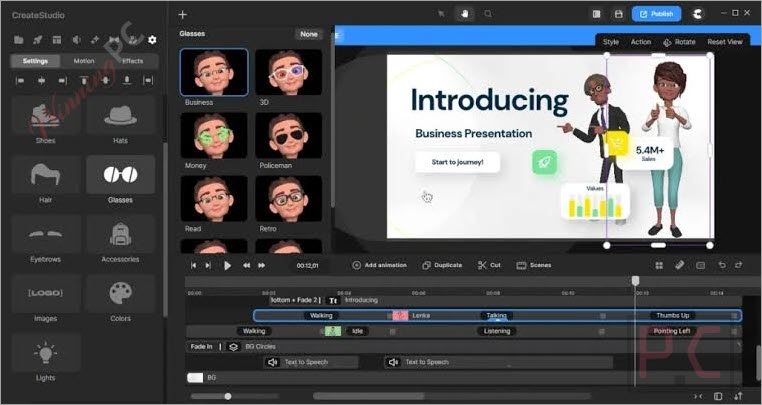
The limitation worth naming upfront: custom characters created outside CreateStudio import as static images or video clips only. They can’t be given walking, talking, or lipsync actions within the platform. If branded characters built in another tool are part of your workflow, they won’t animate here.
Key features
- AI Scene Builder and Voiceovers: Paste a script, pick from voices across multiple languages and accents, and get a timed animation sequence with synced audio.
- 3D Character Creator: Build, customize, and animate 3D characters directly in CreateStudio, with automatic lipsync to voiceover recordings.
- Seven video formats: Explainer videos, promo ads, social shorts, VSLs, product demos, bobble head clips, and whiteboard doodle videos, all from one tool.
- Royalty-free asset library: 1,000+ templates, 1,200+ scenes, 2,000+ music tracks, 500+ effects, plus Vecteezy stock footage integration.
- Commercial use license: Included on all plans. You can create and sell videos to clients without a separate licensing upgrade.
What we think
Which CreateStudio Plan Should You Choose?
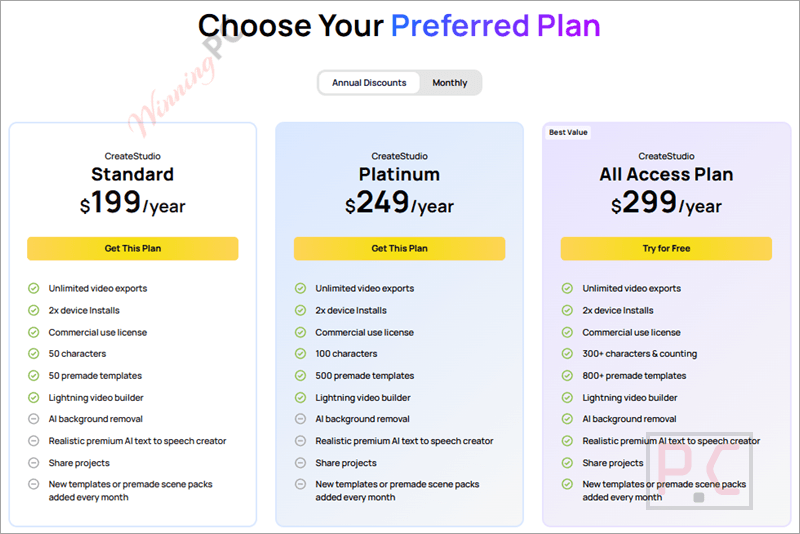
| Plan | Monthly | Annual | Best for |
|---|---|---|---|
| Standard | $27/mo | $199/yr | Light use, single creator |
| Platinum | $37/mo | $249/yr | Mid-level needs |
| All Access | $47/mo | $299/yr | Agencies, client work, heavy AI use |
Annual vs monthly math (All Access): $47/mo multiplied by 12 equals $564. The annual plan is $299 – that’s $265 in savings and a 47% reduction. There’s no financial reason to stay on monthly if you’ll use CreateStudio for more than a few months.
The All Access case: it includes 1,500 AI credits per month, the full premium asset vault, fresh monthly content drops, and the Motion Secrets Agency training (how to set up and scale a video agency). For freelancers billing clients for video work, $299/year for a tool with a commercial license is competitive.
CreateStudio vs other video creation tools
| Tool | Annual price | Video types | AI features | Desktop or browser | Best for |
|---|---|---|---|---|---|
| CreateStudio All Access | $299/yr | Explainer, VSL, shorts, promo, doodle, 2D/3D animation | AI video builders, AI voiceover, image generator, background removal | Desktop (Win/Mac) | All-in-one animated marketing videos |
| FlexClip AI Plus | $100.42/yr | Marketing, social, promo, slideshow, tutorials, shorts | Text-to-video, script generator, image generation, voice cloning, AI audio tools | Browser | Quick marketing & social videos |
| HitPaw Edimakor | $34.96/yr | Marketing, social, talking avatar, tutorials, standard edited videos | Text/image-to-video, avatars, TTS, AI subtitles, translation, script generation | Desktop (Win/Mac) + AI web tools | AI creation + traditional video editing |
| VEED.IO Pro | $192.75/yr | Social, marketing, presentations, training, talking-head videos | Text-to-video, avatars, scripts, subtitles, translation | Browser | Online video creation & team workflows |
Frequently Asked Questions
Is there a free trial before I commit to a paid plan?
Yes. CreateStudio offers a 14-day All Access trial with no feature limits – every template, AI tool, and character is included, along with 750 AI credits. It auto-bills on day 15 if you don’t cancel. Important: cancelling the trial permanently deletes all video projects in your account, so export anything you want to keep before you cancel.
Can I sell videos I create with CreateStudio to clients?
Yes. A commercial use license is included on all plans, including during the free trial. You can create, deliver, and charge for videos made in CreateStudio without a separate licensing agreement.
What happens to my videos if I cancel my subscription?
CreateStudio’s official FAQ states that cancelling – whether during the trial or on a paid plan – permanently deletes all video creations in your account. Export finished videos before you cancel.
Can I import my own characters or branding assets?
Partially. You can import your own images and video files and layer CreateStudio’s built-in animated characters on top. However, custom external characters – whether hand-drawn images, vector files, or characters animated in another platform – import as static assets only. They cannot be given walking, talking, or lipsync actions inside CreateStudio. Characters animated externally can only be imported as .mov or .webm video clips, not editable rigs.
How do I cancel if I need to?
Open the CreateStudio app, go to Settings in the left navigation panel, and select “Cancel Trial” or the subscription cancellation option. You can also switch to a different plan from the same screen instead of cancelling outright.
Is there a money-back guarantee?
Yes. Banzai offers a full 100% refund within 14 days of purchase. Contact their support desk to submit a request.
System Requirements & Details
| Field | Value |
|---|---|
| Operating system | Windows 10 or later; macOS 10.13 (High Sierra) or later |
| Supported input formats | Video: MKV, AVI, MP4, FLV, MOV, WEBM, MTS; Images: JPG, JPEG, PNG, GIF, SVG; Audio: MP3, WAV, OGG, M4A, FLAC; Lottie files |
| Supported output formats | Video up to 4K; supports social-media resolution/aspect-ratio presets. MOV and WEBM are confirmed for transparent-background video export. PNG/JPEG image snapshots are also supported. |
| Other requirements | 8 GB usable RAM minimum; 2 GHz or faster 64-bit Intel/AMD processor with 2+ cores; 1 GB storage for installation (additional space needed for projects/assets); Intel HD Graphics 5000+, NVIDIA GeForce GTX 700+, or AMD Radeon R5+. Internet access is required for online services such as login and downloading cloud-hosted assets. |