
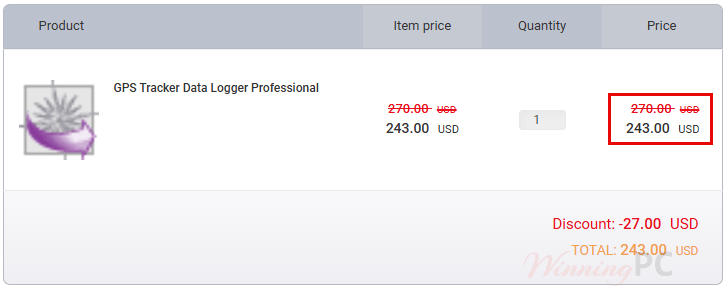
GPS Tracker Data Logger prices with the code applied
GPS Tracker Data Logger Professional 30 trackers
GPS Tracker Data Logger Enterprise 50 trackers
GPS Tracker Data Logger Enterprise 100 trackers
GPS Tracker Data Logger Enterprise 200 trackers
GPS Tracker Data Logger Enterprise 400 trackers
GPS Tracker Data Logger Enterprise 600 trackers
GPS Tracker Data Logger Enterprise 800 trackers
GPS Tracker Data Logger Enterprise Unlimited
Applying the code at checkout
- Hit Copy above to grab the coupon code. Checkout opens on PayPro Global, AGG’s authorized reseller.
- Paste WinningPC into the coupon field and apply it.
- Pay by card, PayPal or wire transfer. Your key arrives by email; activate it from inside the program.
How well does GPS Tracker Data Logger work?
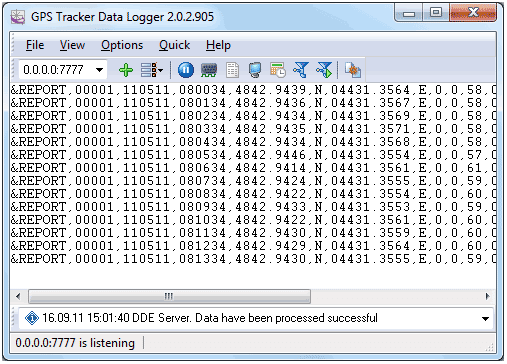
The parser and plugin architecture is the actual product here. A tracker fleet is rarely one brand, and each vendor invents its own packet layout, so the useful thing this Aggsoft GPS Tracker Data Logger software does is turn seven flavours of binary and ASCII into one uniform set of variables that your SQL table, Excel sheet or OPC client can read without anyone writing integration code. The retransmission module is the part worth paying attention to: it can rebuild parsed data into a different tracker’s protocol (Wialon IPS, EGTS, Teltonika and a dozen others) and forward it to another server, which means hardware your telematics platform doesn’t support can still be made to work with it.
Where it stops is visualisation. There is no map, no dashboard, no reporting. That is a separate product, GPS Tracker Monitor, and if a map is what you came for, this on its own will disappoint you. One detail that says something about the vendor: if your tracker isn’t among the 422 supported models, AGG says it will write the parser for you at no charge provided you send the protocol description and a sample packet.
Key features
- Broad protocol coverage: 231 formats across 422 models and 141 vendors, reading binary, HEX and ASCII over TCP, UDP, serial COM (up to 255 ports) or SMS through a GSM modem.
- Data lands where you already work: Real-time export to any ODBC database (MS SQL, MySQL, Oracle, Access, Firebird), or written straight into Excel cells, plus CSV, XML, HTML, PDF and KML/GPX track files.
- Protocol bridging: Convert one tracker’s format into another and forward it to a second server, so unsupported hardware can join an existing platform.
- Runs headless as a Windows service: Collection starts with the OS, before login, and keeps running after you log off.
- Junk filtering built in: The tracker filter drops parked-vehicle GPS drift, coordinates outside valid range, stale timestamps, and points spaced too closely or too far apart.
What we liked, what we didn’t
Professional or Enterprise: what actually changes?
Price and tracker count are in the table above. This is what you gain or lose on capability.
| Capability | Professional | Enterprise |
|---|---|---|
| Trackers per server | 30 | 50 to unlimited, by tier |
| Retransmit keeping the original format | No | Yes |
| Retransmit with format conversion | Yes | Yes |
| Expressions (math, string and logic on parsed variables) | No | Yes |
| Deadband (drop insignificant records before export) | No | Yes |
| Aggregator (merge several records into one) | No | Yes |
| ODBC and cloud database export, Excel, OPC, DDE, MQTT | Yes | Yes |
| Windows service mode, unlimited IPs and tracker models | Yes | Yes |
| Custom ASCII parser, data query plugins | Yes | Yes |
| Best for | One depot or a pilot on a single tracker model | Mixed fleets, protocol bridging, heavy data pipelines |
The tracker count is the obvious difference, but the three data-processing plugins are the one that bites later. If you’ll ever need to calculate a value from parsed data, thin out records before they hit the database, or merge packets into one, Professional can’t do it. The upgrade path exists (you pay the price difference between editions), so this isn’t a trap, but it’s worth deciding up front rather than discovering it mid-deployment.
Is there a cheaper or free option?
| Tool | Cost | Protocol coverage | Runs on | Best for |
|---|---|---|---|---|
| GPS Tracker Data Logger (our pick for Windows shops) | $243 to $1,800 with code, one-off | 231 formats, 422 models | Windows server, on-premise | Feeding tracker data into an existing SQL, Excel or OPC stack |
| Traccar | Free, open source | 200+ protocols, 2,000+ models | Windows or Linux, self-hosted | Teams who want a full tracking UI with live maps at zero license cost |
| flespi | Free tier; roughly €0.20 per device/month around 1,000 devices | Large hosted protocol library | Cloud service | Developers who’d rather consume a JSON API than run a server |
Be honest with yourself about which of these you need. If your goal is “see my vehicles on a map with reports,” Traccar is free, open source, covers more device models, and ships the web interface AGG sells separately. GPS Tracker Data Logger earns its price in a narrower situation: you already have a Windows environment, a database or SCADA/OPC stack, and you need tracker data delivered into it cleanly, or you need to translate one tracker protocol into another. That’s a real job, and it’s one Traccar wasn’t designed for.
Questions people ask about GPS Tracker Data Logger
What’s the cheapest GPS Tracker Data Logger license?
$243.00, the Professional edition for 30 trackers, with AGG Software coupon code WinningPC applied to the $270 list price. If you need more than 30 devices, the entry Enterprise license covers 50 trackers at $288.00.
Is this a one-time payment or a subscription?
One-time. The license is perpetual and never expires. What’s time-limited is updates: you get 12 months, and after that the software keeps running on the last version you were entitled to. A renewal for another 12 months of updates costs 50% of the current new-license price.
How many computers can I install it on?
One. AGG licenses per computer, so 1 license equals 1 PC or server, not a site or a company. A second collection server needs a second license.
Is there a free trial?
Yes, on the download page, though AGG’s own two sources describe the limits differently. The buy page says you can’t save your work and sessions are capped at thirty minutes.
My tracker model isn’t in the supported list. What then?
AGG will write a parser for it free of charge if you send the protocol description and a sample data packet. You can also build the parser yourself with the ASCII data parser module, which is the documented route for text-format packets.
Does it show vehicles on a map?
No. GPS Tracker Data Logger program collects, parses and exports data; it has no map or reporting view. Mapping and route reports come from GPS Tracker Monitor, a separate AGG application that reads the database this one writes to.
Requirements & supported formats
| Field | Value |
|---|---|
| Operating system | Windows 2000 – Windows 11 (2022), incl. Server editions, x86 and x64. |
| Processor / RAM / disk | Not specified |
| Supported input formats | 231 tracker protocol formats across 422 models and 141 vendors, including Teltonika, Queclink, Concox, Suntech, Ruptela, Meitrack, Coban, GT06, TK103, Wialon IPS, EGTS and NMEA 0183 (RMC). Binary, HEX and ASCII packets over TCP, UDP, serial COM (up to 255 ports) or SMS via GSM modem. |
| Supported output formats | Any ODBC database (MS SQL, MySQL, Oracle, MS Access, Interbase, Firebird); Microsoft Excel, RTF, HTML, CSV, DIFF, SYLK, plain text, XML, DBF, PDF, Lotus 1-2-3, Quattro, Windows Clipboard; KML, GPX and Google Earth track files via Geo Export. Cloud databases (Azure, PostgreSQL, MariaDB, MongoDB, Amazon Aurora, Amazon Redshift) and Google Sheets require paid plugins. |
| Retransmission formats | APKCOM ASC 5, AutoGRAPH, EGTS, GlobalTrack G200X, GpsGate SmartPipe and TrackerOne, HTTP 1.1 GET/POST, M2M SOAP, MTA8000, Navtelecom Signal 2115, Teltonika, Wialon IPS, Wialon IPS v2, Wialon Retranslator, Gis Sonic SOAP, GMT SOAP |
| Live data interfaces | OPC DA, OPC UA, DDE, MQTT, HTTP POST, SFTP/FTP, built-in web server |
| Other requirements | 1 license = 1 computer or server. OPC server mode needs the OPC Core Components Redistributable from opcfoundation.org. SMS input needs a GSM modem attached to the server. TCP/IP server mode needs a network card with an assigned IP; a static IP is recommended. |