
upload.am Giveaway
upload.am
- Product
- upload.am
- Website
- upload.am
- License
- 100 GB of free storage
- Platform
- Web (12 languages), Windows 10/11 64-bit, Android
- Installer
- client.exe
- Credit card required
- No
- Updated
- October 5, 2026
Get your unique code by email
License key delivered free to your inbox within minutes.
Protected by Cloudflare Turnstile · Email quality checked by Reoon
All codes have been claimed or the giveaway has closed.
How to Get the upload.am License Key for Free
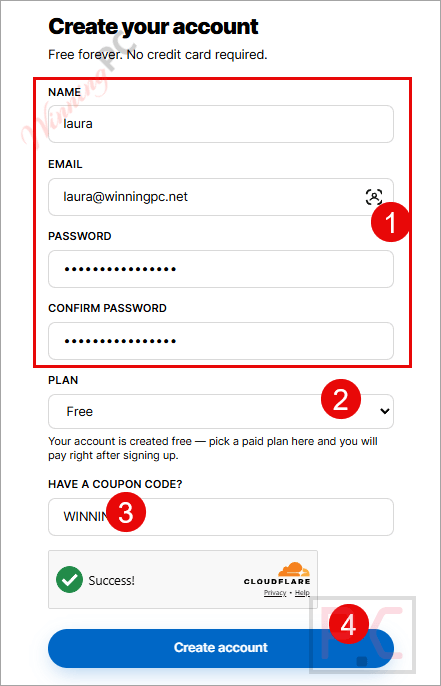
- Go to upload.am and create a free account. No credit card is asked for, and the free plan never auto-upgrades.
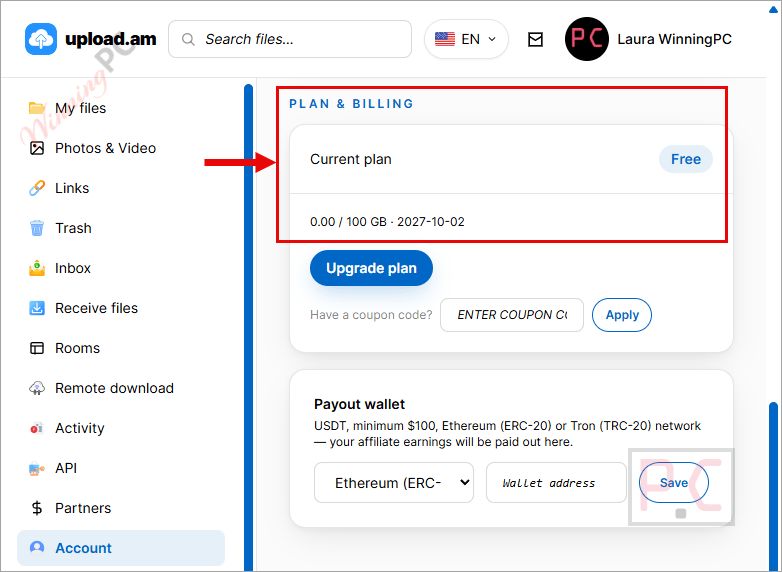
- Enter the promo code above and click on “Create account” button. Check that your storage total now shows the extra 100 GB.
- Optional: install Upload.am for Windows or Android and sign in with the same account. Same storage, same links.
Top Cloud Storage Softwares Coupon Code
pCloud
5 plans · best save 64%
pCloud Mid-Autumn Festival Sale: Up to 64% Off ★ Best Deal
This Mid-Autumn Festival, get a pCloud Lifetime plan with FREE Encryption and enjoy up to 64% OFF 1 TB Lifetime, 2 TB Lifetime, and 10 TB Lifetime. The event ends on October 7, 2026.
Business - Yearly (3 users)
1 TB storage per user | 180 days file versioning
Family - Lifetime (5 Users)
10 TB Storage | 10 TB Shared link traffic

Drime Secure Cloud Storage Advanced
10TB of lifetime storage | Lifetime access | 30-day money-back guarantee

Koofr Cloud Storage: Lifetime Subscription (1TB)
Lifetime access | 1TB cloud storage plan | 30-day money-back guarantee

Is this upload.am promo safe to claim?
Yes. The code comes from upload.am itself, and claiming it costs nothing.
Official source
The 100 GB promo is issued by upload.am for WinningPC readers, not resold through a third-party key shop.
No card, no surprise charges
The free account needs no credit card, and paid plans are one-time payments rather than subscriptions that bill you automatically.
Clean download pages
People who open your links see your file and your message, not pop-up ads or fake download buttons. That holds on the free plan too.
Protection against account wipes
A recently deleted file can’t be force-erased for a few days, and you can turn on two-factor authentication for the account.
What upload.am is actually good at
upload.am is surprising in how little its free plan holds back. Password links, download caps, expiring links, and burn-after-download all work without paying, and they stack on one link, so a contract can need a password, die after one download, and expire in 24 hours anyway. The download cap counts finished downloads, not page views, which matters if you’re sending a one-time file to someone who might open the page twice. The trade-off shows up in retention. Free files are kept for 30 days after their last download, so it’s a working shelf, not an archive. And there’s a 10-second wait before free downloads start, which is mildly annoying but beats an ad wall.
Key features
- Link controls on every plan: password, download limit (1 to 1,000), self-destructing links (10 minutes to 7 days), and one link for a whole set of files, downloadable as a ZIP.
- Upload Inbox: a personal link where clients or strangers send you files without an account, with your rules on file type, size, and password.
- Remote upload: paste a direct URL and upload.am’s servers fetch the file into your account, so your own connection never touches it.
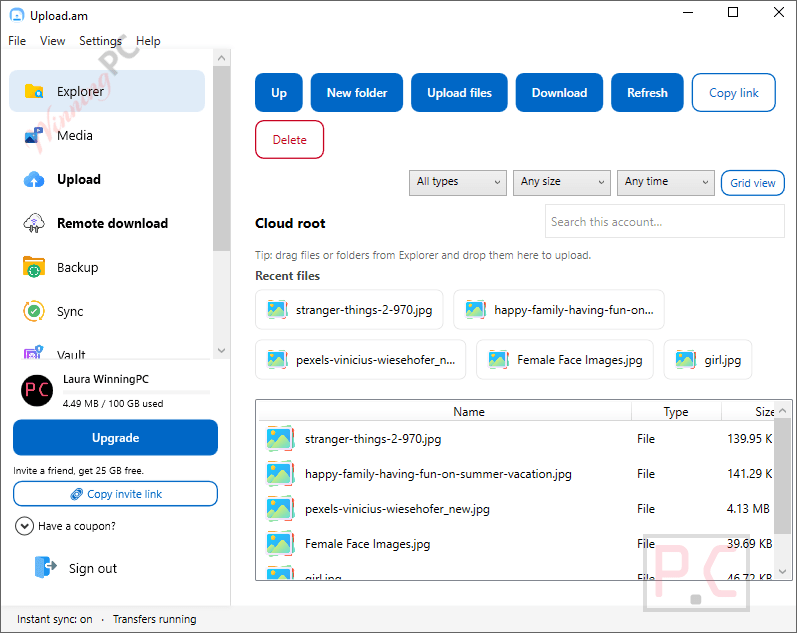
- Windows and Android apps included: folder backup, live sync, and optional local encryption on Windows; camera roll, contacts, and document scanning on Android.
- No-logs VPN: included with every account, free, and not a time-limited trial.
What we think
upload.am vs other free file hosts
| Service | Free storage | Free plan limits that matter | Ads for recipients | Best for |
|---|---|---|---|---|
| upload.am (our pick) | 25 GB (plus this 100 GB promo) | 5 GB per file, 10-second wait, 30-day retention after last download | No | Keeping files and sharing them with password, cap and expiry |
| MediaFire | 10 GB | Ad-supported free plan | Yes, removed on paid plans | Simple long-term public file links |
| WeTransfer | None (transfer only) | 3 GB per transfer, 10 transfers or 3 GB per 30 days, links expire in 3 days, personal use only | Yes, removed on paid plans | Occasional small one-off sends |
| SwissTransfer | None (transfer only) | 50 GB per transfer, links up to 30 days | No | A single huge file sent once, for free |
| Google Drive | 15 GB, shared with Gmail and Photos | No download caps or burn-after-download on links | No | People already living in Google’s apps |
Frequently Asked Questions
Does the 100 GB add to the free 25 GB?
No. The coupon upgrades your total storage from 25 GB to 100 GB, so you’ll have 100 GB in total, not 125 GB.
Will my files get deleted on the free plan?
Yes, if nobody downloads them for 30 days. Every download resets that countdown, so files people actually use stay put. On a paid plan, files are kept for as long as the plan is active. If you later stop paying, nothing is deleted on the spot, but your files go back to the free plan’s expiry rules.
Can I upload .exe files or installers?
No. Executable and script formats are blocked across the whole platform. Zipping an installer may not get around this, so check before you rely on upload.am for distributing software.
Is a password-protected link the same as encryption?
No. The password controls who can reach the download page; the file itself sits on upload.am’s servers unencrypted by you. For sensitive files, encrypt them first (the Windows app can do this locally) and then add a password to the link.
Is there a Mac or iPhone app?
No official one. upload.am lists apps for Windows 10/11 and Android only. On a Mac or iPhone, the browser cabinet does everything except backup and sync.
Do paid plans renew automatically?
No. The monthly plan can be paid with a one-time crypto or card payment, while the yearly plan is available as a one-time crypto payment. Both require manual renewal. The yearly plan costs the equivalent of 10 monthly payments for 12 months of service, so you effectively get two months free.
Can people send me files without an account?
Yes, through Upload Inbox. You share one link, they upload from any browser, and you accept or decline each file before it counts against your storage.
System Requirements & Details
| Field | Value |
|---|---|
| Operating system | Any modern web browser; Windows 10 or 11 (64-bit) app; Android app (minimum version not specified) |
| Processor / RAM / disk | Not specified |
| Upload file types | Documents, archives, video, photos, audio and design files; executable and script formats are blocked |
| In-browser preview formats | Images, video, audio, PDF, text, Word, Excel and PowerPoint |
| Max file size | 5 GB (Free), 20 GB (Access), 100 GB (Premium), up to 300 GB (Premium GOLD) |
| Other requirements | Account needed for the cabinet, remote upload and apps; Windows app installs without admin rights |
| Interface languages | English, Russian, Spanish, Portuguese, French, German, Arabic, Vietnamese, Persian, Indonesian, Filipino, Hindi |