On this page
SoftOrbits Giveaway
Auto Video Redaction Software
AI-powered face and license plate blurring for body cam, dashcam, and CCTV footage.
- Product
- Auto Video Redaction Software
- Website
- softorbits.net
- License
- Lifetime
- Platform
- Windows 11/10/8.1/8/7
- Usage
- Non-commercial only
- Updates
- No future upgrades
- Support
- No support
- Updated
- October 26, 2026
Get your unique code by email
License key delivered free to your inbox within minutes.
Protected by Cloudflare Turnstile · Email quality checked by Reoon
All codes have been claimed or the giveaway has closed.
How to Get the Auto Video Redaction Software License Key for Free
Enter your email address in the giveaway form on this page. You’ll get your free download link.
Run the Auto Video Redaction Software installer. When it asks, type your email address and click Get free registration key.
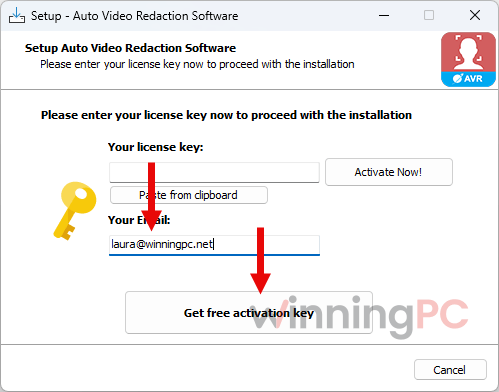
The installer opens the SoftOrbits giveaway page. Fill in the short profile form there to unlock your license.
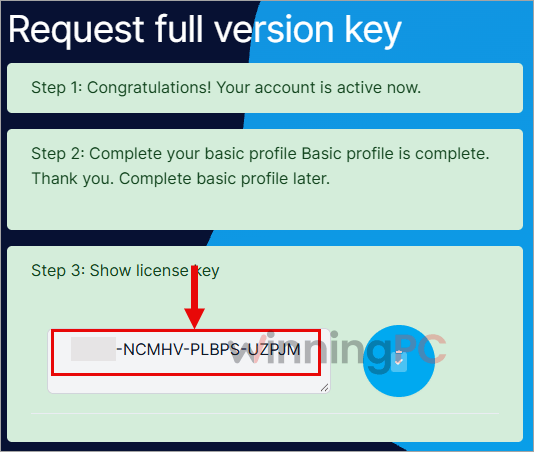
Copy the license code shown on that SoftOrbits page, switch back to the setup wizard, paste it into the activation field and press Activate Now!
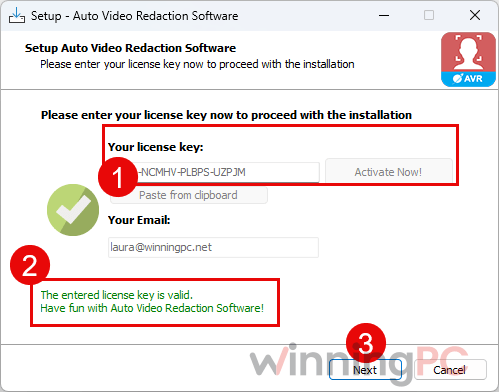
Finish setup and launch the program. Your Lifetime license is active for non-commercial use.
Top Blur Video Software Coupon Code Oct 2026
Capcut Pro Pro yearly
1 TB of space storage | 1200 monthly AI credits

AVCLabs Video Blur AI Yearly Plan
1-License for 1-PC | Free Update & 24/7 Support
Is this SoftOrbits giveaway safe and legit?
Yes. This is an official SoftOrbits promotion, and nothing about it involves a cracked or modified installer.
No crack or keygen
You install SoftOrbits’ own build and activate it with a genuine code from their giveaway page.
Official source
The license code comes straight from the publisher, not from a reseller or a key-sharing site.
No payment details
Claiming the key takes an email address and a basic profile. No card, no trial that converts to a charge.
Your footage stays put
Redaction runs locally on your PC, so the videos you process aren’t uploaded to SoftOrbits or anyone else.
Auto Video Redaction Software Review & Features
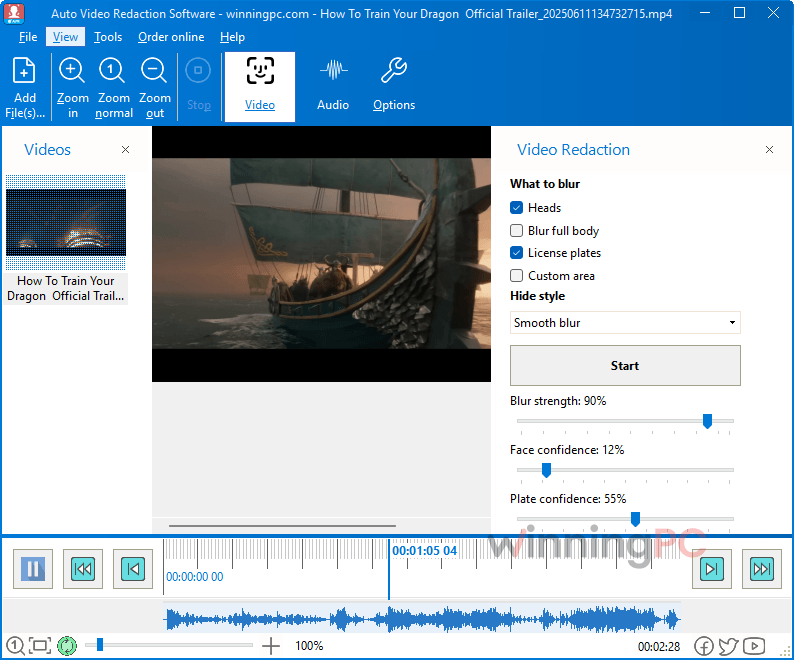
The feature we’d care about most is the tracker. Redaction fails on a single frame: if the AI loses a face for a split second as someone turns away, that one clear frame is enough to identify them. Auto Video Redaction keeps the mask on through those short detection gaps, and it detects whole heads too, including the back of a head, helmets and hoods, which basic face detectors tend to miss. Audio is the weaker side. You can beep or silence a segment, but finding every spoken name is on you. SoftOrbits cites a police department estimate of 8 hours to hand-redact 10 minutes of body cam video, and even SoftOrbits says you should review what the AI produces. So treat it as a very fast first pass, not the final sign-off.
Key features
- AI detection that covers the awkward angles: faces in any pose (profile, tilted, partly covered), heads from any direction, and license plates on cars and motorcycles.
- Masks that don’t drop out: the built-in object tracker follows moving subjects through brief detection gaps, so no unblurred frames slip into the export.
- Your choice of mask: Gaussian blur for a natural look, pixelation, or a solid black box. You can also draw permanent boxes over screens, badges and on-camera documents.
- Audio redaction: beep or silence selected segments, independently of the video masks.
- Fully offline batch work: queue as many files as you like and let it run overnight on your own machine, even on an air-gapped network.
What we think
Auto Video Redaction Software vs CapCut, VideoStudio and AVCLabs
| Tool | Price | Platform | How redaction works | Best for |
|---|---|---|---|---|
| Auto Video Redaction Software (this giveaway) | Free (giveaway) or $149 lifetime | Windows, fully offline | Automatic: detects and tracks faces, heads and plates; blur, pixelate or black box; audio beep/silence | Privacy-first redaction of dashcam, doorbell and CCTV clips |
| AVCLabs Video Blur AI | $39.95/mo, $64.98/yr $119.95/lifetime | Windows, Mac | Automatic: detects faces and license plates, plus background and object blur | Mac users, or creators who want blur for style as well as privacy |
| CapCut Pro | $9.99/mo $89.99/yr | Windows, Mac, web, mobile | Mostly manual: add a blur or mosaic effect and track it to the subject | Social creators already editing in CapCut who blur the odd face |
| Corel VideoStudio Pro | $79.99 one-time | Windows | Manual: place a motion tracker on each face or plate, then apply mosaic | Home video editors who occasionally need to hide someone |
| deface (open source) | Free | Windows, macOS, Linux (Python command line) | Automatic, faces only; blur or black box | Tech-comfortable users blurring faces in bulk |
The real split here is automatic versus manual. CapCut and VideoStudio can hide a face, but you place and track each one yourself, which is fine for a 30-second clip and slow going for an hour of dashcam footage. AVCLabs is the closest match feature for feature, and it runs on a Mac too.
Frequently Asked Questions
Can I use the free license for police, legal or business work?
Not under the giveaway terms. The free key is for non-commercial use only, so redacting footage as part of your job, for an agency, a firm or a paying client, falls outside it. If you’re unsure whether your organization counts, ask SoftOrbits before relying on the giveaway key, or buy the $149 Lifetime license.
Does Auto Video Redaction Software need an internet connection?
Only once, to get your key. The installer sends you to the SoftOrbits giveaway page to unlock the license. After that, redaction runs entirely offline.
Can it bleep out names in the audio?
Yes, but you pick the moments yourself. Select an audio segment, choose beep or silence, and the change is burned into the exported file. It won’t hunt through the soundtrack for names on its own, so listen through the whole clip before you export.
Will a court accept the redacted video?
That’s up to the court, not the software. What you get is a standard MP4 with the masks burned into the pixels, which any evidence player can open. SoftOrbits recommends the solid black box for legal use because the redaction is obvious at a glance. Keep the untouched original alongside it.
Do I need a powerful graphics card?
No. SoftOrbits says the program is optimized for desktop CPUs, and the minimum is an Intel i3 or AMD Ryzen 5 with 4 GB of RAM. A faster processor just gets through a batch sooner.
Will the free version get updates?
No. The giveaway license includes no free updates, so you keep the version you install today, AI detection included. If SoftOrbits improves detection later, getting it means buying a license.
Does it run on Windows 11?
Yes. It supports Windows 11, 10, 8.1, 8 and 7, in both 32-bit and 64-bit editions.
System Requirements & Details
| Field | Value |
|---|---|
| Operating system | Windows 11/10/8.1/8/7 (32-bit and 64-bit) |
| Processor | Intel i3, AMD Ryzen 5 or above |
| RAM | 4 GB or more |
| Graphics | NVIDIA GeForce 8 series, Intel HD Graphics 2000, AMD Radeon R600 or newer, with up-to-date drivers |
| Disk space | 1 GB free or more |
| Screen | 1280 × 768, 32-bit color |
| Supported input formats | MP4, MOV, AVI, MKV, WMV, FLV, MPG, TS and more; H.264, H.265, VP9 and AV1 codecs |
| Supported output formats | MP4 (H.264 video, AAC audio) |
| Other requirements | Internet once to claim the giveaway key; redaction runs offline |