On this page
HotPDF Component Coupons & Pricing
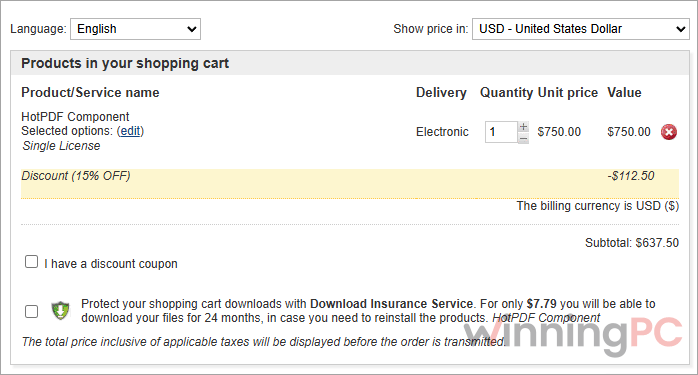
HotPDF Component Single License
1 developer. Full Object Pascal source, works with Lazarus. Core feature set, 1 year of updates and email support. You save $112.50.
HotPDF Component Small Business License
Up to 5 developers in one company with full source code. Adds e-invoice validation and document comparison. You save $337.50.
HotPDF Component Enterprise License
Unlimited developers in one company with full source code. Every Enterprise feature plus priority email support. You save $1,125.
How to Use the losLab HotPDF Coupon Code
Pick your tier and open the HotPDF purchase page on WinningPC
Paste the discount code into the coupon field and confirm the total drops by 15% before you continue.
Pay by card, PayPal, wire transfer or AliPay where supported. The download link for a first order arrives right after payment.
HotPDF Component Review & Features
What sets HotPDF apart is depth without dependencies. Plenty of Delphi PDF units stop at writing pages. This one also loads, edits, renders and signs them inside your own executable, so there’s no Acrobat install or background service to babysit on a customer’s machine. If you ship desktop software to offices you’ll never visit, that matters more than it sounds.
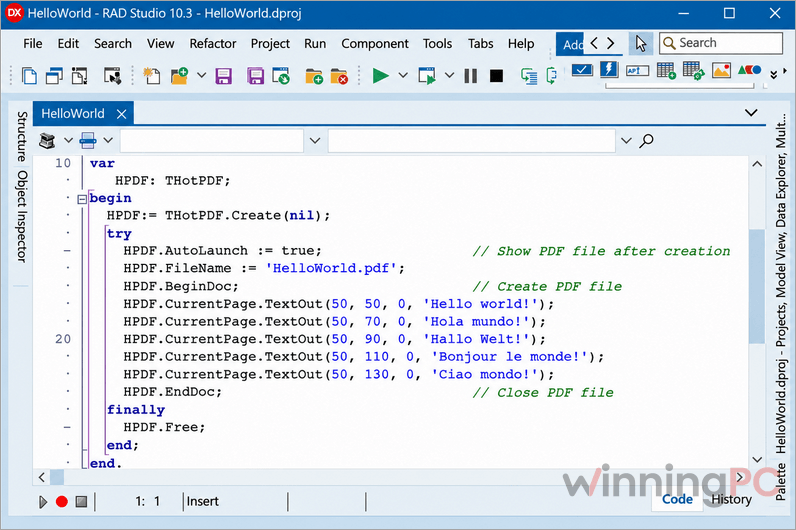
The developer reference runs past 2,814 topics, and finding the right API for a job takes real time. Linux is also a different story from Windows: it’s a separate headless core with its own provider dependencies, not your VCL app recompiled. And the headline speed figures (a 2 GB file rewritten in about 6 seconds) come from losLab’s own benchmark, so read them as a best case rather than a promise.
Key features
- Nothing extra to install: the built-in authoring and rendering engine covers core Windows work without Adobe Acrobat or a separate PDF runtime.
- Forms that actually run logic: create, fill and flatten AcroForms, or process dynamic XFA with JavaScript (QuickJS) and FormCalc scripting.
- Text in almost any script: Arabic, Persian, CJK, Devanagari, bidirectional and vertical writing, with OpenType shaping, font subsetting and color fonts.
- Encryption and signing built in: AES-128/256 (including PDF 2.0 R6), password and certificate security, PFX signing and PAdES B-B/B-T out of the box.
- Huge files without huge RAM: the Direct File API rewrites, encrypts or decrypts multi-gigabyte PDFs on disk instead of loading the whole document.
What we liked, what we didn’t
Which HotPDF Plan Should You Buy?
| License | With code (regular) | Developers | Source code | Lazarus | What the tier adds | Yearly renewal (list) |
|---|---|---|---|---|---|---|
| Source Single | $637.50 ($750) | 1 | Yes | Yes | Core feature set | $375 |
| Source Small Business | $1,912.50 ($2,250) | Up to 5, one company | Yes | Yes | E-invoice validation, document comparison | $1,125 |
| Source Enterprise | $6,375 ($7,500) | Unlimited, one company | Yes | Yes | Same as DCU Enterprise, plus test-suite source on request | $3,750 |
Frequently Asked Questions
Is HotPDF a subscription or a one-time purchase?
It’s a one-time, perpetual license. The version you buy keeps working forever, and the first year of updates and email support is included.
Does HotPDF need Adobe Acrobat or a separate DLL?
No. Core Windows PDF creation and rendering compile straight into your application. Optional workflows such as external OCR engines, Cairo rendering or third-party signing providers bring their own dependencies.
Does HotPDF run on Linux?
Yes, but only for headless processing. losLab provides a separate native Linux core built with Free Pascal for jobs like rendering, text extraction, forms, encryption and signing, and some workflows need extra providers.
Can I sell my app to unlimited customers?
Yes. Deployment is royalty-free with no per-user or per-server fees, and you can build unlimited applications. The limit is on developers: one for Single, up to five for Small Business, everyone in your company for Enterprise.
Should I pick HotPDF or losLab’s PDFium Component?
Pick HotPDF if your app creates or edits PDFs. losLab positions its PDFium Delphi Component for building embedded viewers: rendering, page navigation, search and text selection.
What You Need To Run HotPDF
| Field | Value |
|---|---|
| IDEs | Delphi and C++Builder (RAD Studio XE5 through 13.1 Florence); Free Pascal 3.3.1+ with Lazarus (source edition only) |
| Target platforms | Win32, Win64, Win64x (RAD Studio); Win32, Win64 (Lazarus); Linux via a separate headless core |
| Processor / RAM / disk | Not specified |
| Supported input formats | PDF (1.3 to 2.0, including encrypted and damaged files), JPEG, BMP, TIFF, JPEG 2000, JBIG2, WMF, EMF, FDF, XFDF, XFA/XDP data, HTML/CSS layout; optional XPS, EPUB and CBZ handlers |
| Supported output formats | PDF, PDF/A-1 to PDF/A-4, PDF/UA-1 and -2, PDF/X-1a to PDF/X-6; FDF, XFDF; HTML, XHTML, XML, JSON export; tables to CSV, JSON and XLSX |
| Runtime dependencies | None for core Windows authoring and rendering; optional OCR engines and models, Cairo, QuickJS, signing providers |
| Report tool integrations | FastReport, QuickReport, ReportBuilder, DevExpress ExpressPrinting |