
 Laura Marano
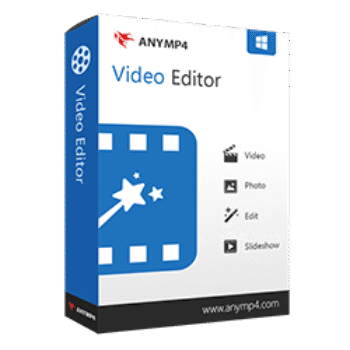
AnyMP4 Video Editor creates slideshows, promo videos, intros, travel videos, social media clips, and more using ready-made templates and built-in editing tools. It supports HD and 4K video editing, dynamic effects, music integration, and export options for popular social platforms.
AnyMP4 Video Editor for Windows
1 plan · best save 50%
Lifetime License ★ Best Deal
One license for 1 PC | Lifetime free upgrades
📄 Licensing & Support Details
- 30-Day Money Back Guarantee
- License Instant Delivery by Email
- 100% Clean & Secure Purchase
- Free Customer Support
- Free Technical Support
- Lifetime Free Upgrades.
📝 How to apply
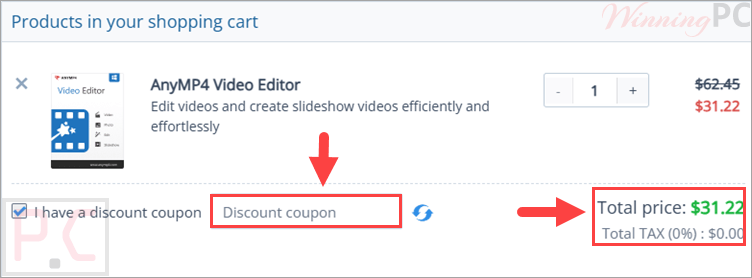
Just click the ‘Copy Code’ button above. You’ll be redirected to checkout to paste your code and get the discounted price.
AnyMP4 Video Editor License Key Free Download
- Product name: AnyMP4 Video Editor
- Website: https://www.anymp4.com/
- License type: 1-year
- Platform: Windows
- Giveaway:
AnyMP4 Video Editor giveaway link - Download: video-editor.exe
How to get the license key?
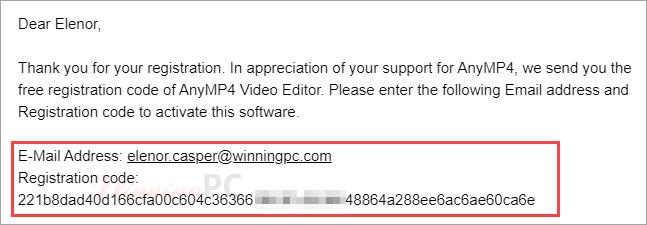
Open the giveaway page, and fill in the blanks to get the annual license code for AnyMP4 Video Editor. Then check your mailbox for the license:
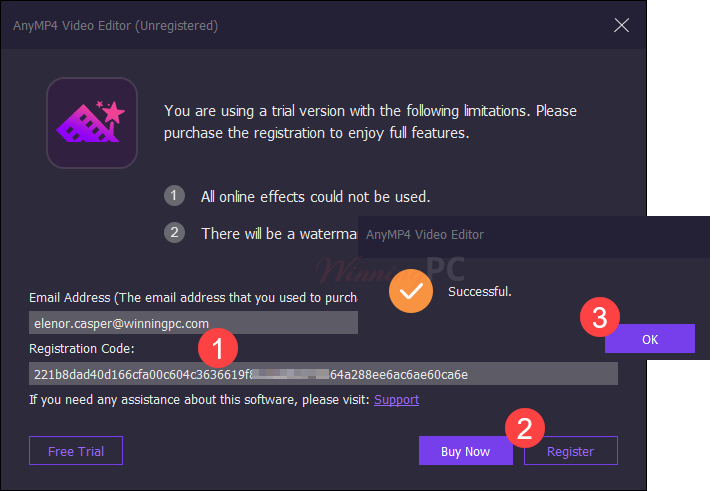
Install this Video Editor on your PC then open and register it:
AnyMP4 Video Editor: In-Depth Review & Features

Key Features
- Instant Slideshow Maker: Turn digital photo albums and raw clips into polished presentations without professional help.
- Ready-Made Templates: Choose from built-in themes for weddings, travel, sports, Christmas, business, and fashion.
- Custom Text Animations: Add dynamic text overlays and adjust the font, color, position, and animation style.
- Smooth Transitions: Connect scenes using a variety of transitions like mosaic, fade, pentagram, squares, and windmill.
- Visual Filters & Stickers: Apply color filters (such as sketch, pixelate, or romantic) and overlay stickers like emojis, shapes, and lenses.
- Screen Cropping: Change the video frame to a 16:9, 4:3, or custom aspect ratio to fit specific devices or platforms.
- Video Trimming: Clip files into smaller segments to cut out unwanted sections.
- Orientation Control: Rotate media 90 degrees clockwise or counterclockwise, and apply horizontal or vertical flips.
- Color Correction: Fine-tune brightness, contrast, saturation, and hue with simple slider controls.
- Speed & Volume Adjustments: Speed up footage, create slow-motion effects, and modify the audio levels.
Pros & Cons
More AnyMP4 Video Editor screenshots:


Frequently Asked Questions
Where can I find AnyMP4 Video Editor coupon codes or discounts?
You can usually find updated AnyMP4 Video Editor deals on WinningPC, along with official AnyMP4 promotions during seasonal sales and special campaigns.
What’s the biggest discount currently available for AnyMP4 Video Editor?
Right now, WinningPC features a 50% OFF lifetime license deal, reducing the price from $62.45 to $31.22.
Is AnyMP4 Video Editor good for beginners?
Yes. The software is designed for beginners and includes ready-made templates, drag-and-drop editing, and simple controls.
Can I create TikTok or Instagram videos with this software?
Yes. You can create and export videos for TikTok, Instagram, Facebook, Twitter, YouTube, and other social platforms.
Does AnyMP4 Video Editor support 4K videos?
Yes. It supports both editing and exporting 1080p HD and 4K UHD videos.
Can I make slideshows with photos and music?
Yes. You can combine pictures, videos, and background music to create slideshow videos quickly.
What video formats are supported?
The software supports many formats including MP4, MOV, MKV, AVI, WMV, FLV, WebM, TS, and more.
System Requirements & Details
| Language Support | English, Français, Italian, Spanish, Swedish, and more… |
| Operating System | Windows 7 / 8 / 10 / 11 (32-bit & 64-bit) |
| Processor | Intel i3 or better multicore processor, 2GHz+ |
| RAM & Storage | At least 4GB RAM |
| Supported Input | 4K/HD/General Video (MP4, MOV, MKV, AVI, etc.), Audio (MP3, WAV, FLAC, etc.), Image (JPG, PNG, GIF, etc.) |
| Supported Output | 4K UHD Video (MOV, MP4, MKV), 1080p HD & General Video (MP4, AVI, WMV, WebM, FLV, etc.) |




Ended by 2023-08-29 oops!
It only converts MP3s to 192kbps.
The giveaway page is not working
thank you, it’s a good video editor software.