
 Chris Bruner

Leawo DVD Creator is a desktop program built to burn digital video files into playable DVDs. The software converts standard video formats and applies custom disc menus. It provides direct editing options to structure the video layout and format the final DVD output.
- Product name: Leawo DVD Creator
- Publisher: Leawo
- Homepage: https://www.leawo.org/dvd-creator/
- License type: 1-year license
- Price:
$29.95$0.0 - Platform: Windows 7, 8, 8.1, 10, 11 & macOS 10.13 – 26
- License code & download – last updated: May 02, 2026
Click here...
Unlocking content...
📝 Note: Please follow the Activation Guide to successfully claim your license.
Leawo DVD Creator Plans & Coupon Codes (100% Working)

Leawo DVD Creator - 1 Year
50% Off coupon code: regular price $29.95, discounted price $14.97
Leawo DVD Creator - Lifetime
50% discount coupon code: regular price $39.95, discounted price $19.97
Leawo DVD Creator for Mac - 1 Year
50% Off coupon code, regular price $29.95, discounted price $14.97
Leawo DVD Creator for Mac - Lifetime
50% Off promo code: regular price $39.95, discounted price $19.97
Activation Guide: How to Download Leawo DVD Creator for Free
Open the Leawo DVD Creator giveaway page and choose your operating system. Enter your information and click the “Get it now” button

They will send you an email that contains the register code & a confirmation link

Open Leawo Prof. Media and access the “Activation Center”. Just enter the license code above, and you will have a 1-year license.
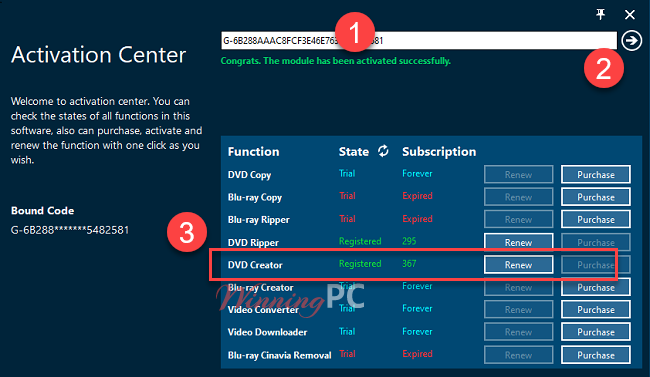
Leawo DVD Creator screenshot:

Playing Media

Editing screenshot:

Burn to:

Media information

Burning screenshot:

Key Features
- Support for various video formats: Leawo DVD Creator supports a wide range of video formats, including AVI, MP4, WMV, MKV, MOV, and more, making it easy to convert and burn video files to DVD.
- Customizable DVD menu templates: The software includes a variety of customizable DVD menu templates, allowing users to create personalized DVD menus with their own images, background music, and more.
- Video editing features: This DVD Creator offers a range of video editing features, such as trimming, cropping, adding watermarks, and adjusting video effects, to help users enhance their videos before burning them to DVD.
- Real-time preview: The software allows users to preview their video files and customized DVD menus in real time, enabling them to make any necessary adjustments before burning the DVD.
- Fast-burning speed: It is designed to burn DVDs quickly and efficiently, with fast-burning speeds and high-quality output.
- Multiple DVD disc types: The software supports various DVD disc types, including DVD-5, DVD-9, and DVD-R/RW, allowing users to choose the disc type that best fits their needs.
- Multi-language support: This DVD creator tool supports multiple languages, making it accessible to users around the world.
Why Choose WinningPC
- Why Trust? We are committed to providing 100% valid and verified coupon codes, so you can always shop with confidence.
- Found an Invalid Coupon or a Better Deal? If you encounter an invalid code or a better offer, please let us know. Our team updates all discount information regularly to ensure accuracy.
- Official Authorization: We only share authentic discounts from trusted software developers.
- No Fake Discounts: Unlike some sites, we never use misleading deals. The final price you see is the true discounted price.
- Secure Purchases: All transactions are processed on the official vendor’s website, ensuring authenticity and data protection.
- Extra Support: If you face order or vendor issues, contact us. We’ll liaise with the vendor to help resolve your problem quickly.
Technical Details
| Language Support | English, Français, Italian, Portuguese, Russian, Spanish, Swedish, and more… |
| Money Back Guarantee | 30-Day |
| Operating System | Mac OS, Windows |
| Shipping | Instant Delivery by Email |
| Subscription | 1-Year, Lifetime |
| Support Services | Tickets |




I am very surprised that people are still using dvd’s in this digital age.
Can this license for Leawo DVD Creator alone produce a DVD-standard conform 720×576 DVD from a MP4 file with 1920×1080? Or do I additionally need to activate the Video-Converter module?
Hi,
you don’t need the Video Converter module:
Leawo DVD Creator Input File Format Supported
Video: AVI, MP4, DAT, WEBM, RMVB, RM, MPG, MPEG, VOB, MOV, M4V, QT,FLV, F4V, NSV, NUT, MKV, MTS/M2TS/TS/TP/TRP(AVCHD, H.264, VC-1, MPEG-2 HD), MOD, TOD, DV, WMV, ASF, 3GP, 3G2, DVR-MS
Thank you for the info!
Hope they do a giveaway on their Blu-ray Creator.
Thank you works really well. Never lets me down for creating DVDs.Love your websight,it has some really good stuff. Appreciate your work.