
 Chris Bruner
PhotoWorks by AMS Software is an intelligent photo editor for Windows that combines powerful features with an easy-to-use interface — perfect for anyone from beginners to casual photographers. Thanks to its AI-powered tools, you can enhance portraits, retouch landscapes, fix flaws, and even replace backgrounds in just a few clicks. Whether you’re editing wedding photos or travel shots, PhotoWorks helps you turn ordinary images into stunning works of art — even on low-spec PCs!
PhotoWorks Coupon Code Sep 2026 (100% Working)

PhotoWorks - Standard license
70% promo code: regular price $27.50, discounted price $8.25
PhotoWorks - Pro license
70% coupon code: regular price $56, discounted price $16.80
PhotoWorks Ultimate - Lifetime license
75% discount code: regular price $114, discounted price $28.50
AMS PhotoWorks Standard Free License Key
- Product name: AMS PhotoWorks Standard 7.0
- Website: https://ams-photo-software.com/
- License type: lifetime
- Platform: Windows
- Giveaway link: n/a
- Giveaway download (updated: Dec 25, 2019)
License key:PhotoWorks_Standard_7.0.txt
Download:PhotoWorks_Standard_7.0.zip
How to get the license key?
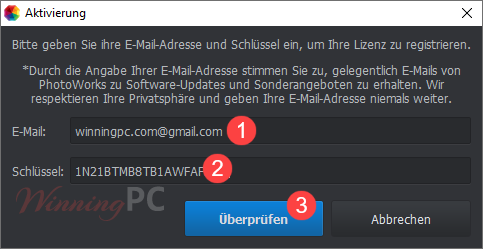
Download the installer, install AMS PhotoWorks on your computer. Launch it and register by using the following license code.
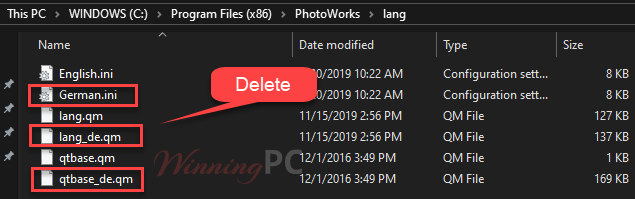
How to get the English language
Browse the program folder & delete files – lang_de.qm, qtbase_de.qm, German.ini
Windows 64bit: C:\Program Files (x86)\PhotoWorks\lang
Windows 32bit: C:\Program Files\PhotoWorks\lang
PhotoWorks screenshots


Main Features
- AI Auto Enhancement: Instantly correct exposure, contrast, and color tone with smart one-click optimization.
- Portrait Retouching: Use the Portrait Magic tool to smooth skin, whiten teeth, remove shine, and more. Sculpt facial features with sliders using Face Sculpt.
- 200+ Filters and LUT Effects: Choose from retro styles, HDR, color splash, 3D LUTs, and many more artistic presets.
- Smart Background Editing: Blur, remove, or replace backgrounds with intuitive selection tools — no complex masking needed.
- Object Removal Tools: Erase unwanted elements using the Healing Brush or Clone Stamp with ease.
- RAW File Support: Supports 450+ RAW formats from various camera brands, including the latest models.
- Composition & Perspective Correction: Crop photos with Golden Ratio or Rule of Thirds guides. Fix lens distortion and perspective in a click.
- Beginner-Friendly Workflow: Simple 3-step editing: Auto Correct ➜ Fine-Tune ➜ Enhance Composition — all via easy sliders.
- Runs on Low-Spec PCs: Lightweight and optimized to deliver smooth performance even on basic hardware.
PhotoWorks – Pros and Cons Table
Frequently Asked Questions
What is PhotoWorks and who is it for?
It is an AI-powered photo editing software for Windows, designed for beginners, hobbyists, and casual photographers. It’s perfect for anyone who wants professional-looking edits without complex tools like Photoshop.
Does it offer one-click photo enhancement?
Yes! PhotoWorks uses intelligent Auto Correction and Portrait Magic tools that enhance your photos with just one click — fixing exposure, contrast, and even facial features.
Is PhotoWorks compatible with RAW files?
Yes, it supports over 450+ RAW formats from different camera brands. However, keep in mind that advanced RAW processing options are limited compared to pro tools like Lightroom.
Does it work on older or low-spec PCs?
Yes! One of PhotoWorks’ standout features is its lightweight performance, meaning it runs smoothly even on low-spec Windows PCs or laptops.
Can I try PhotoWorks before buying?
Yes, there’s a free trial version available for download from the official website (https://ams-photo-software.com/photoworks-photo-editor-for-pc/) so users can test all major features.
Is there a discount available for PhotoWorks?
WinningPC offers an exclusive discount coupon that helps you save up to 75% off on all PhotoWorks licenses. Don’t miss this chance to grab a powerful editor at a great price!
What’s the refund policy?
It offers a 30-day money-back guarantee, so you can buy with confidence.
Technical Details
| Language Support | English, Français, Italian, Spanish, Swedish, and more… |
| Money Back Guarantee | 30-Day |
| Operating System | Windows 11, 10, 8, 7 |
| Shipping | Full version license code will be sent to you within minutes |
| Subscription | Lifetime |
| Support Services | Email, Phone, Tickets |


No free trail
good awsome
This promo has ended. Can’t launch the software.