
 Cathryn Lee

If you worry about online privacy and security while you are online, you’ve come to the right place. SurfShark VPN is a reliable, fast and affordable VPN service that offers all features you need. It will encrypt your connection to the internet to ensure that you browse the Internet without being tracked, ads, malware, and data leak. SurfShark also enables you to connect and use unlimited devices simultaneously including Windows, Linux, Mac, iOS and Android phones, Xbox and PlayStation, Chrome or Firefox.
Surfshark VPN Coupon Code & Deals
Surfshark VPN Special Offers
1 plan · best save 86%
Surfshark Special Offer: Up to 86% Off + 4 Months Free ★ Best Deal
Snag this incredible Surfshark VPN deal for just $2.39/month with the coupon code below! The event ends on soon. Don't miss out!
Surfshark Starter
3 plans · best save 85%
1 Month
Get deal for 1-month ($16.45/mo)
12 months + 4 months EXTRA
12 months + 4 months EXTRA ($3.09/mo)
24 Months + 4 EXTRA months ★ Best Deal
24 months + 4 months EXTRA ($2.39/mo)
Surfshark One
3 plans · best save 86%1 Month
Get deal for 1-month ($18.95/mo)
12 Months + 4 months
12 months + 4 months EXTRA ($3.29/mo)
24 Year + 4 months ★ Best Deal
24 months + 4 months EXTRA ($2.69/mo)
Surfshark One+
3 plans · best save 80%1 Month
Get deal for 1-month ($21.85/mo)
12 Months + 4 months
12 months + 4 months EXTRA ($6.99/mo)
24 Months + 4 months ★ Best Deal
24 months + 4 months EXTRA ($4.29/mo)
Surfshark VPN Free License Key
- Product name: Surfshark VPN
- Website: https://surfshark.com/
- License type: 6-month
- Platform: All
- Giveaway link: click here
- Download: https://surfshark.com/download
How to get the license key?
Apply for a free Surfshark account for small companies (up to 10 employees), open the giveaway page and fill out the form:
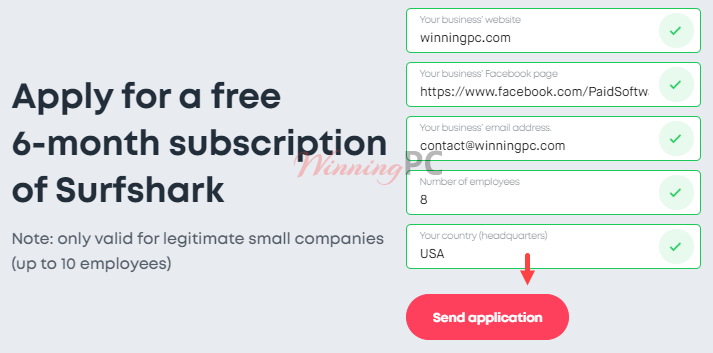
They’ll get back to you shortly with a free 6-month subscription:
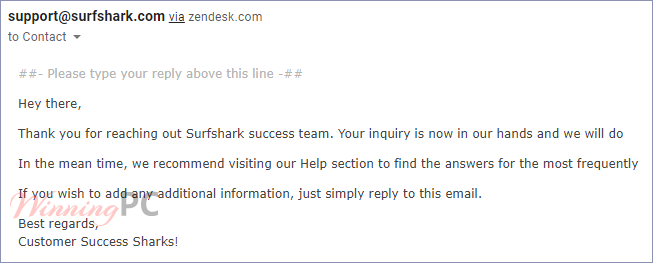
Download the Surfshark app and install it on your computer, login by your account (email/password) or by code:

Check your Surfshark subscription from App Settings

To connect to the internet via VPN, just choose a location then press “Connect” button:

Key Features and Screenshots
Block ads and malware
Adblock VPN from Surfshark VPN will block malware, ads, banners and pop-ups not only on a browser but also on any apps. It hides your IP address to protect your data, bypass geo-blocks and censorship.
To activate the Adblock VPN you need to open your Surfshark app and go to the features, check the box, or toggle the switch on for the “CleanWeb” feature.

Unlimited devices
Surfshark secures your digital life on all devices including macOS (10.12 and later), Windows (Windows 7 and later such as Windows 10/11), Linux (works on Ubuntu, Debian), Browsers (Chrome 80 and later, Firefox 91.1 and later, all Edge versions), Smart TVs (Fire TV 2 and later, Android TV 5.0 and later), Phones and tablets with iOS/Android.
VPN split tunneling – Bypasser
Bypasser helps you choose which data you want to encrypt, which means you can use two different IP addresses at the same time and access local content on specific apps while staying hidden on the others. Using a VPN app may slow your speed down, Bypasser is a simple way to run apps that do not require encryption at a normal speed.
To use VPN split tunneling, go to the Surfshark app and click Bypasser, just add apps or websites you want to be excluded.

No-log VPN & Encryption
Surfshark is a No-log VPN, it does not keep track of your data like your IP address, browsing history, used bandwidth, network traffic, session information, and connection timestamps. Surfshark VPN uses AES-256-GCM encryption to protect all your traffic from IP, WebRTC, and DNS leaks.
VPN Kill Switch
A VPN Kill Switch is an automatic deactivation button that helps you secure your privacy by disconnecting you from the internet when your VPN connection drops without warning. This feature makes sure your traffic is always encrypted and guards your sensitive data against hackers and snoopers.
To enable the Kill switch, open the app and go to the Settings -> Connectivity -> enable the “Kill Switch” button.

Private DNS & leak protection
Surfshark uses private DNS on each server and leak protection. All your DNS queries travel over the encrypted tunnel and are resolved on the same server.

Camouflage Mode
This mode makes sure that your internet provider doesn’t know you are using a VPN application.
Browse privately
Change your IP
Changing your real IP address so other websites and third parties can not track your location and your activity around the web. It allows you to bypass the restrictions from the firewall and surf with total freedom.

Secure protocols
Surfshark VPN supports three protocols includes WireGuard, IKEv2, and OpenVPN.
You can change the protocol on your app from the Settings -> Advanced section and select one.

Surfshark now has 100 country locations to choose from
After releasing the newest servers in Ghana, Saudi Arabia, and Puerto Rico, Surfshark officially offers servers in 100 unique countries! It gets even better as the total server count reaches 3200+.
Kill Switch is available for Linux
Linux Kill Switch is finally here, providing an even smoother functionality to our freshly-released graphical user interface for Linux. The feature turns off the internet connection if the VPN service stops and turns it back on once you reconnect to a VPN server.
Technical Details
| Language Support | English, Français, Italian, Spanish, Swedish, German, Japanese, Chinese, and more… |
| Money Back Guarantee | 30-Day |
| Operating System | Mac OS, Android, iOS, Linux, Windows |
| Shipping | Instantly receive the latest Full Version download link and license code |
| Subscription | 1-Month, 1-Year, 2-Years |
| Support Services | Live Chat, Tickets |


Cheers for the link I signed up, but I’m not happy with customer service
Hi, thanks for your offer. But currently, I am using ProtonVPN, which is great. Please share it with someone else who really need it (Maybe in the Future ????). Thanks.
Hello Sir, as you say I tried every VPN offers from your given page. But unfortunately they are not working anymore!☹️ Any help?
I can share my Seed4.Me VPN account for you. I don’t use this service. Do you want it?
Hi WinningPC can I please have the Seed4.me account? would be very much appreciated
????
You can try other apps: https://winningpc.com/product-category/internet/vpn/
Hey Sir, what about us? How can we get it? We don’t have any business profile.
You can not get this giveaway.
I’m so sorry about that ????