
 Cathryn Lee
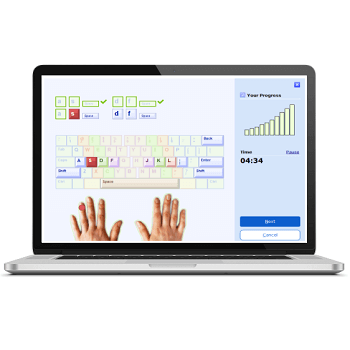
TypingMaster 12 is an easy-to-use typing tutor for Windows that helps you type faster, type more accurately, and follow healthier typing habits. It includes step-by-step lessons, built-in speed tests, fun practice games, and a smart TypingMeter tool that tracks your real typing in the background. If you’re a beginner learning touch typing or someone who wants to improve daily work speed, Typing Master guides you through everything in a calm, structured way. It’s also popular for classrooms, homeschool setups, and exam preparation thanks to its offline stability and clear progress reports.
TypingMaster Coupon Code October 2026

TypingMaster 12 Standard (6-Month)
6-month access for 1 device | 30-day money-back guarantee
TypingMaster 12 Standard - 1 Year
1-year access for 1 device | 30-day money-back guarantee
TypingMaster 12 Standard - Lifetime
Lifetime license for 1 PC | 30-day money-back guarantee

TypingMaster 12 Premium (6-Month)
Family license (6-month, 1-3 devices) | 30-day money-back guarantee
TypingMaster 12 Premium - 1 Year
Family license (1-year, up to 3 devices) | 30-day money-back guarantee
TypingMaster 12 Premium - Lifetime
Family license (lifetime, up to 3 devices) | 30-day money-back guarantee
Giveaway: TypingMaster License Code for Free
- Product name: TypingMaster 11
- Website: https://www.typingmaster.com/
- License type: 2-week
- Platform: Windows
- Download: typing-tutor
- License code – last updated: Jan 28, 2022
Click here...
- License:
Registration name: FriendRegistration key: TTJLSU-DFPXJN-C2G63N-TNYECS-XBZREQ-8EGMFB-M595TT-TEKRCX
- License:
How to get the license key?
Download and install TypingMaster on your computer then access the “About” tab. Click on the “Enter Registration Key” then use the above Typing Master license code to activate it:

Now start typing to improve your skill!
Main Features & Screenshots

- Complete Touch Typing Courses: Step-by-step lessons covering letter keys, word drills, sentence drills, punctuation, special characters, and numeric keypad practice.
- Adaptive Learning System: Automatically adjusts lesson difficulty, duration, and focus areas based on your mistakes, weak keys, and accuracy trends.
- TypingMeter Real-Time Tracker: Monitors your natural typing in the background and generates personalized exercises based on slow keys and error patterns.
- Built-in Typing Speed Tests: Includes 1, 2, 5, and 10-minute typing exams with results for WPM, KPM, accuracy, gross speed, and net speed. Print certificates or save reports.
- Personalized Review Sessions: The program identifies difficult keys, common typos, and slow combinations, then creates targeted review drills to fix them quickly.
- Fun Typing Games: Practice with interactive mini-games like Bubbles, Clouds, Pipe Master, Wordtris, and Alphabet ABC to improve speed and reaction time.
- Detailed Progress Statistics: Track daily and weekly WPM, accuracy charts, key difficulty reports, bigram analysis, and keyboard heatmaps.
- Multi-Language & Multi-Layout Support: Works with QWERTY, QWERTZ, Colemak, and more. Supports several training languages and includes configurable Hindi typing tests.
- Customizable Lessons & Tests: Create your own practice texts, adjust lesson length, change display mode (WPM/KPM), or import custom keyboard layouts.
- Offline Training Mode: Runs entirely offline, making it safe for school labs, shared computers, and homeschool environments.
- User Profiles for Multiple Learners: Each user gets separate progress tracking, lessons, and test history—ideal for families or shared PCs.
- Centralized User Manager (Ultimate Edition): Teachers can manage multiple student accounts, check results, and generate class-wide typing performance reports.
- Break Reminders & Ergonomic Tips: Built-in tools encourage taking healthy breaks and guide you toward better posture and typing habits.
- Lightweight & Easy to Install: Works smoothly on Windows 11/10/8/7 and runs well even on older or low-spec computers.
More screenshots


Frequently Asked Questions
What is TypingMaster?
It’s a typing tutor for Windows that teaches touch typing through lessons, drills, games, and real-time performance tracking.
Is TypingMaster suitable for beginners?
Yes. It starts from the basics and gradually increases difficulty.
Does it help advanced typists too?
Absolutely. Features like TypingMeter, advanced drills, and customizable tests help polish speed and accuracy.
Can I use TypingMaster offline?
Yes. All lessons, user profiles, and progress data work offline.
Does TypingMaster support Hindi typing practice?
Yes, it includes a configurable Hindi typing test and supports other international layouts.
Is TypingMaster good for exam preparation?
Yes. Many people use it for government exam typing practice thanks to the structured tests and speed-building drills.
Does WinningPC offer discounts for TypingMaster?
Yes. WinningPC provides an exclusive 15% discount coupon code, updated regularly on our TypingMaster deal page. You can always check our page for the newest promo codes.
Why Choose WinningPC
- Why Trust? We are committed to providing 100% valid and verified coupon codes, so you can always shop with confidence.
- Found an Invalid Coupon or a Better Deal? If you encounter an invalid code or a better offer, please let us know. Our team updates all discount information regularly to ensure accuracy.
- Official Authorization: We only share authentic discounts from trusted software developers.
- No Fake Discounts: Unlike some sites, we never use misleading deals. The final price you see is the true discounted price.
- Secure Purchases: All transactions are processed on the official vendor’s website, ensuring authenticity and data protection.
- Extra Support: If you face order or vendor issues, contact us. We’ll liaise with the vendor to help resolve your problem quickly.
Technical Details
| Language Support | English, Français, Italian, Spanish, Swedish, and more… |
| Money Back Guarantee | 30-Day |
| Operating System | Windows 11/10/8/7 |
| Shipping | Register code will be sent to your email in minutes |
| Subscription | 1-Year, Lifetime |
| Support Services | Tickets |


Thanks so much, the 40% off code worked for me.