

 Cathryn Lee

MultCloud is a cloud management tool for transferring, syncing, backing up, and managing files across multiple cloud services. It supports over 30 services, including Google Drive, OneDrive, Dropbox, MEGA, Google Photos, iCloud Drive, FTP, WebDAV, Amazon S3, and more.
MultCloud Premium
Focus on transferring across clouds.
- ProductMultCloud Premium
- Websitemultcloud.com
- License1-user, 1-year license for advanced features
- PlatformWeb-based
- Data Traffic200GB lifetime data traffic
- UseCommercial and non-commercial use
- SupportNo free tech support
- Updated2026-06-11
MultCloud Premium Coupon Code Jun 2026 (100% Working)

AOMEI Summer Sale 2026: Up to 80% OFF & New Family Bundle
AOMEI’s 2026 Summer Promotion offers discounts of up to 80% on reliable backup, recovery, and partition management software, along with an all-new Family Bundle designed to secure multiple devices at a highly affordable seasonal price. The event ends on August 31, 2026

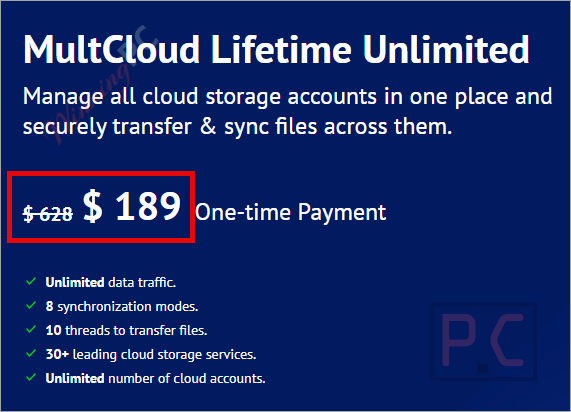
MultCloud Lifetime Unlimited
Onetime payment, lifetime use | Unlimited data traffic for a lifetime
MultCloud Yearly Unlimited
Annual Payment | Unlimited data traffic per year
MultCloud 1200GB / Year
Annual Payment | 1200GB data traffic per year
MultCloud 100GB /Month
Monthly Payment | 100GB data traffic per month
📄 Licensing & Support Details
- License Type: Free version (5GB data traffic/month) and Premium plans (Monthly, Yearly, Lifetime).
- Support: Provided via email support team.
- Money-Back Guarantee: Not specified in the provided data.
📝 How to apply
- To grab this deal, click the “Copy” button in the box above.
- The promo applies automatically, taking you directly to checkout to lock in your software at a discounted price.
How to Get the MultCloud Giveaway Premium License for Free?
Open the MultCloud Premium redeem page, enter your email address and password to create your free account.
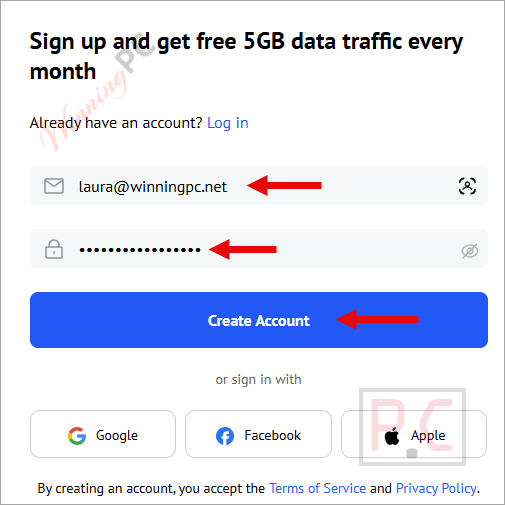
Please check your email to confirm your registration.

Log in with your account

Enter the license code above to get 200GB of data traffic for a lifetime and access to all the advanced features for a year.
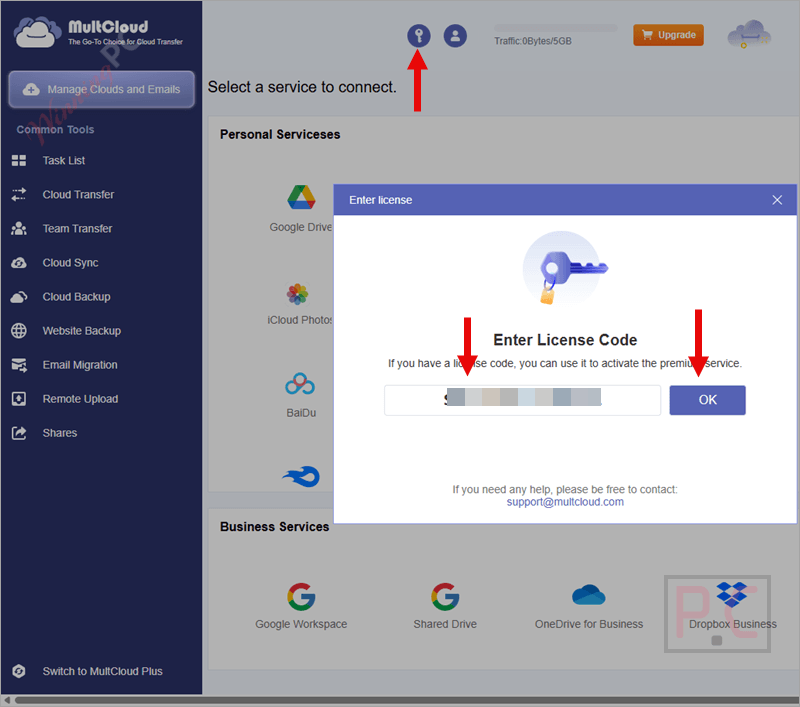
Login to your MultCloud account, and click the user icon on the right side you can see account settings and other options (change language, create a sub-account,…)
On the left side are common tools (task list manager, cloud transfer/sync/backup,…)

To use this service to manage your cloud accounts, you have to add these cloud storage services to MultCloud first.
Just click the “Add Cloud” button, then choose a cloud service to connect. Following the instructions of MultCloud Premium for each cloud service, you must agree to its authorization or enter the username/password to finish this step:

Now all your cloud services are showing on the left side (under the “My Cloud Drives” section).
Left-click to manage a cloud, such as browse data, copy, cut, delete, rename, copy, etc.
Right-click to rename the cloud or remove it from MultCloud:

Select a task – Cloud Sync for example just select source and target cloud then press “Sync now” to start this task.

You also have other options for this task: sync mode (normal sync, one-way sync, two-way sync, simple sync, email notification, filter,..)

All tasks appear on the “Task List” section: you can manage cloud transfer, cloud sync, and shared file saving tasks here.

In-Depth Review & Features
Main Features
- 1-Cloud File Transfer: Migrate files directly from one cloud service to another (e.g., from Dropbox to Google Drive) without using your local bandwidth. Transfer tasks run in the background even if your browser is closed.
- Cloud Sync: Keep folders matched between two different cloud drives in real-time. It supports both one-way and two-way synchronization, alongside timed sync intervals.
- Cloud Backup: Back up data from one drive to another and quickly recover lost files by restoring them from your saved backup versions.
- Email Migration: Back up your Gmail conversations and attachments in bulk, saving them directly to your computer or cloud drive as PDF files.
- Cloud Explorer: Manage your files across multiple clouds with a single login. You can upload, download, copy, cut, preview, rename, and share files just like you would in Windows Explorer.
- Extensive Integration: Supports over 30 online storage services, including Google Workspace, SharePoint, MEGA, pCloud, Amazon S3, and standard FTP/WebDAV.
- Security Guarantee: Uses 256-bit AES encryption for data transmission and OAuth authorization to connect your accounts, ensuring your passwords are never saved on their servers.
Pros & Cons
Frequently Asked Questions
Where can I track down active promo codes and deals for MultCloud?
To find the most reliable discounts for this cloud management tool, check out WinningPC. We regularly update our platform with the latest verified offers and coupons alongside official promotions.
What is the absolute highest discount currently available for MultCloud?
Right now, you can lock in a massive 75% OFF the Lifetime Unlimited plan through the exclusive deals featured on WinningPC.
Is MultCloud a cloud storage service itself?
No, it acts as a management channel. It does not provide its own storage space. Instead, it lets you move files between your existing cloud drives based on the free space available on your destination cloud.
Do I need to keep my browser open during a cloud transfer?
No, you do not need to keep your browser working. Once you schedule or start a cloud transfer task, it processes on the servers.
Can I access MultCloud through an Android or iOS app?
At present, there is no separate mobile application available. It is accessed entirely through your web browser.
Will transferring files delete my original data?
By default, the transfer task simply copies the data from the source to the target drive. However, if you check the option to “Delete all source files after transfer is complete,” it will remove the original files.
How does MultCloud keep my passwords safe?
The platform uses the OAuth authorization protocol, which allows it to build a connection to your cloud services with your permission, without ever requiring or seeing your actual usernames and passwords.
Is it possible to migrate my emails using this service?
Yes, you can directly back up and save your Gmail emails, including attachments, as PDFs to your computer or directly to a cloud drive in bulk.
Technical Specifications
| Supported OS | Web-based; Google Chrome extension available |
| Supported Input | 30+ cloud services (Google Drive, OneDrive, Dropbox, MEGA, etc.) |
| Supported Output | 30+ cloud services, PDF (for Email migration) |





verifation code ?
Thanks so much
this is CHEAT because offer 500-GB but when Sign-Up and Message shows 200GB as
{to activate your account and gain 200GB of lifetime data traffic, along with all advanced features for a year.}
Please check? thanks
This giveaway is exclusively for new users! Please use your new email address to participate.
Thank you for the gift WinningPC
Thanks WinningPC for the giveaway.
This is for life or for 1 year. In different sources in different ways.
Hi Yury,
This giveaway offers 500GB of Data Traffic for Lifetime.