
 Laura Marano

SoftOrbits Video Converter is a Windows video tool for converting, compressing, enhancing, and editing video files. It supports GPU acceleration, AI upscaling, batch conversion, subtitles, audio fixes, and 1000+ presets.
SoftOrbits Video Converter
Convert and compress video files with GPU acceleration.
- Product
- SoftOrbits Video Converter
- Product website
- softorbits.net
- License
- Lifetime
- Platform
- Windows 11/10/8.1/8/7 (32/64 bit)
- Support
- No free tech support
- Update
- No free updates
- Usage
- Non-commercial use
- Updated
- 2026-06-11
Continue on softorbits.com
The publisher handles registration and license delivery on its official website.
The free license is no longer available.
Top Video Converter Software Coupon Codes in Oct 2026

HitPaw Univd Standard - Perpetual License
Perpetual Use for 1 PC | Free Updates for All Big Versions

VideoProc Converter AI (Lifetime License for 2-5 PCs) + Gifts
Lifetime Free Upgrade

Aiseesoft Video Converter Ultimate
Lifetime/1 PC | Free updates and 24/7 customer support
CamRio Video Converter - Lifetime
Perpetual Use | Lifetime Free Updates | Lifetime Free Support

AnyMP4 Video Converter Ultimate - Lifetime License
One license for 1 PC | Lifetime free upgrades | Free customer support
How to get SoftOrbits Video Converter License Code for Free?
Access the software by clicking the giveaway installer link; then, as you install it, submit your email and press the button labeled “Get free registration key.”
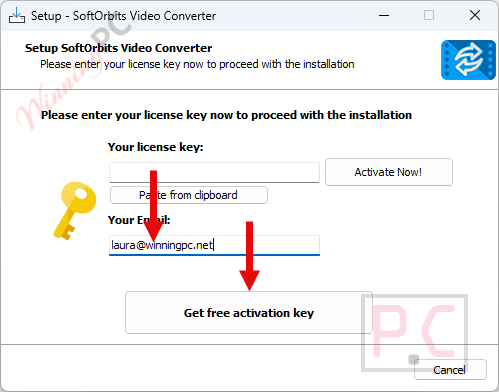
You will be directed to the giveaway page. Fill out your basic profile to get your free license code:

Copy the license key, return to the setup window, insert it into the field, and press ‘Activate Now!’ to unlock the full SoftOrbits Video Converter software.
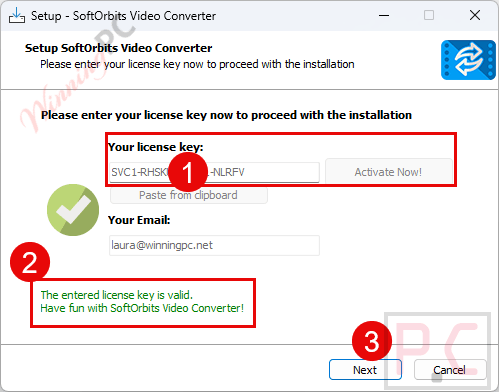
When installation is done, launch it, then paste the license key and your email to activate the full version of the software.

In-Depth Review & Features

Main Features
- Hardware Acceleration: Encodes and decodes media rapidly by utilizing Intel QuickSync, AMD VCE, and NVIDIA NVENC.
- AI Video Enhancer: Cleans up visual noise, reduces compression artifacts, and upscales standard-definition footage to 4K resolution.
- Audio Optimization: Normalizes volume levels, removes background noise with a single click, and allows manual delay adjustments to fix lip-sync issues.
- Target Size Compression: Automatically calculates the necessary bitrate when you input a specific desired output file size.
- Lossless Splitting: Auto-splits long clips into fixed-length segments or cuts them without the need for re-encoding.
- Subtitle Integration: Adds custom text subtitles to your footage with full control over font face, positioning, and timing delays.
More SoftOrbits Video Converter Screenshot!
Formats

Video compressor

Video Editor


Video Enhancer

Pros & Cons
Frequently Asked Questions
Are there any active promos or deals for SoftOrbits Video Converter?
You can discover the most recent promotional offers and giveaway campaigns for this application directly on WinningPC, as well as by checking the developer’s official promotional pages.
Can I create animated GIFs from my clips?
Yes, the software allows you to turn short video files into single or looped animated GIF avatars and smileys.
Will I lose visual quality when changing formats?
The program relies on advanced algorithms to ensure your output file maintains the highest possible quality while processing at fast speeds.
Can I use this tool to prepare content for YouTube?
Absolutely. It provides dedicated preset profiles optimized for online platforms like YouTube and Vimeo.
Does the software let me trim my footage?
Yes, it includes basic editing features that allow you to trim, crop, and apply watermarks to your media.
Can I manually adjust the technical settings before converting?
Yes, you have full control over custom parameters, including video resolution, frame rate, and bitrate to meet your specific needs.
Can I adjust the brightness of a dark video?
Yes, the built-in AI enhancer can automatically balance the contrast and brightness, or you can manually fine-tune the appearance yourself.
Is it possible to process a whole folder of videos at once?
Yes, the tool supports batch conversion, allowing you to select and convert multiple files simultaneously to save time.
System Requirements & Details
| Language Support | English, Français, Italian, Spanish, Swedish, and more… |
| Operating System | Windows 11/10/8.1/8/7 (32/64 bit) |
| Processor | Intel i3, AMD Ryzen 5 or above |
| RAM & Storage | 4 GB of RAM or above / 1 GB of free hard disk space |
| Supported Input | MP4, AVI, MOV, MKV, WMV, MP3, FLAC, WMA, TS, GIF, H.264, H.265/HEVC, Xvid, VP8, VP9 (SD, HD, 5K, 8K) |
| Supported Output | MP4, AVI, MOV, MKV, WMV, MP3, FLAC, WMA, TS, GIF, AAC, WAV |





Hi
I’ve tried to register the video converter, but all the keys are invalid.
– License Key #6: SVC1-AAEZZ-AYPEL-JNYUB
– License Key #5: SVC1-UFUEQ-RUFNR-HTRRK
– License Key #4: SVC1-QAXGV-YAYXJ-BUKDL
– License Key #3: SVC1-XLTRZ-EUGKH-LQKUA
– License Key #2: SVC1-ZXGKU-LLBQH-AEUFN
– License Key #1: SVC1-GWTMP-HUNXC-NQZRE
I tried SoftOrbits but they said come to you to get a valid license key. Could you please get a key for us all. Thanks
Kind regards
We do not provide the license codes mentioned above. A giveaway for this product will be held soon, so please check our website for updates.
i am trying to register it with the following serial i was given
SVC1-AAEZZ-AYPEL-JNYUB
and says invalid [icense key . Very strange,
SoftORbits downloadportal and online-installers still state v1.2:
https://download.softorbits.com/dist/VideoConverter.exe
https://download.softorbits.com/uni7z/VideoConverter.exe (what is this good for?)
Actual offline-installers (2024-18-04):
SoftOrbits Video Converter v1.3 (115 780 888 Bytes)
https://download.softorbits.com/files/VideoConverter.exe
SoftOrbits Video Converter v1.3 (115 794 400 Bytes)
https://download.softorbits.com/filesNew/VideoConverter.exe
v1.3 installers don’t let you change the destination for installation
(c:\Users\…\AppData\Roaming\SoftOrbits\SoftOrbits Video Converter)
Installation of v1.1 and v1.2 worked correctly.
My patience ended there and I stopped any further testing.
Weird.
v1.3: Impossible to change install path from C:\Users\xxxxxx\AppData\Roaming\SoftOrbits\SoftOrbits Video Converter
refers to a ‘Back’ button – there is none. Thanks.
tested v1.2:
Tried to apply a USER PROFILE and chose it for conversion.
The program instantly begins to write endless directories into the programs standard temporary folder. Hundreds and thousands!!!!! The only way to stop this is closing the program.
Afterwards you have to manually delete all those junk files.
BEWARE !