


WinX MediaTrans Giveaway
WinX MediaTrans
The best iPhone manager software for two-way transfer of photos, music, and videos for iPhone 12/11 Pro Max and iPad.
- Product
- WinX MediaTrans
- Product website
- winxdvd.com
- License
- Lifetime
- Platform
- Windows
- Usage
- Personal use only
- Updates
- No update to future versions
- Support
- Basic support only
- Updated
- 2026-09-16
Continue on winxdvd.com
Share to reveal the official giveaway page, then register there to receive your license.
This giveaway ended on .
The limited-time giveaway!
83% Off WinX MediaTrans + 3 Gifts
WinX MediaTrans License Key Free Download
- Go to the WinX MediaTrans giveaway page and get the license code for Free.
- You also get the license code and the installer from the information above. We recommend going to the giveaway page for the latest registration info.
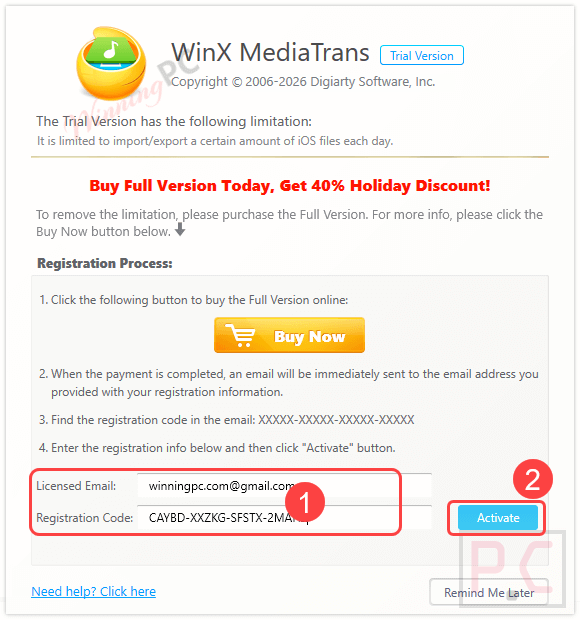
- Install this software and launch it. Click the “Register” icon and insert your email address/license code.
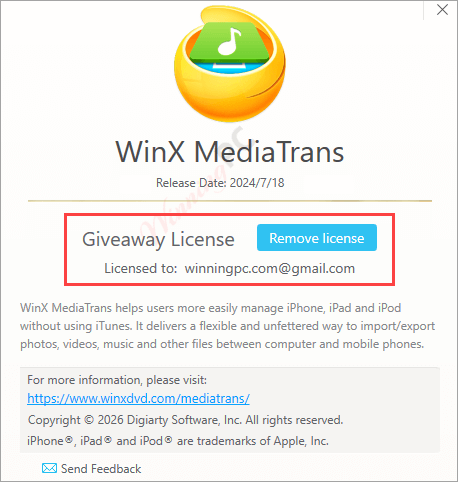
- Press the “Activate” button to finish activation.
- Now enjoy it for a lifetime with full features. For future updates and support from Winx DVD, you can buy the WinX MediaTrans lifetime license at a cheaper price (discount 50%) by using our discount codes below.

WinX MediaTrans Coupon Code Oct 2026

WinX MediaTrans + 3 Gifts
Buy 1 Get 3 Free Gifts: Video Watermark Remover, Ashampoo WinOptimizer 27, Anyviewer Solo.
WinX MediaTrans (1-Year/ 3 PCs)
One-Year Subscription / 3 PCs | 1-year free upgrades
WinX MediaTrans (Lifetime/ 1 PC)
Lifetime Plan / 1 PC | Free Lifetime upgrade service

WinX 4-in-1 Bundle (Lifetime License / 1 PC)
Bundle content: WinX DVD Ripper Platinum, WinX MediaTrans, WinX DVD Copy Pro, Winxvideo AI
Is this WinX MediaTrans giveaway safe and legit?
No crack or keygen
You install WinX MediaTrans from WinXDVD’s official build and activate with a genuine key the publisher issues. Nothing is patched, repackaged, or modified.
Official authorized source
The giveaway is sanctioned by Digiarty/WinXDVD. The fallback coupon routes through their own secure store, not a third-party checkout.
Secure HTTPS checkout
If you opt for a paid plan, payment is handled on WinXDVD’s encrypted store. WinningPC never touches your card details.
No financial risk on the free license
The giveaway key costs $0, so there’s nothing to lose. Paid plans include a 30-day money-back guarantee.
Hands-on with WinX MediaTrans
WinX MediaTrans earns its “iTunes replacement” positioning in practice. Two-way music transfer, batch tag editing, playlist management, and ringtone creation all work without iTunes present on the machine – a real convenience for Windows users who resent Apple’s syncing model. The encryption feature is the genuine differentiator here: protecting photos and videos during transfer with AES-256, RSA-1024, and Argon2 puts it ahead of most basic transfer tools that ship your private files with zero protection. Video handling is practical too; the app auto-converts formats like MKV on import and can reduce video file size by up to 50% without visible quality loss.

Key features
- Two-Way Music Transfer: Safely move songs and playlists between your iOS device and Windows PC without the risk of unexpected data leaks or file erasure.
- Zero Data Erased: Unlike standard iTunes syncing, backing up and transferring files selectively or extensively will not delete existing media on your iPhone or iPad.
- Unbreakable Encryption: Password-protect your local and transferred photos and videos using 256-bit AES, 1024-bit RSA, PBKDF2, and Argon2 encryption to prevent brute-force attacks.
- Smart Video Compression: Automatically reduce the file size of large videos by up to 50% without quality loss to save storage space on your device.
- Format Auto-Conversion: Automatically converts unsupported video formats (like MKV) to fit your iOS device and converts music to AAC or MP3.
- Fast Photo Backups: Quickly transfer photos, including native support for converting and transferring HEIC files, without needing WiFi or iCloud.
- Playlist & Ringtone Maker: Create, modify, or delete music playlists via drag-and-drop, edit artist information in bulk, and easily create custom iPhone ringtones.
- Secret Flash Drive Capability: Store non-media files, including Word documents, PDFs, and Excel spreadsheets, directly on your iPhone to use it as a portable USB drive.
Pros & Cons
More WinX MediaTrans screenshots!


WinX MediaTrans vs the alternatives
| Tool | Price | Platform | File encryption | Best for |
|---|---|---|---|---|
| WinX MediaTrans | Free (giveaway) / $19.95 with code | Windows only | AES-256, RSA-1024 | Windows users who want encryption + full media management |
| iMobie PhoneTrans | $32.19/lifetime | Windows & Mac | Not specified | Cross-platform households |
| AOMEI FoneTool Pro | $41.96/lifetime/5PCs | Windows only | AES-256 encryption | Backup-first users |
| EaseUS MobiXpert | $203.85/lifetime | Windows & Mac | Not specified | All-in-one iOS device managers |
| iReaShare Phone Transfer | $19.97/Lifetime/PC | Windows & Mac | Not specified; secure USB/read-only transfer | Phone-to-phone transfers |
| iTunes (Apple) | Free | Windows & Mac | None | Users who don’t mind Apple’s sync model |
Free/open-source note: iTunes remains the zero-cost baseline for iOS media on Windows. It handles basic syncing without the encryption or per-file control WinX MediaTrans offers, but for users who just want to sync a playlist occasionally, it’s enough. WinX MediaTrans earns its place when you need two-way transfers, encryption, or format conversion that iTunes simply doesn’t do.
Frequently Asked Questions
Where can I track down active promo codes or discounts for WinX MediaTrans?
While you can occasionally find promotions on the official developer site, WinningPC is the best place to find verified, working deals. We coordinate directly with developers to list the most current and valuable coupons for this software.
What is the biggest price drop currently available for WinX MediaTrans?
At the moment, you can secure up to an 83% off bundle that includes three free gifts on WinningPC. If you just want the software, the 1-Year/3 PC license is available for $9.90 (a 67% drop from $29.95), and the Lifetime/1 PC license is down to $19.95 (a 60% savings).
Do I need to have iTunes installed on my computer to use this?
No, you do not. WinX MediaTrans is designed to work completely independently of iTunes, allowing you to bypass it entirely.
Will syncing my iPhone with my PC using this tool overwrite my existing media?
No. This is one of its core benefits. It transfers your files extensively or selectively with zero data erased, completely avoiding the data-loss issues common with standard iTunes syncing.
Can I use this software to store regular work documents on my phone?
Yes. The software features a “Flash Drive” function that lets you use your iPhone to store and carry any file type, including Word documents, PDFs, and Excel spreadsheets.
Does it support the new HEIC photo format used by iPhones?
Yes, it offers unique, built-in support to not only transfer HEIC photos at high speeds but also convert them so they can be easily viewed on your Windows system.
How secure is the file encryption feature?
Highly secure. The software utilizes multiple layers of advanced encryption—including 256-bit AES, 1024-bit RSA, PBKDF2, and Argon2—to password-protect your photos and videos and prevent unauthorized file leaks.
Can it help me free up space if I have too many 4K videos on my phone?
Yes. WinX MediaTrans has an optimal size feature that can reduce large video files by up to 50% without noticeable quality loss on your device’s screen, helping you reclaim storage space.
What happens if I try to transfer a video format that an iPad doesn’t natively play, like an MKV file?
The software will automatically convert the incompatible video into an iOS-friendly format during the transfer process and auto-rotate it for full-screen playback.
System Requirements & Details
| Feature | Specifications |
|---|---|
| Language Support | English |
| Operating System | Windows 11 (32/64-bit); Windows 10/8/7 and earlier |
| Supported Input | iOS devices (Supports up to iOS26 and iPhone 17 lineup), MKV, HEIC, 4K/1080p video, Word, PDF, Excel |
| Supported Output | AAC, MP3, custom ringtones |





A bogus giveaway. There is no way the registration key is going to work. The key on this website or the one they email you.
They are just hoping you will buy it to get the real license key to register the software.
A scam!
Thanks for your comment! Just to clarify — this is not a scam.
You need to use the correct giveaway installer from this link: https://www.winxdvd.com/download/winx-mediatrans-giveaway.exe
Then activate it using the license code provided on the giveaway page. If you use the wrong installer (like the trial version), the key won’t work.
Dear admin
I followed your advice and installed your correct giveaway installer from the link you provided but got a ” invalid licence key ” message after using the licence code from the giveaway page !
Any suggestion ?
Please activate it with your email address and this license code: CACEQ-JL6E3-32P6B-KJ323
Thank you very much , new key worked perfectly … God bless
No, it doesn’t.
Do you care to read some criticisms with regards to Digiarty software?
I can quote you plenty.
Don’t use any of WinX software. None of its software is actually a giveaway.
This company is devious!
Once installed, it prompts you to pay to get a licensed copy.
How low can you get?!
Yes, the giveaway version of WinX software does come with some limitations — like no free updates or technical support — and it does promote the paid full version. But that’s pretty standard for most software giveaways.
You can simply skip the ads and continue using the giveaway version as provided. It still works normally within the giveaway terms. Hope that clarifies!
I find winninpc always late with the updates.
The new version is already here.
So what are you guys (admins) waiting for. Hurry up and post it. Jesus!
Hi Peter,
Thanks so much for the reminder. I have just updated the giveaway.
Have a nice day! ????
There seems to be a problem with the photos, I paid for this app and support can’t seem to help… I have all my photos in albums and as I add albums, some photos from previously added albums get removed from my iPhone and if I readd them, others get removed… it’s very frustrating. The music manager works just fine.
Did you get support from WinX DVD?
Their email is support@winxdvd.com
That’s who I contacted when I said support and they (winxdvd) couldn’t help… they didn’t (don’t) know what the problem could be. They wanted me to send a video as to what happens as there was no error messages… how the heck do you send a video of photos being removed when new albums are added… that doesn’t show what the problem is!!!
In response to WYNFORD October 4, 2022-10-04 “… There seems to be a problem with the photos, I paid for this app and support can’t seem to help… I have all my photos in albums and as I add albums, some photos from previously added albums get removed from my iPhone and if I readd them, others get removed… it’s very frustrating. The music manager works just fine …”
My wild guess is that the photos in question are synched to Apple’s cloud backup for you, so when you re-organize by moving them, you are fighting Apple who sees them as being deleted from their original location, so they sync the deletion.
Solution: turn off Apple cloud sync, then run WinXDVD Mediatrans and do your organizing.
Let us know if that helps.
However, if you turn Apple cloud sync back on, Apple may then re-organize and undo your moves, or think you deleted the photos, and Apple may try to ‘sync’ the deletions once more.
Solution: either never use Apple cloud sync, OR never organize our stuff the way we prefer – the phone is seeing two bosses, and the Apple-boss always wins.
We don’t think we actually own our Apple phones, do we?
.
My wild guess is that the photos in question are synched to Apple’s cloud backup for you, so when you re-organize by moving them, you are fighting Apple who sees them as being deleted from their original location, so they sync the deletion.
Solution: turn off Apple cloud sync, then run WinXDVD Mediatrans and do your organizing.
___________________________________________________________________________________
I don’t use icloud to store my photos, never have never will… so for right now, i’m just using music manager
For the heck of it, I installed iTunes for Windows and that copied all my photos album by album to my iPhone without removing any photos from other albums… the problem has to be with winx mediatrans… i have uninstalled iTunes after testing and no help from winxdvd