WinningPC

MD Moo Converter is the ultimate tool for converting and backing up Readmoo e-books. Designed to free your purchased e-books from platform limitations, it allows you to convert Readmoo e-books into EPUB or Kindle-compatible formats while maintaining 100% quality. Whether you want to enjoy your e-books on other devices or safely back them up to your computer, MD Moo Converter makes it simple and efficient.
MD Moo Converter Coupon Code (100% Working)
Epubor Ultimate for Windows:

Epubor Ultimate for Win - 1 Year
20% Off coupon code: regular price $29.99, discounted price $23.99
Epubor Ultimate for Win - 5 Year License
20% Off coupon code: regular price $59.99, discounted price $47.99
Epubor Ultimate for Win - 5 Years / 5 PCs
20% discount coupon code: regular price $109.99, discounted price $87.99
Epubor Ultimate for Mac:

Epubor Ultimate for Mac - 1 Year
20% Off coupon code: regular price $29.99, discounted price $23.99
Epubor Ultimate for Mac - 5 Year
20% Off coupon code: regular price $59.99, discounted price $47.99
Epubor Ultimate for Mac - 5 Years / 5 PCs
20% discount coupon code: regular price $109.99, discounted price $87.99
MD Moo Converter Key Features
- Convert Readmoo E-books: Transform your Readmoo e-books into DRM-free formats like EPUB or Kindle for easy reading on multiple devices.
- Batch Conversion: Convert multiple e-books simultaneously with just one click, saving time and effort.
- High-Speed Processing: Achieve up to 60X faster conversion speed without compromising layout, fonts, or picture quality.
- Perfect Backup Solution: Safely back up your Readmoo e-books to your computer’s hard drive.
- Cross-Platform Compatibility: Works seamlessly on both Windows and Mac operating systems.
- 100% Quality Preservation: Ensures original fonts, layouts, and images are perfectly restored in the converted e-books.
How to use MD Moo Converter?
Step 1. Download Readmoo for PC/Mac here: md_moo.exe md_moo.zip
After installation, launch the program and access your Readmoo books, click on the “Download” button to download these ebooks for offline reading:
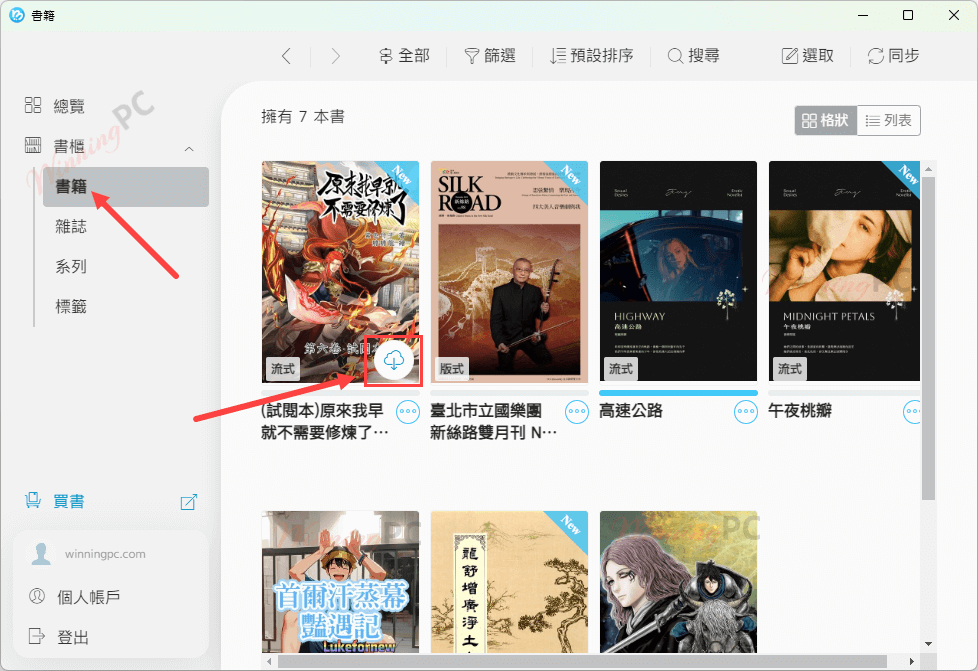
Step 2. Open MD Moo Converter, click on the “Refresh” button to load the downloaded books:
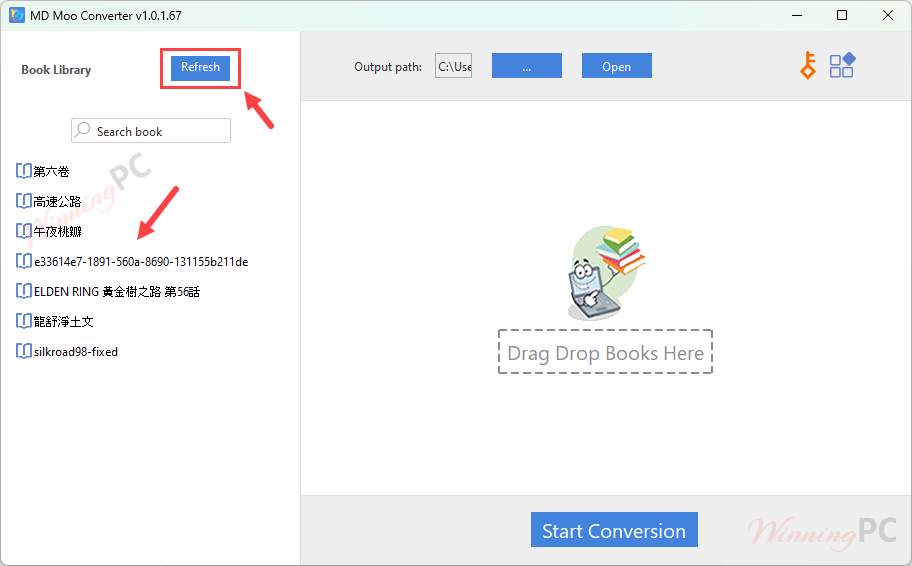
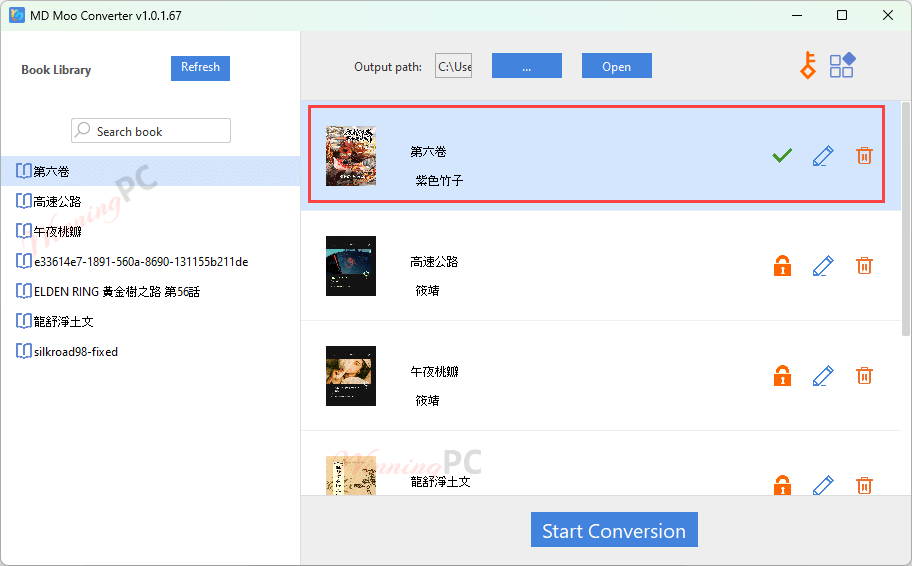
Step 3. Drag and drop the books you want to convert to the right window, then click “Start Conversion” to convert them to DRM-free EPUB files:
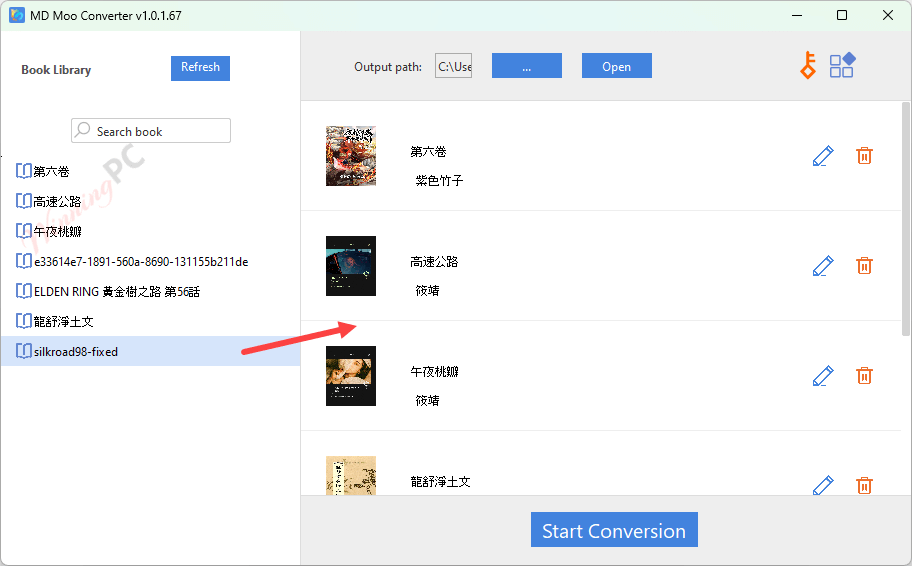
Step 4. Once the conversion is complete, all the converted EPUB files will be stored in the designated output folder. From there, you can effortlessly transfer and enjoy these EPUB files on almost any platform, including popular e-readers like Kindle, Kobo, Nook, Remarkable, and more.
Frequently asked questions
What is MD Moo Converter, and what does it do?
It is a software tool designed to convert Readmoo.com e-books into DRM-free formats such as EPUB or Kindle, making them compatible with various devices and e-readers.
Do I need an active Readmoo account to use Moo Converter?
Yes, you need access to your purchased Readmoo e-books to use this software for conversion.
What is the maximum number of e-books I can convert at once?
MD Moo Converter supports unlimited batch conversions, enabling you to convert large libraries of e-books simultaneously.
Does MD Moo Converter require an internet connection?
No, the software works offline, so you can convert and back up your Readmoo e-books without an internet connection.
Is there a trial version available for MD Moo Converter?
Yes, it offers a trial version so users can test its features before purchasing. You can convert a complete Readmoo e-book file. If you have more e-book files that need to be converted, please purchase the full version.
Is there a discount available for MD Moo Converter?
Yes, WinningPC offers an exclusive 20% discount coupon for MD Moo Converter. Use the coupon during checkout to save on your purchase and enjoy all the features of this powerful e-book conversion tool at a reduced price.
Technical Details
| Language Support | English |
| Money Back Guarantee | 30-Day |
| Operating System | Windows MacOS |
| Shipping | Register code will be sent to your email in minutes |
| Subscription | 1-Year, 5-Year |
| Support Services | Email, Tickets |