Laura Marano
I use OtsAV DJ Silver for DJ mixing, automated playback, and live performance, and it works very well. It features intelligent fade-mixing, high-quality tempo control, live vinyl-style scratching, and ultra-low latency via ASIO. OtsAV DJ Silver responds instantly, includes flexible output modes, powerful search, and a media library with advanced query tools for smarter playlists. I can record mixes, use Winamp visualisations, and even control it remotely.

Key Features and Screenshots
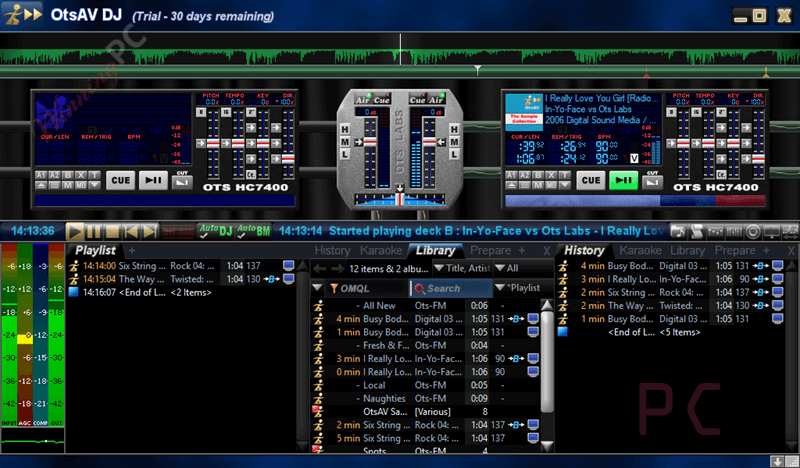
- Intelligent automated fade-mixing: Automatically blends tracks together using built-in logic, so transitions stay smooth without constant manual work.
- High-quality tempo and time-scaling sliders: Let you change playback speed up to ±100% while keeping audio clear and usable.
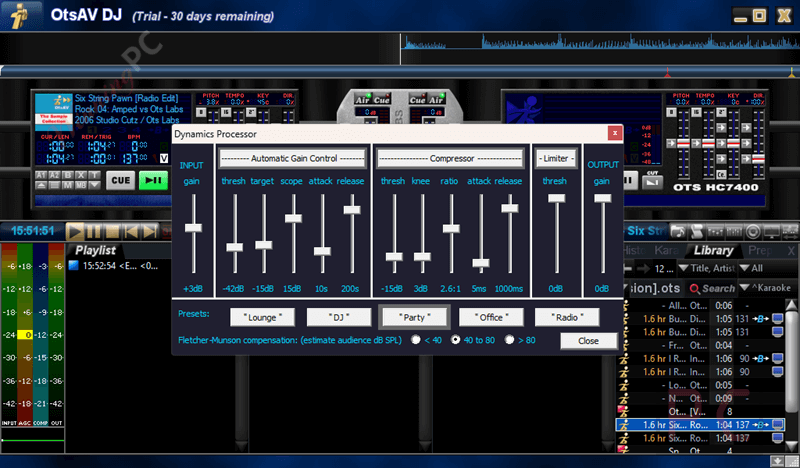
- Professional broadcast dynamics processor: Manages volume and dynamics to keep output levels steady during playback.
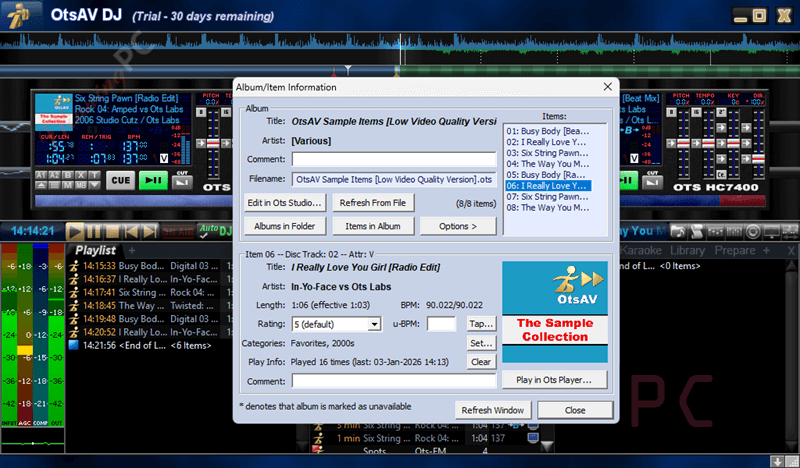
- Ots Album file and cover art handling: Groups tracks as albums and displays cover graphics for better organization.
- Fast and accurate search tool: Helps you quickly find tracks in large music libraries.
- Simple list management and layout: Makes arranging and managing playlists easy to follow and control.
- Instant control response: All buttons and sliders react immediately, with no noticeable delay.
- Save mix as WAV recording: Allows you to record your live mix directly to a WAV file.
- Live vinyl-style scratching: Lets you scratch on virtual turntables with sound that matches real vinyl.
- ASIO driver support: Provides very low audio latency when used with compatible hardware.
- Flexible output channel modes: Supports external mixers in Old School Mode or internal mixing in standard mode.
- Media Library with OMQL support: Uses a query language to sort media and build smarter playlists.
- Remote access control: Enables control of the software over a local network or the internet.
- Winamp visualization plugin support: Works with many classic Winamp visual effects during playback.
- Included Ots Studio companion app: Lets you edit tags, beats, covers, video and CD+G settings, rip CDs, and batch convert files in a visual interface.
More Screenshots!
How to Use (Step-by-Step Guide)
Step 1. Install and launch the software
Download OtsAV DJ Silver, install it, and open the program.
Step 2. Set up audio output
Choose ASIO for low latency or use a standard Windows audio device.
Step 3. Select your mixing mode
Use the built-in mixer or Old School Mode with an external mixer.
Step 4. Add and organize your music
Import files into the Media Library and use search or OMQL to find tracks.
Step 5. Load tracks into decks
Send songs to the decks and check waveforms for timing.
Step 6. Adjust tempo and pitch
Use tempo sliders, pitch control, and BPM matching to keep tracks in sync.
Step 7. Mix and scratch
Use automated fade-mixing or mix manually, with optional vinyl-style scratching.
Step 8. Record your mix
Save your session as a WAV file when finished.
Frequently Asked Questions
Is OtsAV DJ Silver suitable for live DJing?
Yes, it supports live mixing, scratching, tempo control, and instant response, making it reliable for real-time use.
Does OtsAV DJ Silver support automatic mixing?
It includes intelligent automated fade-mixing that smoothly transitions between tracks without manual adjustments.
Can I record my DJ mixes with this software?
Yes, you can record your full mix directly and save it as a WAV file.
Can I control OtsAV DJ Silver remotely?
Yes, remote access control lets you manage playback over a local network or the internet.
Does OtsAV DJ Silver support visual effects?
Yes, it works with many Winamp visualization plugins during playback.
Is there any way to save money when buying OtsAV DJ Silver?
Yes, WinningPC provides a coupon that helps you get 5% off, making the purchase more affordable.
Why Choose WinningPC
- Why Trust? We are committed to providing 100% valid and verified coupon codes, so you can always shop with confidence.
- Found an Invalid Coupon or a Better Deal? If you encounter an invalid code or a better offer, please let us know. Our team updates all discount information regularly to ensure accuracy.
- Official Authorization: We only share authentic discounts from trusted software developers.
- No Fake Discounts: Unlike some sites, we never use misleading deals. The final price you see is the true discounted price.
- Secure Purchases: All transactions are processed on the official vendor’s website, ensuring authenticity and data protection.
- Extra Support: If you face order or vendor issues, contact us. We’ll liaise with the vendor to help resolve your problem quickly.
Technical Details
| Language Support | English, Français, Italian, Spanish, Swedish, and more… |
| Money Back Guarantee | 30-Day |
| Operating System | Windows 7/8/8.1/10/11 (32 and 64-bit) |
| Shipping | Register code will be sent to your email in minutes |
| Subscription | Lifetime |
| Support Services | Email, Tickets |