

On this page
Your free RecoveryFox AI license
RecoveryFox AI
AI-powered scanning and recovery
- Product
- RecoveryFox AI
- Product website
- wonderfoxrecovery.com
- License
- 1 Year
- Platform
- Windows
- Support
- No support
- Updates
- Free updates
- Usage
- Non-commercial only
- Updated
- 2026-10-21
Continue on wonderfoxrecovery.com
Share to reveal the installer and the official giveaway page.
This giveaway ended on .
Get 53% off Lifetime license
RecoveryFox AI Coupon Code Nov 2026

Limited-time offer: RecoveryFox AI - Lifetime license Editor's Pick
Limited-Time Deal - Save $80
RecoveryFox AI (1-MONTH)
1 PC, 1 license | Free updates & support | 7 days money back guarantee
RecoveryFox AI (1-YEAR)
1 PC, 1 license | Free updates & support | 30 days money back guarantee
RecoveryFox AI (LIFETIME)
1 PC, 1 license | Free updates & priority support | 30 days money back guarantee
How to claim the RecoveryFox AI giveaway
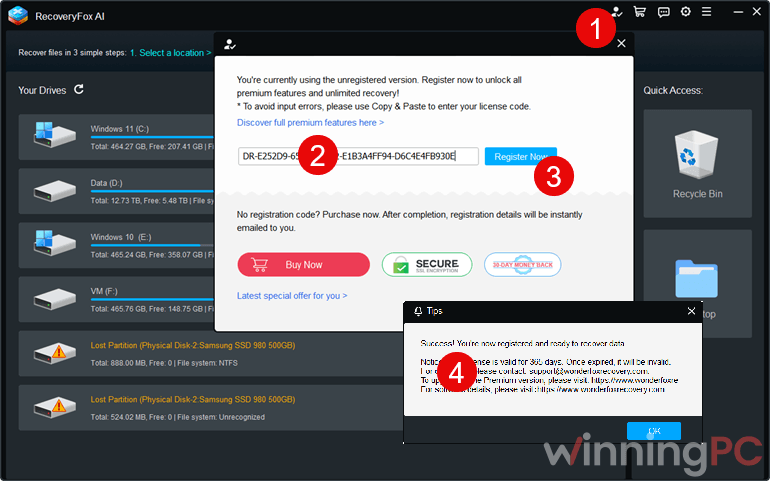
Unlock the WinningPC form below to reveal the link to the giveaway page. On the giveaway page, enter your email address and click “Get License”.

Download and install RecoveryFox AI on your computer.
Open RecoveryFox AI, register it with the key
How well does RecoveryFox AI work?
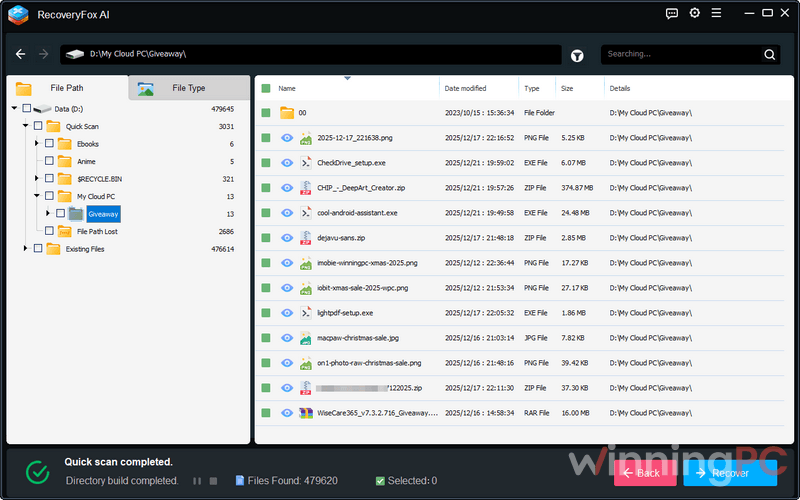
The smart part is that RecoveryFox AI doesn’t make you pick a scan mode. Quick Scan runs first and tries to keep original filenames and folders, then AI Scan takes over and hunts for fragments by their data structure, which is what you need after a format or when a partition shows up as RAW. That second pass can be slow. WonderFox itself says large jobs may run for hours, occasionally days, so being able to browse results while the scan is still going matters more than it sounds.
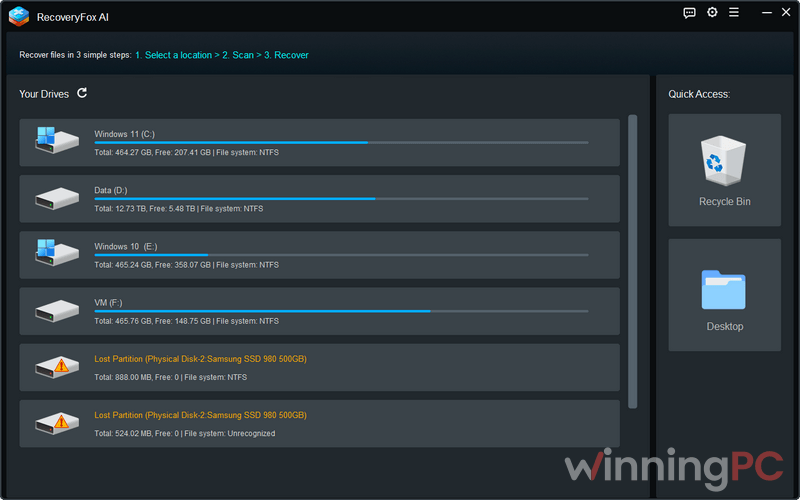
The tool is built for logical damage: deletion, formatting, corrupted file systems. It won’t save a clicking hard drive, and on an SSD that has already run TRIM the data may simply be gone. One more thing worth knowing: the “98% success rate” on WonderFox’s site is the vendor’s own claim, not an independent benchmark.
Key features
- Two scans in one pass: Quick Scan for recent deletions with names intact, then an automatic AI Scan for fragmented or long-deleted files.
- Quick Access shortcuts for the Recycle Bin and Desktop, the two places most “I just deleted it” accidents happen.
- Partial recovery for damaged files, including usable text from broken Word or PDF files and intact contents from corrupted ZIP, RAR or 7Z archives.
- Filters by path, file type, name, date and size, so a scan with thousands of results stays searchable.
What we liked, what we didn’t
Is there a free alternative to RecoveryFox AI?
| Tool | Price | Free recovery | Platforms | Best for |
|---|---|---|---|---|
| RecoveryFox AI | Free 1-Year (giveaway), $69.95 Lifetime via WinningPC | None (scan and preview only) | Windows | Formatted, RAW or corrupted drives |
| Recuva | Free, paid Pro available | Yes, no cap | Windows | A recently deleted file on a healthy drive |
| PhotoRec (with TestDisk) | Free, open source | Yes, no cap | Windows, macOS, Linux | Formatted cards, if a text-based interface doesn’t bother you |
| EaseUS Data Recovery Wizard Pro | $70/month, $100/year, $150 lifetime | Up to 2 GB | Windows, macOS | Beginners who want a guided wizard |
| Disk Drill Pro | $89 lifetime | Up to 500 MB (Windows) | Windows, macOS | Mac users who also want a one-time price |
Questions people ask about RecoveryFox AI
When does the RecoveryFox AI giveaway end?
You need to activate your key by November 3, 2026. Any license still unactivated when the giveaway ends becomes invalid, so claim and register it now even if you have nothing to recover today.
What happens when the free 1-year license expires?
You lose the ability to recover files, but scanning and previewing should keep working, since WonderFox’s unregistered version allows both with no time limit. To restore files after that, you’d need a paid license.
Can I install RecoveryFox AI on the drive I’m trying to recover?
Better not. Installing or saving anything to that drive can overwrite the very files you’re after. Put the program on another partition or another PC, and always save recovered files to a different drive.
Can RecoveryFox AI recover files from an SSD?
Sometimes. It supports SATA, NVMe and M.2 SSDs, but if the drive’s TRIM function has already cleared the deleted blocks, no software can bring them back. The sooner you scan after the loss, the better your odds.
Can it read a Mac or Linux drive?
Yes, as long as the drive is connected to a Windows PC. RecoveryFox AI supports APFS, HFS+, EXT2/3/4 and XFS, but the program itself only runs on Windows.
Can I get help if the giveaway key doesn’t work?
Not through WonderFox’s tech support, because giveaway licenses don’t include it. Paid licenses do, and the Lifetime plan comes with priority support.
What you need to run RecoveryFox AI
| Field | Value |
|---|---|
| Operating system | Windows 11, 10, 8.1, 8, 7, Vista; Windows Server 2022, 2019, 2016, 2012, 2008, 2003 |
| Processor | 1 GHz or faster Intel or AMD, x86 or x64 |
| RAM | 4 GB minimum, 8 GB recommended |
| Disk space | 1 GB free for installation |
| Supported file systems | NTFS, FAT12, FAT16, FAT32, exFAT, EXT2, EXT3, EXT4, XFS, HFS+, APFS, RAW, unallocated space |
| Storage devices | Internal and external HDDs and SSDs (SATA, NVMe, M.2), USB flash drives, SD, microSD, TF, CF, Memory Stick and NM cards |
| Recoverable file types | 500+ formats, including DOCX, XLSX, PPTX, PDF, JPG, PNG, HEIC, PSD, camera RAW (CR3, NEF, ARW, DNG), MP4, MOV, MKV, MP3, FLAC, ZIP, RAR, 7Z, PST, ISO, VMDK, SQLite |
| Interface languages | English, German, French, Spanish, Italian, Korean, Japanese, Simplified Chinese, Traditional Chinese |
| Other requirements | The storage device must be detected by Windows (File Explorer, Disk Management or Device Manager) |





A simple file recovery program hoping to jump on the AI bandwagon to improve their exposure but think about it WHAT can AI offer to lost or deleted file recovery? Mismatched sectors and clusters, lies and hallucinations and just plain simple mistakes it does not know it’s made! What genuine AI model will run under 32bit Vista? DUH do they think we are morons? fixed filesystem file and data recovery algorithms are mature and AI can offer the process nothing as the restriction with file recovery is not algorithm processing time but media reading time and AI cannot help with that even if it was present. In modern systems with JUST SSD drives with TRIM enabled by default data recovery programs are of little no no use as the area that the deleted file occupied has been deallocated and is no longer addressable from the operating system so cannot be found by any user or system mode recovery software. You have to disable TRIM deleted file deallocation and windows 10 or above SSD optimisation to be able to make use of file/data recovery programs fully… of course if you do that you will have a system with ever diminishing SSD performance as time goes by and spare space get allocated and never released back into the spare pool when a file gets deleted.
And from the giveaway page:
“Support NTFS, FAT, exFAT, etc.”
What OTHER filesystems does it support or is the etc. put there to loosely imply it supports others but doesn’t really or it would have mentioned them e.g. ext2,3 or 4
I also note this illegally distributes GPLv3 licensed FFMPEG.ORG DLLs in a closed source combined works which is completely illegal! So no wonder they are willing to claim an AI scan when it’s NOT genuine AI running in 32bit vista compatible code! Ahh it is 32bit BUT DOES NOT EXECUTE UNDER VISTA…. So no use to me as only non-vista machines I have are all SSD with TRIM enabled so this cannot work with the HD based Vista system and cannot work with SSD based Windows 10 machines… it is pointless except to use it on USB connected storage which is so rarely used as to make it a waste of system space on modern systems!