Cathryn Lee

Why You Need RecoveryFox AI
RecoveryFox AI is an advanced data recovery software that provides two scan modes: Quick Scan and AI Deep Scan, which help you get data back due to deletion, formatting, partition loss, or disk corruption. With its help, you can recover over 500 file formats, including documents, images, videos, archives, and RAW files from internal hard drives and external drives. What makes RecoveryFox AI great is its ability to preserve the folder structure & metadata, and allows you to view files before restoring to ensure accuracy.
RecoveryFox AI Coupon Code Oct 2026

RecoveryFox AI (1-MONTH)
1 PC, 1 license | Free updates & support | 7 days money back guarantee
RecoveryFox AI (1-YEAR)
1 PC, 1 license | Free updates & support | 30 days money back guarantee
RecoveryFox AI (LIFETIME)
1 PC, 1 license | Free updates & priority support | 30 days money back guarantee
Key Features and Screenshots
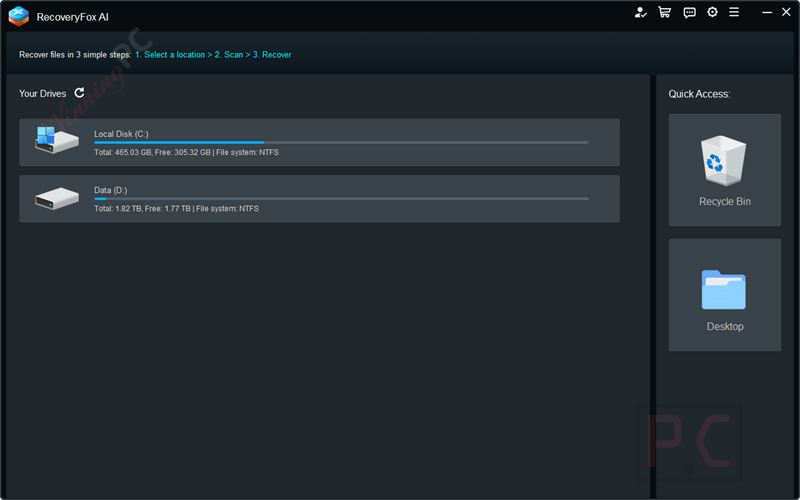
- AI-Powered Data Recovery: Precisely identifies and reconstructs lost files with ~98% recovery success rate in real-world testing.
- Wide File Type Support: Recovers documents, audio, videos, photos, camera footages, zip files, 3D graphics, executables, and even database files.
- Quick Scan Mode: Automatically initiates a fast scan to recover recently deleted files from Recycle Bin or via Shift+Delete, making early recovery easy.
- Broad Device Support: Compatible with internal and external HDDs, SSDs, USB flash drives, SD/TF cards, cameras and more.
- Major File System Compatibility: Fully supports NTFS, exFAT, and FAT32 file systems commonly used across Windows environments.
- Non‑Destructive Read‑Only Recovery: Operates in read-only mode, meaning original data is not altered, preventing overwriting or data corruption during recovery.
- Recovery of Complex Scenarios: Can recover data from formatted drives, corrupted partitions, system crashes (BSOD), ransomware deletion, and other logical failures.
- Smart Filtering & Search Options: Quickly locate desired files using type, date, size, or keyword filters, making it simple to locate specific items.
- Metadata & Original Structure Preservation: Restores files with their original names and folder hierarchy when possible, ensuring organization continuity.
- Pause & Resume Scans: Scans can be paused or stopped midway, with users able to return later to resume without losing progress.
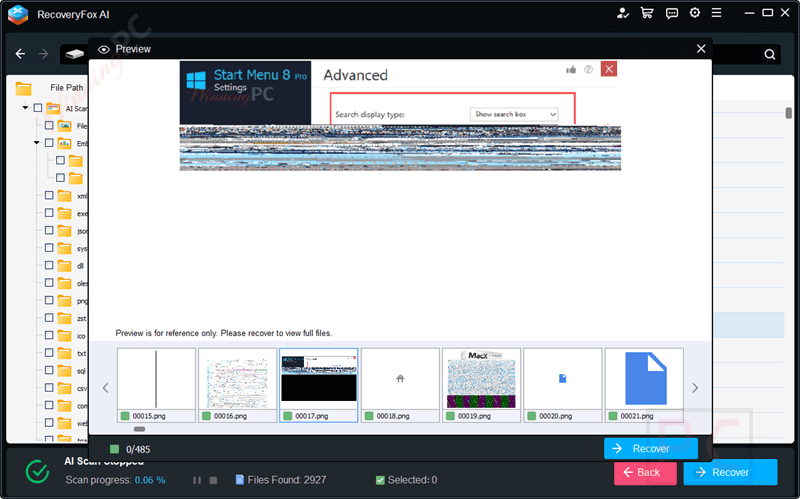
- File Preview Before Recovery: Supports thumbnail or content preview (images, text, audio, video) for accessible verification before restoring files.
RecoveryFox AI Conclusion
Conclusion – Is RecoveryFox AI Worth It?
RecoveryFox AI is a powerful and user‑friendly AI‑powered recovery tool that is designed for Windows users who are dealing with deleted, formatted, or corrupted files. The great thing about this tool is its ability to achieve high recovery accuracy, support a broad range of formats and devices, and enable safe read-only operations, all enhanced by an automatic dual-scan workflow.
However, it has limitations: it may struggle to recover some partitions and scan large USB drives. It doesn’t support encrypted drives (e.g., BitLocker) or cloud storage services like Google Drive or Dropbox. For encrypted media recovery, cross-platform flexibility, or extremely large USB/SD drives, you should explore alternative solutions.
How to Use (Step-by-Step Guide)
Step 1. Select Location
Launch RecoveryFox AI and select the location of the lost file to start scanning.
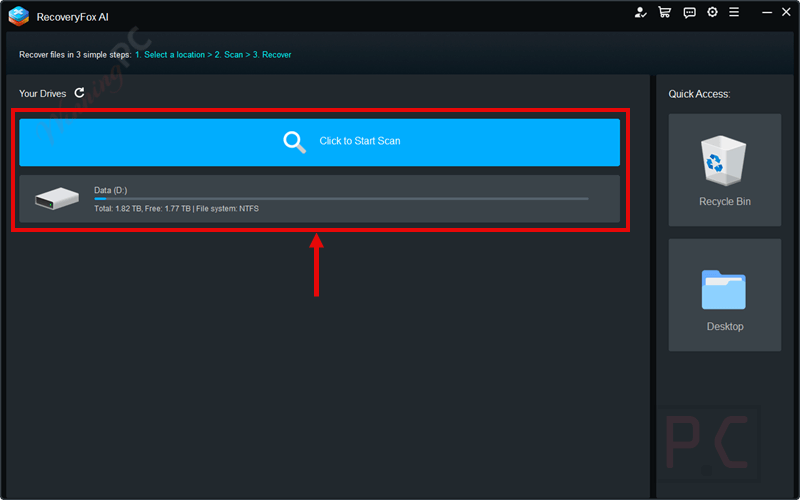
Step 2. Start Scan
Start with a Quick Scan first. Once done, AI Scan will automatically continue with more thorough and in-depth scan. You can pause or stop at any time.

Step 3. Preview and Recover
Filter files from the results to preview. Then select the files to start data recovery.
Frequently Asked Questions
How does the AI technology improve file recovery?
The AI engine identifies fragmented file traces and reconstructs them into complete files, increasing the success rate of recovery, especially in complex data loss scenarios such as formatted drives or corrupted partitions.
Which file types can this tool recover?
It supports over 500 file formats, including documents (Word, Excel, PDF), media files (photos, videos, audio), compressed archives (ZIP, RAR), RAW images, and even some database files.
Does it work on all storage devices?
It supports a wide range of devices such as internal/external hard drives, SSDs, USB flash drives, SD/TF cards, and cameras, as long as they are accessible by the system.
What file systems are supported?
The software is compatible with NTFS, exFAT, and FAT32 file systems, which cover most Windows storage devices.
Can the software restore files with their original folder structure?
Yes. It maintains the original file names and folder hierarchy whenever possible, making restored files easier to organize.
Does the software recover data from encrypted drives?
Currently, it does not support encrypted drives (e.g., BitLocker). You need to decrypt them first to enable recovery.
How long does the scanning process take?
Scan time depends on the drive size and its condition. Quick scans are fast, while AI deep scans may take longer as they thoroughly analyze the storage for fragmented data.
How can I save money on purchasing RecoveryFox AI?
You can use the WinningPC coupon code ASSISTP*** to get up to 43% off on all license plans.
Why Choose WinningPC
- Why Trust? We are committed to providing 100% valid and verified coupon codes, so you can always shop with confidence.
- Found an Invalid Coupon or a Better Deal? If you encounter an invalid code or a better offer, please let us know. Our team updates all discount information regularly to ensure accuracy.
- Official Authorization: We only share authentic discounts from trusted software developers.
- No Fake Discounts: Unlike some sites, we never use misleading deals. The final price you see is the true discounted price.
- Secure Purchases: All transactions are processed on the official vendor’s website, ensuring authenticity and data protection.
- Extra Support: If you face order or vendor issues, contact us. We’ll liaise with the vendor to help resolve your problem quickly.