Laura Marano
If you’re chasing that warm, vintage chorus vibe from the ’80s, I think the Martinic AX Chorus is really worth checking out. It accurately replicates the sound of the old AX60 and AX73 chorus units by modeling the classic MN3009 Bucket Brigade Delay chip, providing the same rich tone we all love in audio editing and production. You can run it in mono or stereo, and the controls are highly flexible, including rate, mix, and a 3-band EQ for fine-tuning. That’s precisely why I like Martinic AX Chorus so much. You get the authentic analog flavor but with precise control, making it a reliable way to add depth and warmth to any mix.
Martinic AX Chorus Plans & Discount Codes (100% Working)

Martinic AX Chorus - Lifetime License
10% coupon code: regular price $49.0, discounted price $44.1
Martinic AX Chorus - One Year License
10% coupon code: regular price $16.0, discounted price $14.40
Yoy may also like
Martinic AX Bundle
This incredible bundle grants you access to our AX73 Synthesizer, AXFX effect rack and AX Chorus effect, including also a compilation of over 1200 high quality presets.
Key Features and Screenshots
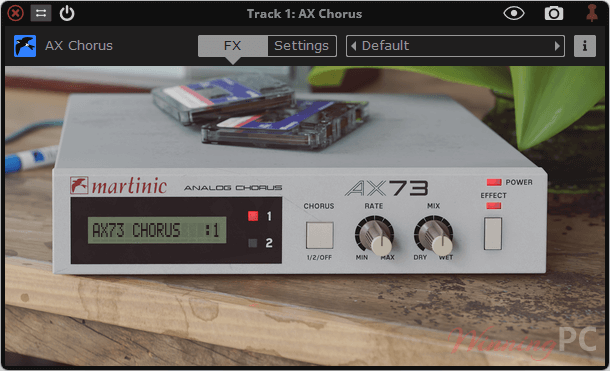
- Authentic Analog Modeling: Built on Martinic’s ACE technology, the plugin faithfully recreates the tone of the MN3009 Bucket Brigade (BBD) chip found in the Akai AX60 and AX73.
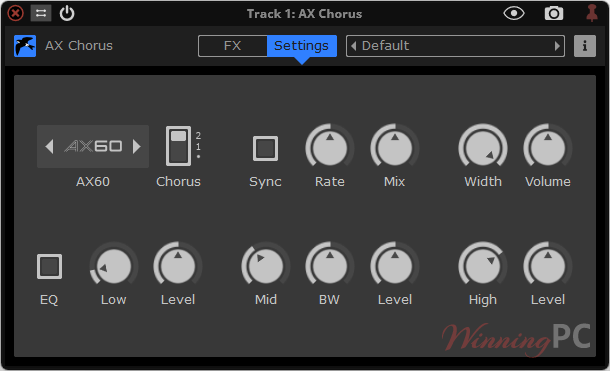
- Two Chorus Modes in One: Switch between the AX60 and AX73 chorus models, each with its own unique sonic character, all housed in a single unit.
- Mono or Stereo Operation: Use it exactly as it appeared on the original hardware in mono mode, or expand your sound with a stereo option designed for today’s productions.
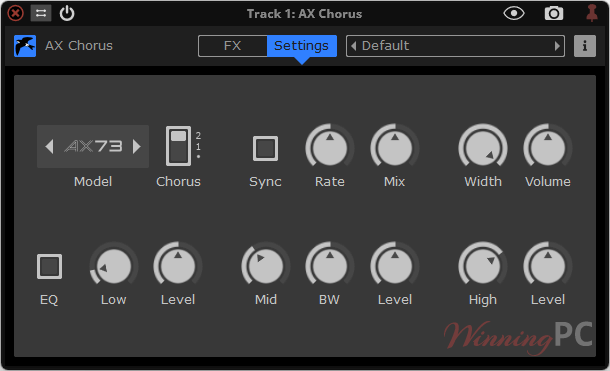
- Built-in 3-Band EQ: Shape your chorus effect without reaching for extra plugins. Adjust lows, mids, and highs directly inside the AX Chorus for precise tonal control.
- Tempo Sync with Your DAW: Lock the modulation speed to your project tempo. Rates can be synced from 16 bars down to 1/64 note, keeping your chorus perfectly in time with the rest of your track.
- Dry/Wet Mix Control: Blend the original and processed signals with the Mix knob, adjustable from 0% (fully dry) to 100% (fully wet). This makes it easy to add just a touch of movement or fully immerse your track in a chorus.
- Master Volume Control: Adjust the overall output level with a master volume fader that ranges from -36 dB to +24 dB, ensuring your processed signal always sits just right in the mix.
- Smooth Bypass Switching: The built-in bypass function keeps the input signal routed through the plugin, allowing you to switch the chorus on and off without clicks, pops, or sudden volume jumps.
- Default Presets: This tool provides 16 ready-to-use presets. These cover both AX60 and AX73 flavors, giving instant access to classic sounds, from subtle thickening to lush, wide modulation.
- Cross-Platform Support: Runs on Windows (7 and above) and macOS (10.9 and above) in AAX, AU, CLAP, VST, and VST3 formats, ensuring compatibility with most DAWs.
More screenshots
How to Use (Step-by-Step Guide)
- Step 1. Download the software on your computer. Install the AAX/AU/CLAP/VST/VST3 formats you need. Open your DAW, scan for new plugins, and insert AX Chorus on a track or bus.
- Step 2. Pick a chorus model: AX60 or AX73 mode, then choose mono or stereo.
- Step 3. Set modulation behavior: Decide tempo-sync (locks modulation to project tempo) vs free-run (set rate by ear).
- Step 4. Dial your tone with the built-in 3-band EQ, then insert directly for full effect, or place AX Chorus on an aux/bus and blend with a send to keep the dry signal punchy and mono-solid.
- Step 5. Adjust the output so that bypassed and engaged are at the same loudness.
- Step 6. Try “Wide Vox Double” on vocals, “Mono Sparkle” on guitars, or “Chorale (Elka Panther)” on keys/organ.
- Step 7. Collapse to mono briefly. If the image becomes too thin, reduce depth, narrow the stereo, or use more dry blend via an aux.
- Step 8. Write light automation on rate/depth or stereo width across sections (e.g., wider chorus on choruses, subtler on verses).
Frequently Asked Questions
How does it differ from stock DAW chorus effects?
Unlike standard digital chorus, AX Chorus captures the analog warmth of the original hardware, giving your mixes depth, movement, and a more musical character.
Can I use it in stereo?
Yes. While the original synth choruses were mono, Martinic added a stereo option for modern productions.
Does it include both the AX60 and AX73 chorus models?
Exactly. You can switch between both chorus modes, each with slightly different textures and tonal colors.
What makes the ACE modeling special?
ACE is Martinic’s proprietary modeling technique that recreates analog circuits with extreme accuracy, ensuring the plugin sounds just like the original hardware.
Can the chorus sync with my project tempo?
Absolutely. The modulation speed can be locked to your DAW’s tempo for perfectly timed effects.
Can I get a discount when buying?
Yes. On WinningPC, you can apply the coupon code HO***10 to save 10% instantly at checkout.
Why Choose WinningPC
- Why Trust? We are committed to providing 100% valid and verified coupon codes, so you can always shop with confidence.
- Found an Invalid Coupon or a Better Deal? If you encounter an invalid code or a better offer, please let us know. Our team updates all discount information regularly to ensure accuracy.
- Official Authorization: We only share authentic discounts from trusted software developers.
- No Fake Discounts: Unlike some sites, we never use misleading deals. The final price you see is the true discounted price.
- Secure Purchases: All transactions are processed on the official vendor’s website, ensuring authenticity and data protection.
- Extra Support: If you face order or vendor issues, contact us. We’ll liaise with the vendor to help resolve your problem quickly.
Technical Details
| Language Support | English and more… |
| Money Back Guarantee | 30-Day |
| Operating System | Windows 7 or newer, or Mac OS X 10.9 (Mavericks) or newer |
| Shipping | The registration code will be sent to your email in minutes |
| Subscription | 1-Year, Lifetime |
| Support Services |