On this page
Vovsoft Giveaway
Vovsoft Bulk Barcode Generator
Create thousands of barcodes from plain-text data in batch mode.
- Product
- Bulk Barcode Generator
- Website
- vovsoft.com
- License
- Lifetime
- Platform
- Windows 11 to XP
- Usage
- Non-commercial only
- Updates
- No future upgrades
- Support
- No support
- Updated
- November 23, 2026
Get your unique code by email
License key delivered free to your inbox within minutes.
Protected by Cloudflare Turnstile · Email quality checked by Reoon
All codes have been claimed or the giveaway has closed.
Vovsoft Bulk Barcode Generator Coupon Code Nov 2026

Vovsoft Universal License
115+ programs | Lifetime license | All future updates
How to Get the Vovsoft Bulk Barcode Generator License Key for Free
Type your email address into the giveaway form above. Your free license code for Vovsoft Bulk Barcode Generator is sent to that address.
Use the download link above to grab either the installer or the portable version. Both are free.
Run the downloaded EXE file and finish the installation. Open the program, paste your key into the license field and activate it.
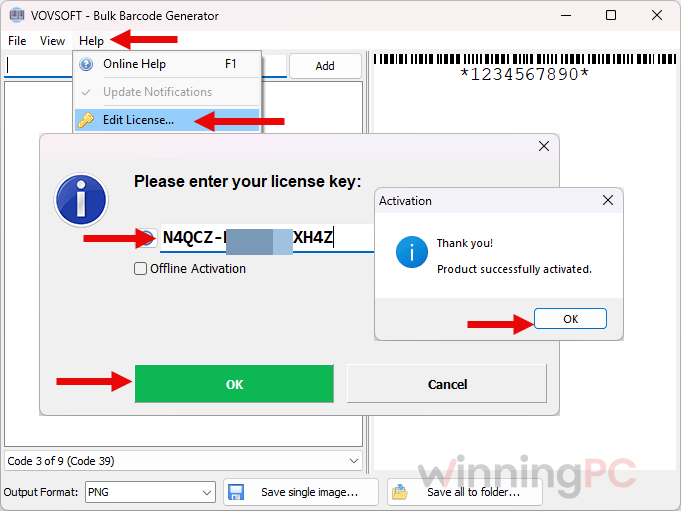
That’s it, the license is yours for life.
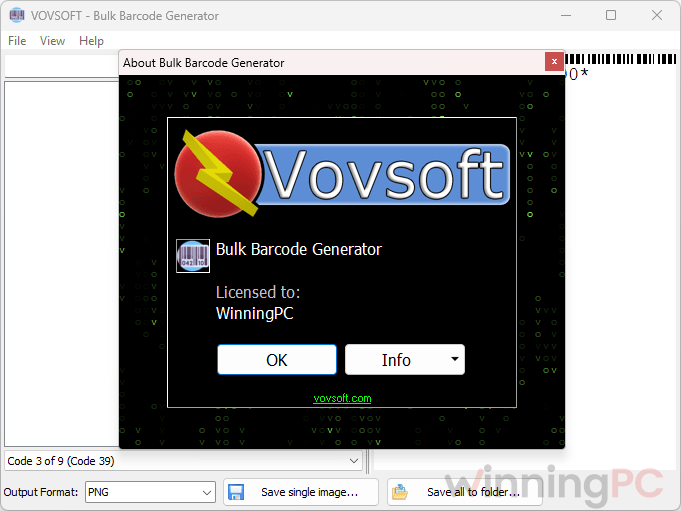
Can you trust this free barcode generator key?
Yes. The key comes straight from Vovsoft, and you install the publisher’s own build, not a repackaged copy.
No crack or keygen
You activate the official program with a genuine license code. Nothing is patched. Skip the “full version” download threads on forums, which is where cracked copies of this tool actually circulate.
Official source
The giveaway is run by Vovsoft itself, and the paid upgrade is sold through Vovsoft’s official store, not a key reseller.
Your data stays on your PC
All barcode generation happens offline, and Vovsoft says no barcode information is ever sent to the internet. That matters if your list holds SKUs, serial numbers or internal asset IDs.
Secure checkout
If you buy the paid license, payment runs on Vovsoft’s encrypted store. Your card details never touch WinningPC.
Vovsoft Bulk Barcode Generator Review & Features
Vovsoft Bulk Barcode Generator keeps the workflow about as short as it gets. Load a text file, pick an output folder, and the app writes out one image per entry while you do something else. Where it really earns its place is coverage: alongside the obvious retail codes, it handles postal formats, pharmacy codes and GS1 composite symbols that most free web generators simply don’t offer.
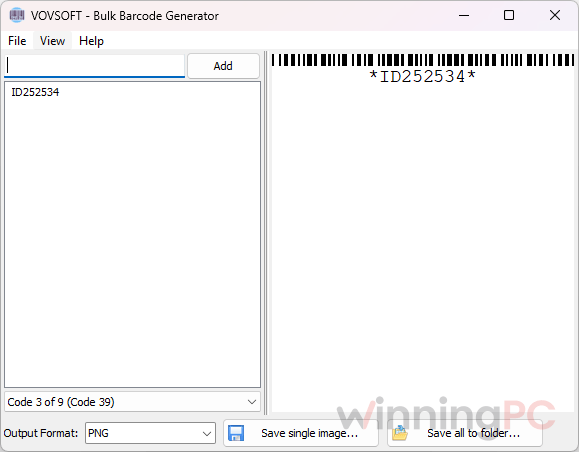
The trade-off is that it’s a barcode image factory, not a label designer. Vovsoft’s description says nothing about sizing, colors or page layouts, so expect to drop the images into Word, Excel or your label software afterwards. For a batch of a few hundred codes, that’s a perfectly reasonable deal.
Key features
- Batch generation from a text file: turn a whole list into barcodes in one go instead of creating them one by one.
- 85 barcode types: retail (EAN-13, UPC-A, ISBN), logistics (GS1-128, ITF-14, Code 128), 2D (QR Code, Data Matrix, PDF417, Aztec) and postal codes for USPS, Royal Mail, Australia Post and Japan Post.
- Fully offline: no account, no upload, no internet connection needed to generate anything.
- Portable edition: run it from a USB stick on any Windows PC without installing it.
What we think
Frequently Asked Questions
Can I use the free license for my shop or business?
No. The giveaway license is for non-commercial use only. If you’re printing labels for products you sell, buy the paid license, which costs $9.50 with code BLACK***AY2026.
Does Vovsoft Bulk Barcode Generator create QR codes and EAN-13 or UPC barcodes?
Yes. QR Code, Micro QR, EAN-13, UPC-A and UPC-E are all among the 85 supported types, along with Code 128, Code 39 and Data Matrix.
I read that it only supports Code 39. Is that still true?
Not anymore. The first release in 2022 (version 1.0) only produced Code 39, and some download sites still describe that version. Version 1.1, the one in this giveaway, raised support to 85 barcode types.
Can I import my barcode data from Excel?
Not directly. Vovsoft describes the input as plain text loaded through File > Load. Save the column you need from Excel as a .txt file first, then load that file into the app.
Does Vovsoft Bulk Barcode Generator need an internet connection?
No. Everything runs offline, and no barcode data is sent anywhere, so it works fine on a locked-down or air-gapped PC.
What happens if I install a newer version later?
The giveaway covers version 1.1 with no future upgrades, so a newer build may not recognize your free key. Keep the original installer or the portable copy somewhere safe. If you want updates, the paid license is the way to get them.
System Requirements & Details
| Field | Value |
|---|---|
| Operating system | Windows 11, 10, 8/8.1, 7, Vista, XP (32-bit & 64-bit) |
| Supported input formats | Plain-text data (.txt file via File > Load) |
| Supported output formats | PNG, JPG, GIF, BMP |
| Download size | 3.66 MB (installer), 2.5 MB (portable) |
| Language | English |
| Other requirements | No internet connection needed |