

CBackup Professional Giveaway
CBackup Professional
Powerful Windows backup, sync & clone software to protect your important files.
- Product
- CBackup Professional
- Product website
- cbackup.com
- License
- 6-month Premium Membership
- Platform
- Windows 11/10/8.1/8/7 and servers
- Installer
- CBackup_Free_GAW.exe
- Updates
- Free updates for six months
- Features
- Full Premium Features
- Speed
- Faster Task Execution
- Support
- Priority Support
- Updated
- 2026-09-11
Continue on apps.cbackup.com
Share to reveal your license code and the official claim page.
The limited-time giveaway!
The free license is no longer available.
Special Discount for WinningPC Readers

AOMEI 2026 Halloween promotion: Up to 80% OFF
Join AOMEI's Halloween Sale 2026 and save up to 80% on popular software and the new Family Bundle. Protect, manage, and recover your valuable data for less. The event ends on Nov 15th, 2026!

AOMEI Backupper Pro (Lifetime Upgrades / 1 PC)
One-time fee, lifetime use and upgrades
AOMEI Backupper Workstation (Lifetime Upgrades / 1 PC)
One-time payment, lifetime use and upgrades

AOMEI Backupper Server (Lifetime Upgrades / 1 Server)
One-time payment, lifetime upgrades
AOMEI Backupper Technician Plus + Lifetime Upgrades
One-time payment, lifetime use and upgrades | Unlimited PCs & Servers
Is the CBackup Professional giveaway safe and legit?
Yes. This is a genuine offer run by the developer through the official CBackup website. A few things worth knowing before you register:
No crack or keygen involved
You receive a genuine license key from the publisher directly. The installer comes from cbackup.com – nothing is patched, repackaged, or sourced from a third party.
Official publisher giveaway
AOMEI Technology runs this promotion through their own site. Your registration goes to the developer, not a grey-market key reseller.
Secure HTTPS checkout for paid plans
If you upgrade to a paid license later, payment happens on the publisher’s encrypted store. Your card details never pass through WinningPC.
90-day money-back guarantee on paid plans
The giveaway key is free, so there’s no financial risk in claiming it. Paid licenses are fully refundable within 90 days.
How to get the CBackup License Key for free?
- Download the CBackup Professional installer from cbackup.com or download link above.
- Run the installer and complete the setup process on your Windows PC or server.
- Launch CBackup Professional and navigate to the activation or license menu.
- Enter the license key delivered to your email to activate your 6-month Premium Membership.


Hands-on with CBackup Professional
CBackup Professional covers three jobs that most rival tools handle separately: local backup and recovery, file synchronization, and disk cloning. The local backup side is solid – incremental and differential modes keep storage use manageable after the initial full image, and event-triggered backup (user logon, shutdown, USB plug-in) means protection runs without manual input. Where it genuinely earns its place is cloud-to-cloud backup: you connect Google Drive, OneDrive, Dropbox, or other accounts and schedule backups between them with no local download or upload involved.

That kind of direct cloud-to-cloud transfer is uncommon at this price point and genuinely useful for anyone who relies heavily on cloud storage. The five sync modes – basic, mirror, real-time, two-way, and scheduled – cover everything from simple folder mirroring to setups where both source and destination need to stay in sync. The main limitation: the cloud backup features require you to bring your own cloud accounts. CBackup itself provides no built-in storage, so the usable capacity depends entirely on what you already have.
Key features
- Cloud-to-Cloud Sync & Backup: Securely transfer files directly between trusted cloud services (like Google Drive, Dropbox, and OneDrive) without downloading or uploading files manually.
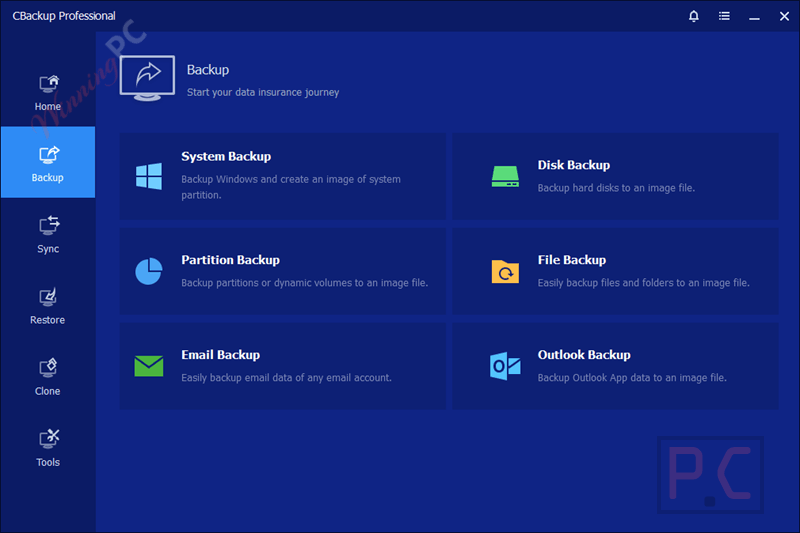
- Full backup modes: System image, disk, partition, and file/folder backup with incremental, differential, and scheduled options to minimize storage footprint.
- Storage Combination: Merge multiple free and paid cloud storage accounts into a single, unified backup space to maximize your available capacity at no extra cost.
- Complete System Backup: Create complete image backups of your entire system, specific disks, partitions, or selected files for fast recovery during emergencies.
- Disk Clone & OS Migration: Transfer your live operating system from an older HDD to a faster SSD without needing to reinstall Windows, keeping the cloned OS fully bootable.
- Advanced Data Security: Protects your data using 256-bit AES encryption during data transfer and complies with GDPR standards to ensure privacy.
- System, Disk & File Backup: Flexible backup options for entire system, selected disks, or individual files.
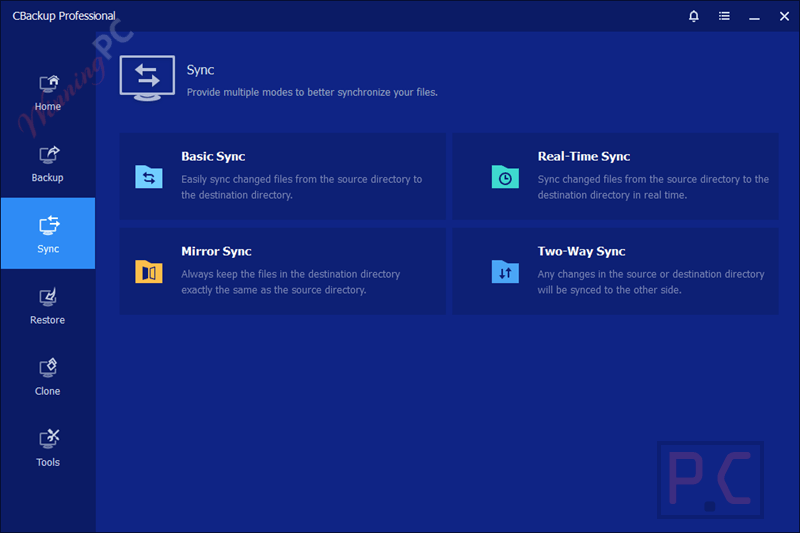
- Five sync modes: Basic, mirror, real-time, two-way, and scheduled, covering mirroring, collaborative setups, and instant change detection.
- Outlook & Email Backup: Backup and restore Outlook emails securely.
- Fast Backup & Restore: High-speed backup and recovery to save time.
- Smart File Filters: Include or exclude specific file types or folders for precise backups.
- Event-triggered and USB plug-in backup: Automatic protection when specific system events occur or when a USB device is connected.
pros & cons
More CBackup Professional screenshots!
Common questions about CBackup Professional
Is it safe to link my cloud accounts to CBackup?
Yes. CBackup uses OAuth authorization, meaning the software never saves your cloud login credentials. Your data transfers are also secured using 256-bit AES encryption.
Can I merge cloud storage from different providers?
Yes. You can combine free space from providers like Google Drive, Dropbox, and OneDrive to create a single, larger backup pool.
How can I get the CBackup Professional license key for free legally?
WinningPC is the safest partner for legal software giveaways. We work directly with developers like AOMEI to bring you official, secure, and fully licensed giveaway keys.
What happens when the 180-day license expires?
Once the license expires, the software will revert to the free version. You will lose access to the premium features unless you purchase a lifetime license or a subscription.
System Requirements & Details
| Supported OS | Windows XP–11 + Windows Server 2003–2022 |
| Processor | 500 MHz x86 or compatible CPU |
| RAM | 256 MB minimum |
| Disk Space | 300 MB for installation |
| Optical drive | Optional – DVD/CD-RW for bootable rescue media (USB stick also supported) |
| Supported File Systems | FAT16, FAT32, NTFS, ReFS, Ext2, ExFAT |
| Supported Storage Devices | Drive interfaces: IDE, SATA, SCSI, SSD, USB external disks RAID: Supported (Redundant Array of Independent Disks) NAS: Supported (Network Attached Storage) Disk standards: MBR and GPT Firmware: UEFI startup process supported |
| Cloud & network | Internet connection: Required for cloud backup and sync features Cloud accounts: Active account(s) required for cloud-to-cloud backup (Google Drive, OneDrive, Dropbox, others) |



Download and install Hasleo Backup Suite FreeV5.6 and never look back. Aomei Backupper just changed its name.
Hasleo Backup Suite Free does NOT backup direct to any cloud providers, a real alternative usually offered as a better giveaway is Ashampoo Backup Pro currently 26 which can backup partitions or files to various cloud providers as a lifetime giveaway license instead of this expiring trial.
How is this software different from Aomei Backupper?
This backs up to cloud providers directly without having to install the cloud client program and have a virtual file system exposed so ransomware can attack it. Aomei Backupper only backs up to discrete enumerable filesystems like local drives and folders or removable drives. that while connected are vulnerable to being encrypted by ransomware or other malware.
This is clearly a rebadged Aomei Backupper – totally the same interface. Wouldn’t touch with a bargepole,