Cathryn Lee

Ironsoftware IronXL is a premier C# Excel Library that gives developers full control over workbooks, formulas, and charts in .NET 10, without requiring Microsoft Office Interop.
Status: ✅ Active & Verified
Last Checked: September 2026
Offer: 15% Off

IronXL Lite License
5% off coupon code: regular price $799, discounted price $759.05
IronXL Plus License
5% off coupon code: regular price $1,199, discounted price $1,139.05
IronXL Professional License
10% off coupon code: regular price $2,399, discounted price $2,159.10
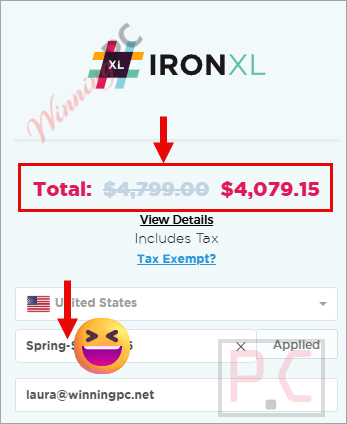
IronXL Unlimited License
15% off coupon code: regular price $4,799, discounted price $4,079.15
📄 Licensing & Support Details
- Perpetual license (no recurring fees)
- 1-year Premium Support & Updates
- 30-day money-back guarantee
- Email support
📝 How to apply
- By clicking the “Coupon Code” button above, you will be taken to IronXL’s official checkout.
- Option for a lifetime license matching your needs, such as Lite, Plus, Pro, or Unlimited, and hit the “Buy License” button.
- After pasting the code into the relevant field, the discount will be active and the final price lowered.
What is IronXL?
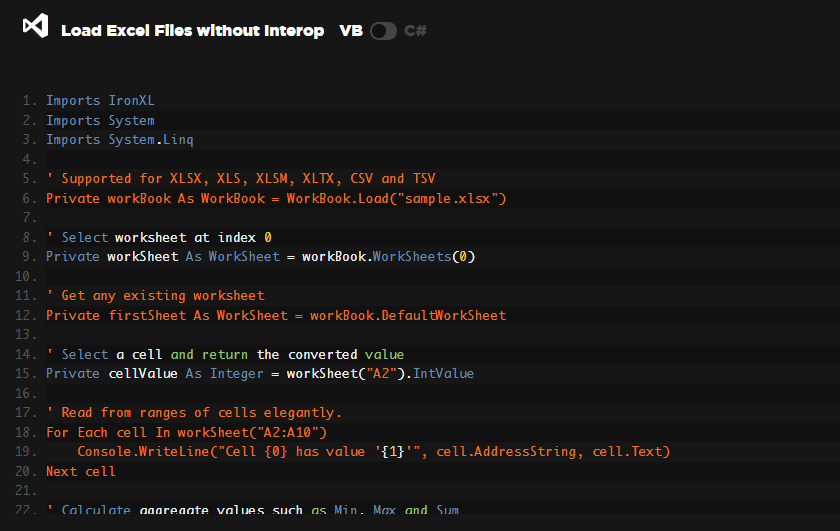
IronXL is the leading C# Excel library tailored specifically for developers who need to generate, read, and edit Excel documents in .NET environments. It is built to prioritize accuracy, ease of use, and speed. Whether you are building Web apps (Blazor/WebForms), Desktop applications (WPF/MAUI), or Console libraries, IronXL provides a user-friendly API that allows you to add robust spreadsheet functionality in minutes, completely bypassing the notoriously frustrating Microsoft Office Interop.
In-Depth Review & Features
In my experience testing .NET libraries, finding one that handles Excel files gracefully without requiring an Office installation on the server is a game-changer. Here is what I found when diving into IronXL’s feature set:
- Flawless Creation and Data Manipulation: I was immediately impressed by how easily I could design spreadsheets from scratch. Using simple standard Excel cell notation (like “A1:B10”), I could add rows, group columns, and set workbook metadata. Working with data is equally powerful. The library natively supports over 165 formulas. I could edit existing formulas, retrieve their dynamic results, and seamlessly use math functions like Average, Sum, Min, and Max.
- Advanced Editing and Formatting: IronXL goes far beyond basic text input. During my testing, I could visually enhance the data by adding and extracting images, creating informative charts (column, scatter, line, pie, bar, area), and editing the layout with freeze panes and autosized columns. The granular styling is fantastic, I had full programmatic control over custom cell fonts, borders, background patterns, and conditional formatting.
- Seamless Exporting and Security: One of my favorite features is the built-in conversion between Worksheets and DataTable/DataSet objects, making database integration incredibly smooth. Exporting is versatile; I could easily save files as CSV, XML, XLSX, TSV, and JSON. For security, IronXL didn’t disappoint. I was able to effortlessly add passwords to encrypt entire workbooks or lock down specific worksheets to read-only mode.
Pros & Cons
Frequently Asked Questions
Where can I find the best coupon code for IronXL?
WinningPC is currently the best place to find the verified coupon code for this product, offering the highest discount rate on the market. Our links ensure the code is applied safely.
Can IronXL read, create, and edit Excel files without Microsoft Office installed?
Yes! IronXL is designed to work completely independently of Microsoft Office and does not require Excel Interop.
What file formats does IronXL support in its API?
It natively supports opening, saving, and exporting to XLS, XLSX, XLSM, CSV, TSV, JSON, XML, and HTML formats.
Is it possible to integrate IronXL directly with databases?
Yes! There is built-in conversion that allows you to import and export between Worksheets and DataTable/DataSet objects.
Does IronXL support cross-platform development?
Yes! It is fully cross-platform, supporting .NET Core, Standard, and Framework across Windows, Linux, macOS, Docker, AWS, and Azure.
Can I manipulate ranges of cells efficiently?
Yes! It supports fast bulk editing using standard Excel cell notation (e.g., “A1:B10”) and allows for operations like sorting, trimming, grouping, merging, and copying cells.
Does IronXL support adding and editing formulas?
Yes! Formulas can be added, modified, and recalculated dynamically. It currently supports over 165 different formulas.
Can I protect sensitive data within my spreadsheets?
Yes! You can open, edit, and save password-protected spreadsheets, encrypt entire workbooks, or set individual worksheets to read-only.
Am I able to add visual elements like charts and images?
Yes! You can add, remove, and extract images, as well as create and edit various charts, including column, scatter, line, pie, bar, and area graphs.
Technical Specifications
| .NET Versions | .NET 10, 9, 8, 7, 6, 5; .NET Core (3.1+); .NET Standard (2.0+); .NET Framework (4.6.2+) |
| Languages | C#, VB.NET, F# |
| OS & Processors | Windows (x64, x86), Mac (x64, ARM), Linux (x64) |
| App Environments | Windows (10+, Server 2016+), Linux (Ubuntu, Debian, CentOS), Mac (macOS 10+), Docker (Windows, Linux, Azure), Azure (VPS, WebApp, Function), AWS (EC2, Lambda) |
| .NET Project Types | Web (Blazor & WebForms), Desktop (WPF & MAUI), Console (App & Library) |
| Supported IDEs | Microsoft Visual Studio, Jetbrains ReSharper & Rider |
| Security | DigiCert Signed Binaries |