On this page
HotXLS Component Coupons & Pricing
HotXLS Single License (1 Developer)
Full Object Pascal source code for Delphi, C++Builder and Lazarus/Free Pascal. Core feature set, perpetual royalty-free license, 1 year of updates and email support.
HotXLS Small Business License (Up to 5 Developers)
Full source code for up to 5 developers in one company. Adds the compiled report engine, workbook comparison and import validation. 1 year of updates and email support.
HotXLS Enterprise License (Unlimited Developers)
Full source code for every developer in one company. Adds XLSX signing, PDF/A and tagged PDF, live data refresh, high-volume streaming and priority support. Internal test suite source on request.
How to Use the HotXLS Component Coupon Code
Choose your tier and open losLab’s official HotXLS purchase page above.
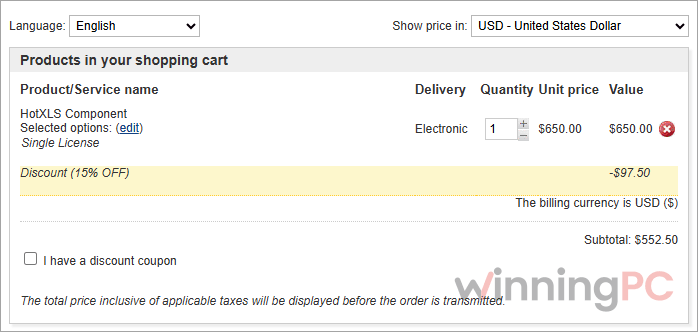
Paste the losLab discount code into the coupon field at checkout and check that the HotXLS total drops by 15% before you pay.
Pay by card, PayPal, wire transfer or AliPay (where supported). The download link arrives right after payment.
HotXLS Component Review & Features
HotXLS covers a lot of ground, and its biggest strength is format coverage. Besides XLS and XLSX, it reads and writes XLSB and ODS, so a binary workbook from a finance team or an .ods file from a LibreOffice user won’t break your import. The formula engine also supports newer Excel functions, so formulas built in recent Excel versions still calculate correctly on a server without Excel. The trade-off is a learning curve: XLS and XLSX use two separate APIs (lxHandle and lxHandleX), and the documentation spans 1,402 topics. This assessment is based on losLab’s documentation, not our own production testing.
Key features
- No Excel, no COM: reads, writes and calculates workbooks inside your process, so it runs fine in Windows services, scheduled jobs and on machines without Office.
- Modern formula engine: dynamic arrays with spill ranges, LAMBDA with closures, LET, regular-expression functions, GROUPBY and PIVOTBY, plus your own functions through the OnUserFunction callback.
- Native PivotTables: compact, tabular and outline layouts, all eleven subtotal functions, calculated fields, Top/Bottom value filters, slicers and timelines.
- Rendering and export: worksheets to PDF, SVG and PNG with print areas, repeated titles and page breaks, plus HTML, RTF, CSV and TSV helpers and TGridToXLS / TDataToXLS for DBGrid and dataset export.
- Safe round-trips: targeted edits keep comments, threaded replies, tables, drawings, conditional formatting and VBA payloads intact (macros are preserved, not executed).
What we liked, what we didn’t
Which HotXLS License Should You Buy?
| License | Developers | Regular | With WINPC | Yearly renewal (list) | What the tier adds |
|---|---|---|---|---|---|
| Single | 1 | $650 | $552.50 | $325 | Core features, full source |
| Small Business | Up to 5 (1 company) | $1,950 | $1,657.50 | $975 | Report engine, workbook compare, import validation |
| Enterprise | Unlimited (1 company) | $6,500 | $5,525 | $3,250 | XLSX signing, PDF/A, live refresh, streaming, priority support, test suite source on request |
Frequently Asked Questions
Does HotXLS need Microsoft Excel installed?
No. HotXLS reads, calculates, edits and saves workbooks inside your application’s own process, with no Excel and no Office COM automation.
Is HotXLS a subscription?
No, it’s a one-time perpetual license. Each new license includes one year of updates and email support, and the version you bought keeps working after that.
Is the full source code included?
Yes, every HotXLS license includes the complete Object Pascal source code for its tier.
How many developers can use one license?
Single covers one developer, Small Business covers up to five developers in one company, and Enterprise covers every developer in one company with no headcount limit. Applications you build can be distributed royalty-free within that scope.
Does HotXLS run on Linux or macOS?
Yes, through the optional Free Pascal portable workbook core (LX_PORTABLE_CORE). It builds natively on Linux x64/ARM64 and macOS x64/ARM64 (macOS 11 or later). The Windows UI components, like the DBGrid exporters, aren’t part of that core.
Can HotXLS run VBA macros?
No. It preserves supported VBA payloads when you edit a workbook, so macros survive the round trip, but it doesn’t execute them.
Can HotXLS convert Excel to PDF?
Yes, every tier can render worksheets to PDF, SVG and PNG. PDF/A-1/2/3, tagged accessible PDF and digitally signed or certified PDFs need the Enterprise license.
Requirements & Supported Formats
| IDEs | Delphi XE5 to Delphi 13 Florence; C++Builder XE5 to C++Builder 13 Florence; Free Pascal 3.2.2 + Lazarus |
| Operating system / targets | Windows Win32 and Win64; Windows ARM64 with Free Pascal 3.3.1; Linux x64/ARM64 and macOS x64/ARM64 (macOS 11+) via the portable Free Pascal core |
| Processor / RAM / disk | Not specified |
| Supported input formats | XLS (Excel 97–2003 BIFF8), XLSX, XLSB, ODS (encrypted XLSX input varies by format and platform) |
| Supported output formats | XLS, XLSX, XLSB, ODS, PDF, SVG, PNG, HTML, RTF, CSV, TSV; PDF/A-1/2/3 and tagged PDF with Enterprise |
| Other requirements | No Microsoft Excel or Office needed; no separate zlib DLL under Free Pascal; DevExpress cxGrid export needs the optional integration unit |