Cathryn Lee
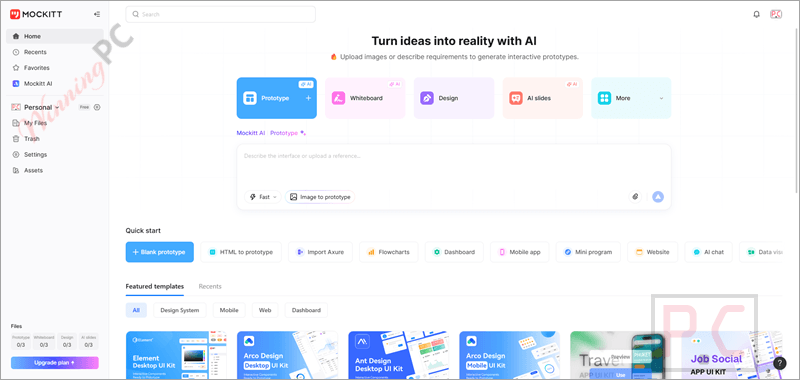
Mockitt unifies AI Prototyping, UI Design, and Whiteboarding in one seamless workspace. If you’ve ever felt the pain of paying for a whiteboard tool, a prototyping tool, and a presentation generator separately, you know how quickly those subscription costs compound.
Status: ✅ Active & Verified
Last Checked: October 2026
Offer: 70% Off
For Pro:

Mockitt Pro Month Subscription
50% discount coupon code: regular price $16, discounted price $8
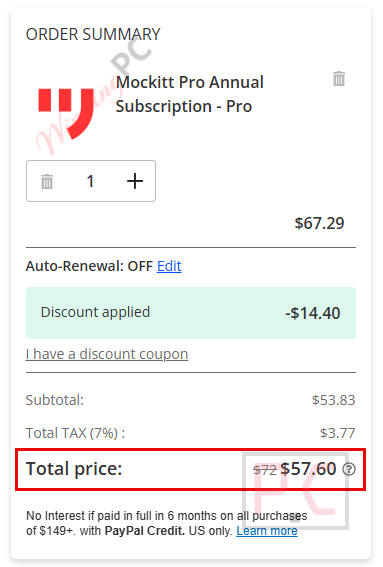
Mockitt Pro Annual Subscription
70% discount: regular price $192, discounted price $57.60
Mockitt Pro Lifetime Plan
20% coupon: regular price $299, discounted price $239.20
For Enterprise:
Mockitt Enterprise Annual Subscription
20% discount: regular price $480, discounted price $384.00
For Team:
Mockitt Team Annual Subscription
20% coupon code: regular price $288, discounted price $230.40
📄 Licensing & Support Details
- Pro plan: Offered for individuals, with 1 editor seat and 100 files.
- Team plan: Built for small teams with 3 workspaces and up to 10 seats.
- Enterprise plan: Designed for organizations, includes unlimited workspaces, collaborators, and files.
- Support details: The Enterprise plan includes dedicated support. The site also lists support@mockitt.com for support and bd@mockitt.com for business inquiries, along with a Help Center and a Contact Sales option.
📝 How to apply
- To secure the pricing, simply click the “Coupon Code” button above.
- The discount is hard-coded into our exclusive link, so it will be automatically applied at checkout without you having to hunt for a string of text.
What is Mockitt?
Mockitt is an AI-native product design platform built to stop you from switching between different apps. It serves as an all-in-one workspace where you can handle everything from initial whiteboarding and AI-generated slides (AIPPT) to high-fidelity UI/UX design and developer handoff. It is designed specifically for product teams, designers, and developers who need a seamless transition from a sketched idea to pixel-perfect code.
In-Depth Review & Features
In my time testing Mockitt, I found the learning curve to be impressively shallow compared to industry heavyweights. Here is what stands out:
- Rapid Prototyping: I was able to drag and drop components from a massive library of built-in widgets and icons.
- Interaction Design: You can create “links” between screens easily. I found that simple gestures like “swiping” or “tapping” can be simulated perfectly for mobile app demos.
- Cloud Collaboration: My favorite part is the real-time sync. You can share a QR code or a URL with stakeholders, and they can view the prototype on their own devices instantly.
- Developer Handoff: It automates the “spec” process. It provides CSS and asset data, which significantly cuts down on back-and-forth emails with the dev team.
Pros & Cons
More Mockitt screenshots


Frequently Asked Questions
Can I import my existing design projects from other tools?
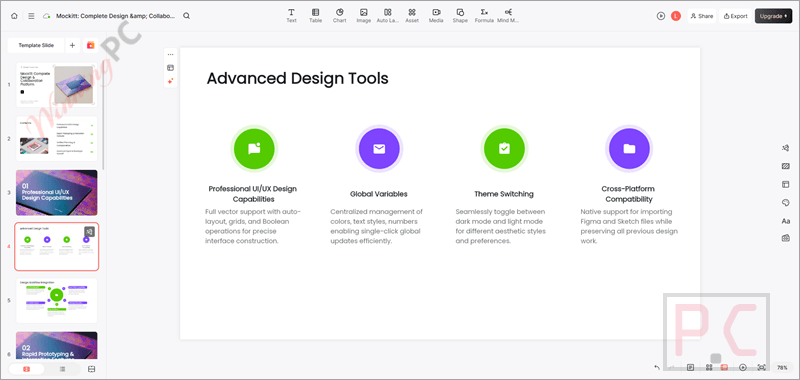
Yes! Mockitt is highly compatible with industry standards. You can import files from Sketch, Figma, and Axure for rapid slicing, annotation, and continued editing.
How does the AI Slide (AIPPT) generator work?
You can import documents like Word, PDF, TXT, or Markdown. The AI automatically parses the heading levels and content logic to generate a complete PowerPoint presentation with matching templates, layouts, and high-definition images.
Can developers use Mockitt?
Absolutely. Mockitt Design features a developer mode where code, styles, and dimensions are visible. It supports one-click exports directly to mainstream front-end frameworks like Vue and HarmonyOS.
Does it have project management features?
Yes, the Mockitt Whiteboard includes Jira-style task tracking, Board Views, Kanban Boards, and Gantt charts to keep your team’s progress synchronized alongside your designs.
Can I create complex flowcharts with Mockitt?
Yes, MockittDiagram allows you to use AI or drag-and-drop tools to create over 10 chart types, including Flowcharts, UML diagrams, ER diagrams, Sequence diagrams, and BPMN.
Can I present my prototypes if I don’t have internet access?
While the design space is cloud-based, Mockitt supports exporting “offline packages.” This ensures you can seamlessly present your prototypes on devices even in environments without an active internet connection.
Where can I find the best coupon code for Mockitt?
WinningPC is currently the best place to find the verified coupon code (70% off) for this product, offering the highest discount rate on the market.
Technical Specifications
| Supported Platforms | Completely browser-based; supports Windows, macOS, Linux, and Web. |
| File Imports | Word, PDF, TXT, Markdown (for AI Slides); Figma, Sketch, Axure, HTML, Images (for Prototyping). |
| Export Formats | PNG, VISIO, PDF, SVG (Diagrams); Offline presentation packages; Vue and HarmonyOS code snippets. |
| Asset Library | 110,000+ AI-ready components, 40+ real device skins (iOS/Android), hundreds of chart types. |
| File Imports Supported | Sketch files, Figma files. |
| Generated Outputs | Multi-page prototypes, multi-stack code, PPTs, PRDs, Business Plans. |