Chris Bruner

iScanner is a powerful mobile scanning and document management application that transforms your smartphone into a portable, AI-driven scanner. It instantly digitizes, edits, and organizes everything from receipts to contracts, allowing you to handle professional paperwork anywhere.
- Discount Status: ✅ Active & Verified
- Last checked: October 2026
- Offer: 84% Off Lifetime Licenses
- Code: Ta**20

30% Off StackSocial Sitewide Coupon Code
Unlock 30% savings on apps and software with this StackSocial coupon code. Copy, apply, and enjoy a better deal at checkout.
iScanner App: Lifetime Subscription
Lifetime access | 200 MB of cloud storage | 30-day money-back guarantee
📄 Licensing & Support Details
- License Type: Lifetime subscription
- Support & Access: Includes 200 MB of cloud storage for file syncing. Accessible on iPhone, iPad, and Android devices.
- Guarantee: 30-day return policy for store credit on unredeemed licenses.
- Regional Restrictions: Not available in Argentina, Venezuela, Spain, Italy, Mexico, Russia, Chile, Ecuador, and Japan.
📝 How to apply
Click the “Copy code” button, then proceed to checkout. Please review your items and the total before placing your order.

What is the iScanner App?
Trusted by over 125 million users globally, this US-based platform replaces heavy desktop scanners with a fast, mobile-first approach. iScanner App is explicitly designed for remote workers, educators, students, realtors, and small business owners who need to manage workflows without relying on bulky office equipment. Beyond basic image capture, it utilizes in-house artificial intelligence to clean up visual distortions, recognize text across multiple languages, and sync your paperwork seamlessly across mobile platforms and the web.

In-Depth Review & Features
- AI Scan Enhancement: Automatically detects document borders, straightens pages, and removes curves or skews.
- Text Recognition (OCR): Extracts and recognizes text from scans in over 20 languages.
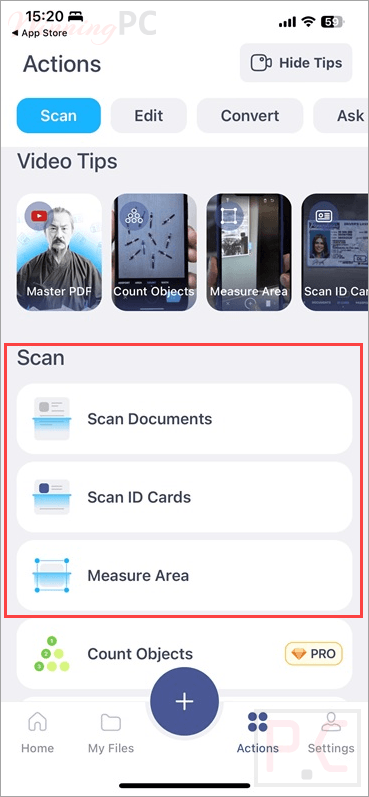
- Specialized Scanning Modes: Dedicated modes for ID cards, passports, and QR codes.
- Math & Measurement Tools: Solves math equations, counts similar objects via the camera, measures object lengths, and calculates surface areas for 3D room plans.
- PDF Editing & Markups: Apply color correction, remove noise, cover/blur confidential text, and autofill custom templates.
- E-Signatures: Sign documents manually on your screen or insert a saved signature from an image.
- File Organization: Merge or split files, add page numbers, insert footers, and apply watermarks.
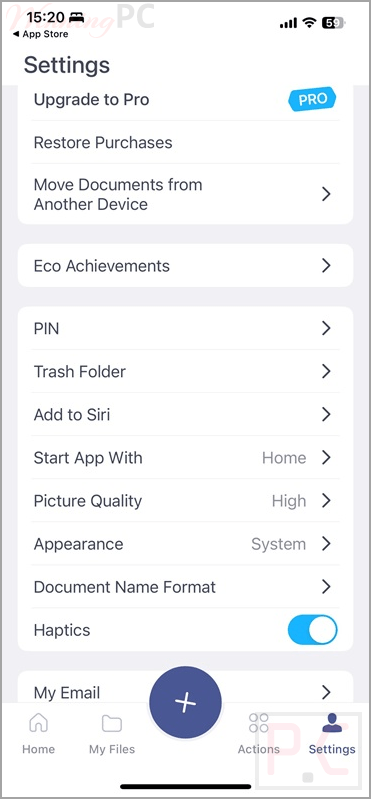
- Security: Lock specific folders and sensitive files with a PIN.
Pros & Cons
More screenshots:
Frequently Asked Questions
Where can I find a coupon code or deal for iScanner App?
The latest and best deals can be found on WinningPC, alongside the official software website or the developer’s social media channels.
What is the best discount currently available for iScanner App?
The best current discount is 90% OFF, available directly on WinningPC.
Can I use this app to measure physical spaces?
Yes, the app features an “Area” mode that lets you measure object length, calculate surface area, and even create 3D room plans using your device’s camera.
Will my scanned documents sync to my new phone if I upgrade?
Yes. By using the “My Files” feature, you can sync your files across all your devices, allowing you to access your documents even if you lose your device or switch to a new one.
System Requirements & Details
| Feature | Specifications |
|---|---|
| Language Support | 20+ languages (for text recognition). |
| Operating System | iOS 16.0 or later; iPadOS 16.0 or later; Android 10 or later. |
| RAM & Storage | 200 MB Cloud storage included. |
| Supported Input | Physical documents, IDs, handwritten notes, QR codes, camera feed (for counting/measuring). |
| Supported Output | PDF, JPG, DOС, XLS, PPT, TXT. |