Epubor Kobo Mate allows you to download your purchased Kobo eBooks and audiobooks directly as EPUB or MP3 files. It bypasses the need for an emulator, ensuring you can read or listen to your digital library on any device or platform.
Epubor Kobo Mate for Win/Mac - 1 Year License
1 PC / 1 Year | 1-Year free upgrades
Epubor Kobo Mate for Win/Mac - 5 Year License
1 PC / 5 Years | 5-Year free upgrades
Epubor Kobo Mate for Win/Mac - Family License
2-5 PCs / 5 Years | 5-Year free upgrades
You may also like
BookFab Kindle + Kobo Converter
25% off coupon code: regular price $213.99, discounted price $159.99

BookFab All-In-One (Lifetime) + Amazon Gift Card
The complete digital reading solution for eBooks, manga, and magazines from Kindle, Audible, FANZA, and more
BookFab All-In-One for Mac (Lifetime) + Amazon Gift Card
The complete digital reading solution for eBooks, manga, and magazines from Kindle, Audible, FANZA, and more
📄 Licensing & Support Details
- License Types: 1-Year (1 PC), 5-Year (1 PC), and Family (2 to 5 PCs) available for both Windows and Mac.
- Support: Free remote assistance and 6×12 free after-sale service.
- Guarantee: 30-day 100% money-back guarantee.
- Upgrades: Free version upgrades included during your active license period.
📝 How to apply
- Click “Coupon Code” above to visit the Epubor Kobo Mate homepage.
- Click “BUY NOW” and select your license type (1-Year, 5-Year, or Family).
- Paste the code into the “Add promotion code” box to secure your discounted price.
Epubor Kobo Mate: In-Depth Review & Features
Key Features
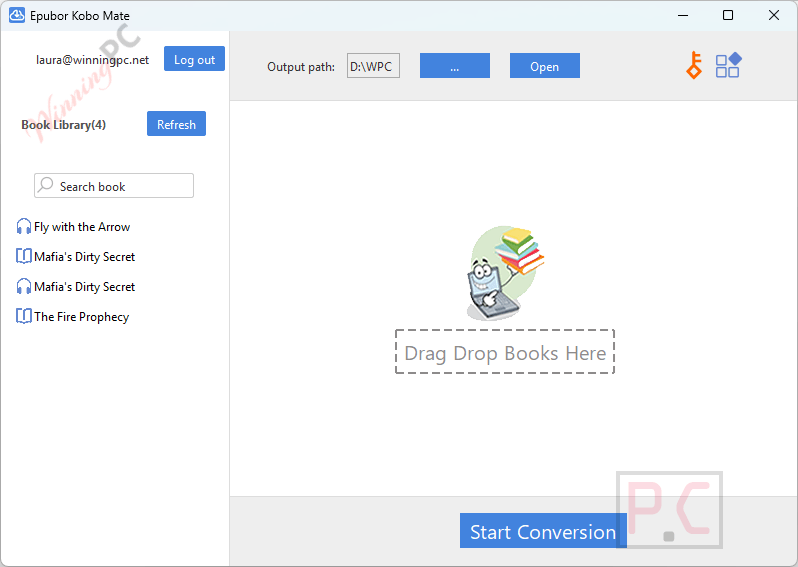
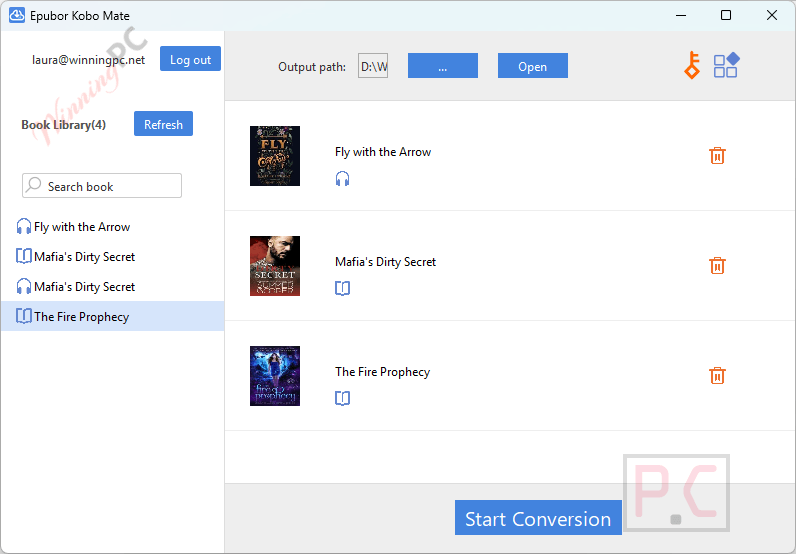
- Automatic library synchronization directly upon logging into your Kobo account.
- Direct retrieval of files without needing to pre-download them via the Kobo desktop app.
- Bulk download capabilities initiated by a single “Start Conversion” click.
- Rapid local processing speeds for fast backups.
- Strict preservation of original formatting, metadata, and audio quality.
- Converts Kobo purchases strictly to standard EPUB and MP3 formats.
Pros & Cons
More Epubor Kobo Mate screenshots!
Frequently Asked Questions
Where is the best place to find valid promo codes for Epubor Kobo Mate?
While official sales happen occasionally, you can always check WinningPC for the most up-to-date and verified deals to save money on your purchase.
What is the biggest price drop currently active for this Kobo downloader?
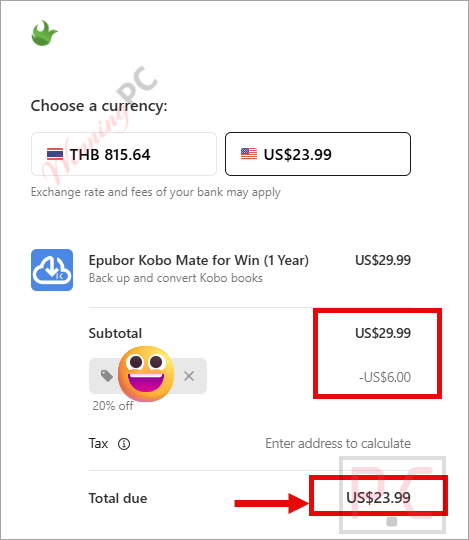
Right now, shoppers can claim a 20% OFF discount exclusively through WinningPC, bringing the 1-Year license down to just $23.99.
What file formats will my books and audiobooks be saved as?
Your purchased Kobo eBooks will be downloaded as standard EPUB files, and your audiobooks will be saved as MP3s.
Do I need to download my books in the Kobo app first?
No. Once you log in, the tool automatically fetches and displays your entire library without needing the official Kobo application.
Does the conversion process compress or lower the audio quality of my audiobooks?
No, the software maintains the original audio quality, as well as the original metadata and formatting for text-based eBooks.
Can I download multiple books at the same time?
Yes, you can add multiple eBooks and audiobooks to the right panel and initiate a bulk download with one click.
System Requirements & Details
| Feature | Specifications |
|---|---|
| Language Support | English |
| Operating System | Windows 10, 11; Mac OS X 13 and later |
| Supported Input | Purchased Kobo eBooks and Kobo audiobooks |
| Supported Output | EPUB for eBooks, MP3 for audiobooks |