
Abex Word to All Converter Coupons & Pricing
Abex Word to All Converter
Single-user license | Free technical support and a lifetime free upgrade.
How to Use the Abex Word to All Converter Coupon Code
- Copy the WinningPC coupon code
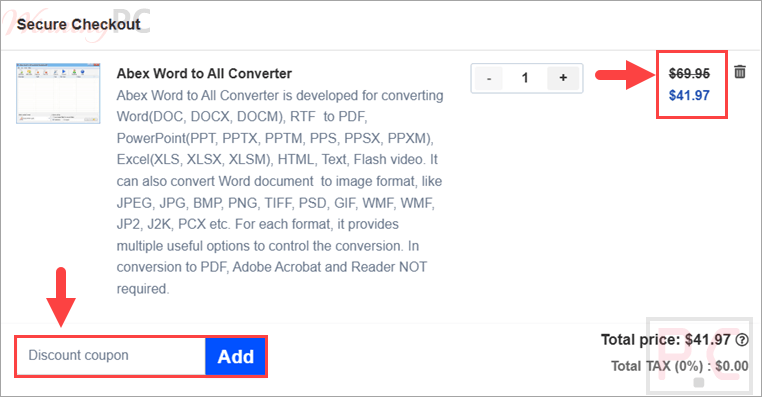
WIN***GPC40. - Open the official Abexsoft page for Abex Word to All Converter and select the purchase option.
- Choose the single-user license with a regular price of $69.95.
- Enter
WIN***GPC40in the coupon or promotional-code field during checkout. - Confirm that the price changes to $41.97 before submitting payment.
- Complete the order using a valid email address so Abexsoft can deliver the registration information.
- Download and install the software, open its Help menu, select Register, and paste the supplied name and license code without extra spaces.
Is the Abex Word to All Converter Safe and Legit?
Yes. This coupon is intended for a normal license purchased through Abexsoft’s official ordering process, not a modified installer or grey-market activation key.
No crack or keygen
You install Abexsoft’s own build and activate it with the registration details supplied after purchase.
Official purchasing route
The order is completed through the publisher’s store rather than an unofficial key reseller.
Protected checkout
Abexsoft states that its ordering partner uses a secure connection to protect payment and customer information.
30-day refund period
The supplied offer includes a 30-day money-back window, giving buyers time to check whether the converter meets their needs.
Abex Word to All Converter Review & Features
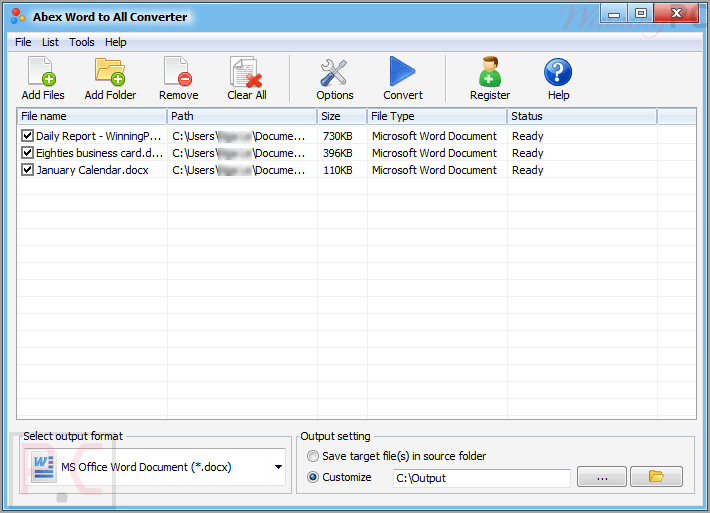
Abex Word to All Converter is a Windows document conversion utility for users who need to turn Word and RTF files into PDF, Office formats, web pages, text, Flash/SWF video, or image files. It is best suited to office admins, students, and anyone handling batches of DOC/DOCX/RTF files who wants a single desktop tool instead of several separate converters.
Key features
- Converts DOC, DOCX, DOCM, and RTF to PDF, Excel, PowerPoint, HTML, TXT, SWF, and image formats.
- Supports batch conversion, folder/subfolder import, and drag-and-drop document loading.
- Converts multipage Word/RTF files into multipage PowerPoint or TIFF output.
- Provides PDF password encryption and permissions for printing, copying, and modification restrictions.
- Offers output controls for image quality, color depth, size, PowerPoint slide size, paper orientation, and SWF width/height/frame rate.
What we think
Screenshots
Frequently Asked Questions
What is the latest Abex Word to All Converter coupon code?
The latest coupon code is WIN***GPC40, which gives 40% off. It lowers the Single-user license from $69.95 to $41.97 when applied at checkout. Copy the code from WinningPC and confirm the discount appears before payment.
Is the Abex Word to All Converter coupon legit and safe?
Yes, the coupon is presented as an official Abexsoft Software discount code for the paid Single-user license. Abexsoft uses RegNow as its e-commerce partner, and the order process is protected by a secure connection for payment details.
Does Abex Word to All Converter work on Windows 11?
Yes, this software supports Windows 11 according to the provided system requirements. It lists Windows Vista, Windows 7, Windows 8, and Windows 10 support too. Hardware needs are modest: 1GHz processor, 256MB RAM, and 100MB disk space.
What input and output formats does it support?
It accepts DOC, DOCX, DOCM, and RTF as input formats. Output options include PDF, Word, Excel, PowerPoint, RTF, TXT, HTM, SWF, and image formats such as JPEG, PNG, TIFF, GIF, EMF, WMF, PSD, PCX, DCX, JP2, J2K, and ICO.
Can it batch convert Word documents?
Yes, it supports batch conversion for dozens of document files at one time. You can add an entire folder, include subfolders, or drag and drop documents into the app, which makes it more useful for office cleanup than one-file-at-a-time tools.
Does it require Adobe Acrobat or Reader for PDF output?
No, Adobe Acrobat and Adobe Reader are not required for Word/RTF to PDF conversion. That matters if you only need to create PDF files from Word documents and do not want to install Adobe tools just to process everyday office files.
Can it create protected PDF files?
Yes, the software can set a password on created PDF files and restrict actions such as printing, copying, and future modifications. Those controls are useful for internal documents, forms, or handouts where you want PDF distribution but still need basic access limits.
System Requirements & Details
| Feature | Specifications |
|---|---|
| OS Support | Windows Vista, Windows 7/8/10/11 |
| Processor | 1GHz Intel/AMD processor or above |
| RAM | 256MB RAM; 512MB or above recommended |
| Free Hard Disk | 100MB space for installation |
| Supported input formats | DOC, DOCX, DOCM, RTF |
| Supported output | PDF: PDF Excel: XLS, XLSX, XLSM PowerPoint: PPT, PPTX, PPTM, PPS, PPSX, PPSM Web and text: HTM, TXT, SWF Image: JPEG, JPG, BMP, PNG, TIF, GIF, EMF, WMF, PSD, PCX, DCX, JP2, J2K, ICO |