

Coolmuster Word to PDF Converter Giveaway
Coolmuster Word to PDF Converter
Convert Word documents (.docx) to PDF with the layout and content integrity maintained.
- Product
- Word to PDF Converter
- Product website
- coolmuster.com
- License
- 1-Year
- Platform
- Windows 11/10/8/7
- Installer
- cool-word2pdf.exe
- Usage
- Strictly non-commercial usage
- Support
- No support
- Updates
- No future upgrades
- Updated
- 2026-06-19
Continue on coolmuster.com
The publisher handles registration and license delivery on its official website.
This giveaway ended on .
50% Off Lifetime (1 PC)
Coolmuster Word to PDF Converter Discount Codes
Coolmuster Word to PDF Converter For Windows
3 plans · best save 50%
Coolmuster Word to PDF Converter For Mac
1 plan · best save 50%
You may also like

All Products Bundle, Lifetime (Windows)
One-time payment, permanent lifetime license | Free lifetime software upgrades
All Products Bundle, Lifetime (Mac)
One-time payment, permanent lifetime license | Free lifetime software upgrades
How to Get the Word to PDF Converter License Key Free
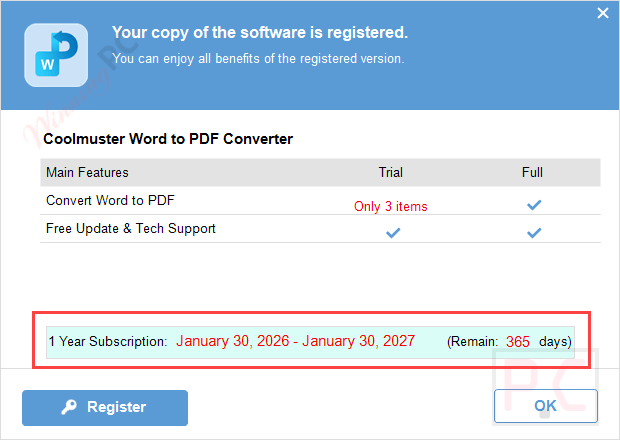
On the Coolmuster Word to PDF Converter giveaway page, please insert your name, email address, and captcha to get a free license code:


Click on the above download link to download and install the software on your computer.

When the installation is done, please register it with your free license code

Got it for 1-year free!
Coolmuster Word to PDF Converter main screenshot!

Add Files

In-Depth Review & Features
Main Features
- Coolmuster Word to PDF Converter can convert Word documents to PDF without hassle. The layout and content integrity will be maintained during the conversion process.
- In order to create individualized PDF files that satisfy your needs, you may also alter the page size, margins, and other variables of your PDF output.
- You can save time by converting multiple Word files to PDF simultaneously. This converter tool efficiently handles batch conversion of docx files to PDF at the same time.
- This tool can convert docx to PDF while protecting sensitive data. You maintain control over the final product, and your documents are kept safe.
Pros & Cons
Frequently Asked Questions
Where can I find the latest Coolmuster Word to PDF Converter coupon codes and deals?
You can check WinningPC for verified discounts, coupon codes, and limited-time promotions. It’s also worth checking the official Coolmuster website for seasonal offers and special sales.
What is the best discount currently available for Coolmuster Word to PDF Converter?
Right now, users can save 50% OFF through the latest deal featured on WinningPC.
What does Coolmuster Word to PDF Converter do?
It converts Word DOCX documents into PDF files while preserving the original formatting, layout, and content.
Does Coolmuster Word to PDF Converter support batch conversion?
Yes. The software can convert multiple Word files to PDF simultaneously, helping save time when working with large numbers of documents.
Will my document formatting remain unchanged after conversion?
Yes. The software is designed to maintain the original layout, text formatting, images, and overall document structure during conversion.
Can I customize the PDF output settings?
Yes. You can adjust settings such as page size, document margins, and the output folder before creating the PDF.
Why choose Coolmuster Word to PDF Converter instead of using Microsoft Word?
While Microsoft Word can save documents as PDFs, Coolmuster offers batch conversion, customizable output settings, and a dedicated workflow for users who frequently convert multiple files.
Does Coolmuster Word to PDF Converter support DOC files?
The product page specifically highlights DOCX to PDF conversion. Users working with older DOC files should verify compatibility with the latest version before purchasing.
System Requirements & Details
| Feature | Specifications |
|---|---|
| Language Support | English, Français, Italian, Spanish, Swedish, and more… |
| Operating System | Windows 11/10/8/7 Mac OS X 10.6 or later |
| CPU/Processor | Win: 1GHz (32 bit or 64 bit) or above Mac: 1GHz Intel or above, M1 |
| Hard Disk Space | 200 MB or more free space |
| RAM | Win: 256 MB or more of RAM (1024MB Recommended) Mac: 512 MB or more |
| Supported Input | DOCX Word file |
| Supported Output |





It only handles .docx files, it does NOT handle .doc word documents. And on the .docx file I just tested it on there were spurious spaces in various words that did NOT appear in the original .docx file.
I got a perfect searchable PDF from same .docx file by opening it in Atlantis word processor giveaway edition and printing it to Nitro PDF reader 5 virtual PDF printer… much better than what this produced!
why would anyone need word to pdf converter , you can open and save in word as pdf format also can print to pdf printer, would be more useful if it is a pdf editor
Creating a useful PDF editor is much harder for a developer than stealing a LGPLv3 open sourced 3rd party command line conversion utility and knocking up a closed source GUI for it and selling it as your own work! This one steals as it does not acknowledge the wkhtmltopdf project or publish a copy of the LGPLv3 license and trying to conceal its true name in the distribution of their renamed wkhtmltopdf.exe in at plugins\Pdf.Creator\1.0.2\h2p.exe