

OnSpace AI Coupons & Pricing
OnSpace AI
6 plans · best save 15%
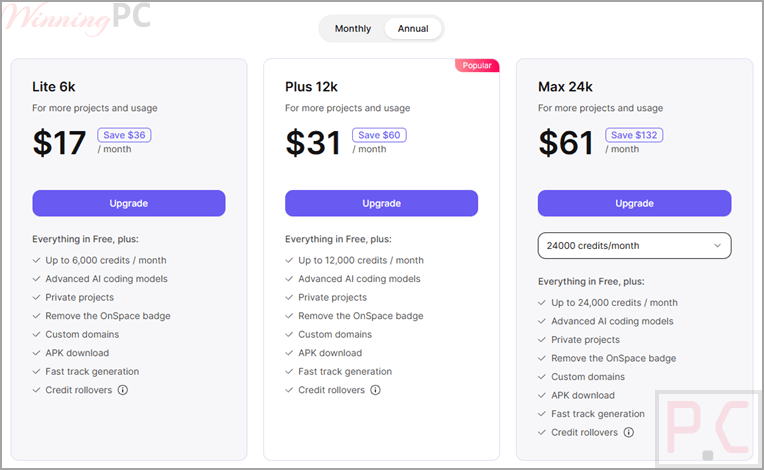
OnSpace AI Lite 6k - Yearly ★ Best Deal
72,000 credits max rollover on a 6,000/month annual plan
Plus 12k - Yearly
144,000 credits max rollover on a 12,000/month annual plan
Max 24k - Yearly
288,000 credits max rollover on a 24,000/month annual plan
How to Use the OnSpace AI Coupon Code
- Click “Buy Now” to open the OnSpace.AI pricing page through the link on this page.
- Sign in to your OnSpace account, or create one for free if you have not yet.
- Switch the billing toggle from OnSpace AI monthly to yearly. This is the step that triggers the saving.
- Pick your credit tier: Lite 6k, Plus 12k, or Max 24k.
- Check the total reads $204.00, $372.00, or $732.00 before you pay. If it still shows the monthly rate multiplied by twelve, the yearly toggle did not register.
- Complete payment. Your credits are available on the account straight away.
Is this OnSpace AI deal safe to use?
Yes. This is OnSpace.AI’s own annual pricing, not a third-party key or a resold licence.
Nothing to redeem
There is no code, no activation file and no download from us. The lower price is simply what the official checkout charges for yearly billing.
You pay OnSpace directly
Payment happens on the publisher’s own encrypted store. Your card details never pass through WinningPC.
A real free tier exists
You can build on the Free plan first and only pay once you know the tool suits you, which is the safest way to test any subscription.
No refund window is published
OnSpace does not state a money-back period, so treat an annual payment as a commitment
OnSpace AI Review & Features
The thing that separates OnSpace AI from most prompt-to-app tools is that it does not stop at the interface. Ask for a car rental app with user login, and it provisions the database tables, the email verification flow, and the user dashboard alongside the screens, using its built-in Spaces backend rather than sending you off to configure Firebase. That matters because backend plumbing is where non-technical builders usually stall. The trade-off is that OnSpace AI is still labeled Alpha, and OnSpace itself recommends regular backups and positions it as suited to prototypes and development work. Its own docs also advise changing one thing per iteration, which tells you something honest about how the AI handles compound requests.
Key features
- Builds cross-platform apps with React Native and Expo, so one prompt targets iOS, Android and web.
- Spaces backend handles database, auth, edge functions, storage and logs with no DevOps setup.
- Twelve AI models available inside apps you build, including GPT-5, Gemini 2.5 Pro, Sora 2 and Veo 3.
- Stripe, Apple Pay and Google Pay integration for charging users from day one.
- Full code access through GitHub export or direct download, so you are not locked in.
- Accepts prompts, file attachments and Figma imports; a mobile creator app lets you edit builds from your phone.
What we think
Screenshots
Which OnSpace AI Plan Should You Buy?
Frequently Asked Questions
Do I need a coupon code for this OnSpace AI discount?
No. The saving is applied when you choose yearly billing at checkout, with nothing to paste.
What is the cheapest paid OnSpace AI plan?
Lite 6k at $204.00 per year, down from $240.00. Below that, the Free plan costs nothing and includes $1 of starting credit, though projects are public and usage is credit-limited.
Is the Spaces database safe for a live product?
Not yet. Spaces is in Alpha; OnSpace recommends regular backups, and it describes the feature as suited to prototypes and development workflows. Build with it, but keep a copy of your data and hold off on customer-critical storage until it leaves Alpha.
Do I own the apps and code OnSpace generates?
Yes, you can take the code with you. OnSpace supports GitHub export and a direct download from the builder, so a project can be hosted on your own infrastructure. This is worth confirming against the current terms of use before you commit annually.
Can I publish an OnSpace app to the App Store and Google Play?
Yes, apps are built with React Native and Expo for store distribution, but the documentation lists direct publishing to Apple and Google as coming soon. In practice, expect to handle submission yourself for now.
System Requirements & Details
| Field | Value |
|---|---|
| Platforms | iOS, Android, web |
| Mobile creator apps | iOS App Store and Google Play |
| Other requirements | Free OnSpace.AI account; internet connection; GitHub account if you plan to export code |