


DeepCleanAudio Giveaway
DeepCleanAudio - AI Noise Reduction
- Product
- DeepCleanAudio
- Website
- steelsoft.site
- License
- Lifetime
- Platform
- Windows 10 / 11 (64-bit)
- Updates
- Free future upgrades
- Updated
- September 28, 2026
Get your unique code by email
License key delivered free to your inbox within minutes.
This giveaway ended on .
Protected by Cloudflare Turnstile · Email quality checked by Reoon
All codes have been claimed or the giveaway has closed.
How to Get the DeepCleanAudio License Key for Free
- Fill in the giveaway form on this page with a working email address.
- Check your inbox for the license code from WinningPC. If it has not arrived within a few minutes, check your spam folder.
- Download DeepCleanAudio from SteelSoft’s official site and run the installer.
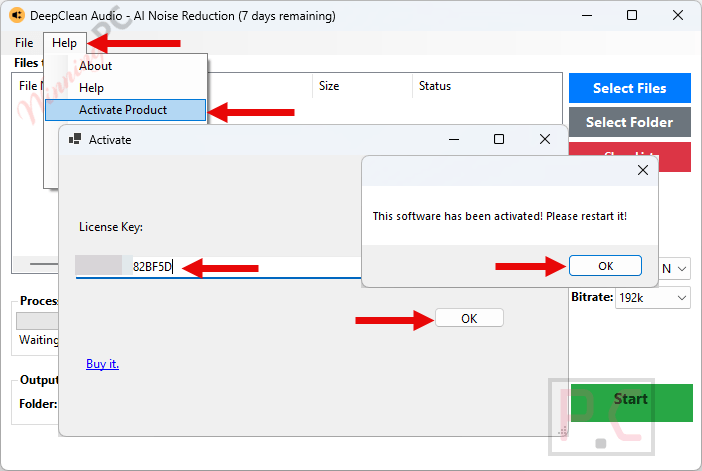
- Open DeepCleanAudio, paste your license code into the activation box, and confirm. Activation is fully offline; no internet connection is needed at this step.
Top Audio Editor Software Coupon & Discount Code

KingShiper Audio Editor - Lifetime/ 2 PCs
One license for 2 PCs | 30-day money back guarantee

HitPaw VoicePea - Perpetual/1 PC (Standard)
Perpetual License | 24/7 tech support

Zortam Mp3 Media Studio Pro (32/64 bit)
1 PC License | Lifetime Free Version Updates

Soundop Audio Editor - Perpetual License
Perpetual License + Lifetime Updates

EaseUS MakeMyAudio (Yearly)
One license for 1 computer | 1-year free upgrades
Is this DeepCleanAudio giveaway safe and legit?
Yes, this is a legitimate giveaway. WinningPC distributes genuine license keys sourced directly from SteelSoft, not cracked builds or grey-market codes.
No crack or keygen
You receive an official SteelSoft license key that activates the publisher’s own installer. Nothing is patched or modified.
Official authorized source
The giveaway runs through WinningPC in direct partnership with SteelSoft; the key is a real commercial license from the developer.
100% offline processing
Once installed, DeepCleanAudio never uploads your files to any server. Your audio and video stay entirely on your machine throughout every session.
No payment required
The giveaway key is completely free. If you later want the paid version, purchases go through SteelSoft’s official site.
Hands-on with DeepCleanAudio
DeepCleanAudio runs two AI models. VoiceFixer handles vocal reconstruction and DeepFilter targets background noise removal, and the combination matters in practice. Basic frequency-based denoisers tend to over-smooth, leaving speech that sounds muffled or processed. The dual-model approach is specifically designed to rebuild vocal detail rather than smothering it, which is where most simpler tools fall short.
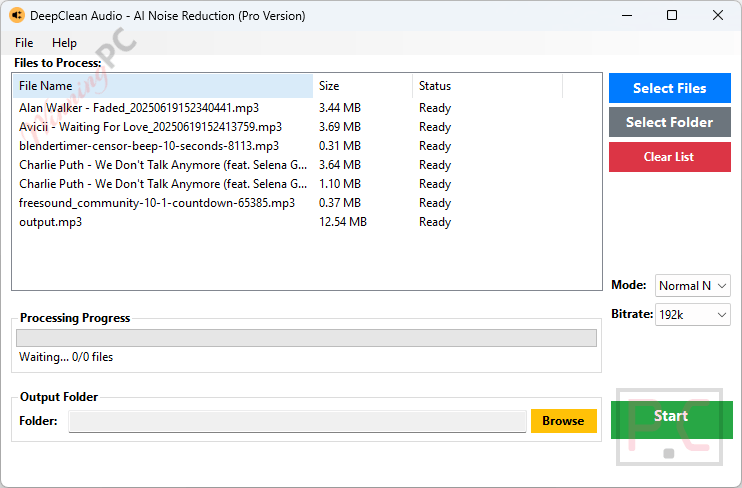
The video passthrough feature is worth calling out separately: it replaces the audio track without touching the video stream, so you take no quality hit on the original footage every time you clean a clip. Batch processing rounds this out for anyone working through dozens of files regularly. The two honest caveats are the non-commercial restriction on the giveaway key and the complete absence of free technical support; if something breaks at activation, you are troubleshooting on your own.
Key features
- AI voice reconstruction (VoiceFixer + DeepFilter): rebuilds muffled vocal detail and strips complex background noise in a single pass, designed to avoid the metallic artifacts simpler denoisers leave behind.
- Zero video quality loss passthrough: swaps the audio track in video files without re-encoding the video stream, preserving original bitrates.
- High-speed batch processing: import entire directories of audio or video files at once for consistent results across large archives.
- 100% offline and private: no cloud uploads, no file-size caps, no duration limits, no monthly fees.
- Windows 10/11 (64-bit) native: installs and runs locally, no account or internet required after setup.
What we think
Frequently Asked Questions
Is the DeepCleanAudio giveaway really free?
Yes, completely free. Fill in the form on this page with your email and WinningPC sends the license key to your inbox. No payment information is needed at any point.
Can I use the giveaway license for commercial work?
No. The giveaway license covers non-commercial use only. If you monetize your content – client video editing, a paid YouTube channel, freelance audio work – you need the $79 Lifetime license from SteelSoft’s site.
Do I need the internet to run DeepCleanAudio?
Not after installation. Activation is fully offline: you paste the license key directly into the app. All processing runs locally after that, with no cloud uploads and no internet connection required.
System Requirements & Details
| Field | Value |
|---|---|
| Operating system | Windows 10 / 11 (64-bit) |
| Internet required | No – activation and all processing are fully offline |





DeepCleanAudio by steelsoft.site is a disastrous failure.
I tried it on 9 hours of cassette recordings where the recording microphone was the default on the recorder itself, recording motor noise ( ! ), tape hiss, and other quality compromises, and the results of DeepCleanAudio are unusable.
It’s as if, in the original, I can hear this, faint, muffled, with noise:
Mary had a little lamb, it’s fleece was white as snow …
And this is all that DeepCleanAudio left me with in the output file, regardless of settings:
_a_y _a_ a _i____ _a__, i___ __ee__ _a_ ___i__ a_ __o_w …
I cannot imagine what anyone thought they were doing, perhaps the programmers, wanting to get paid, said, “Yeah, it’s ready”, so the bosses shipped it without checking.
– – – – –
Google Gemini says today:
User Reviews of DeepCleanAudio by SteelSoft
DeepCleanAudio (developed by SteelSoft Labs) is a Windows-based (10/11 64-bit) desktop utility designed for automated background noise reduction and vocal repair. It stands out from many contemporary AI audio tools by operating 100% offline locally on the user’s PC rather than requiring cloud uploads.
Key Strengths Highlighted by Users & Reviewers
Dual-Model Processing: Reviewers note that it pairs two underlying AI models—VoiceFixer (for vocal reconstruction/clarity) and DeepFilter (for background noise suppression).
Users appreciate that this prevents the muffled or “robotic/metallic” artifacts typical of standard frequency-based noise gates.
Privacy & Local Batching: Highly praised by podcasters, journalists, and video editors handling sensitive client work because files are processed entirely offline with no duration caps, size limits, or cloud security risks.
One-Time Cost Model: Users favor the shareware / lifetime key purchasing model over recurring monthly subscriptions.
Drawbacks & Criticisms
Windows-Only: Not available natively on macOS or Linux.
Basic Interface: Lacks deep, manual spectral repair tools (e.g., individual click, pop, or de-hum surgical tools) found in full digital audio workstations (DAWs).
Overall Rating: Software review portals and tech blogs generally rate it around 8.0 / 10 as a reliable “fire-and-forget” batch audio cleaner.
—
Top Competing Fully Automated AI Audio Noise Reduction Programs
Depending on whether you prefer offline desktop processing or cloud-based web tools, several alternative AI noise reduction programs receive top user reviews:
| Tool | Processing Type | Best For | Key Features & User Praise |
| iZotope RX (Repair Assistant) | Desktop (Offline / Plug-in) | Professional Audio & Offline Repairs | Industry-standard audio restoration. Features an AI Repair Assistant that analyzes audio and automatically applies ideal denoising filters offline. |
| Waves Clarity VX | Desktop (Offline / Plug-in) | Real-Time & Offline Voice Isolation | Neural network trained on vocal isolation. One knob control for instant background noise removal with high vocal fidelity and zero latency. |
| Adobe Podcast Enhance Speech | Web / Cloud | 1-Click Spoken Word Cleanup | Extremely popular web-based tool that eliminates room echo and background hums while re-synthesizing voice warmth in a single click. |
| Cleanvoice AI | Web / Cloud | Podcasts & Spoken Content | Highly rated for salvaging noisy mobile recordings. In addition to noise removal, it automatically strips filler words, breaths, and mouth clicks. |
| LALAL.AI Voice Cleaner | Web & Desktop / Hybrid | Voice Isolation in Complex Audio | Uses neural networks to separate vocals from complex background music, chatter, and environmental noise. |
—
Key Recommendations Based on Workflow
If you require 100% offline privacy on Windows or Mac: Consider iZotope RX (Elements/Standard) or Waves Clarity VX, as both run locally without uploading files to third-party servers.
If you want the simplest 1-click web automation: Adobe Podcast Enhance Speech and Cleanvoice AI offer top-tier speech enhancement without requiring installation.
– – – – –
I presume steelsoft.site is making their own reviews, because the software I downloaded from Winning PC is not even pre-alpha level.
Seriously, did anyone else actually use it on any real-world noisy, muffled audio files?
Please do share your experience, and tell us how you got any happiness from DeepCleanAudio by steelsoft.site
Thanks anyway.
.
Slow (extremely slow) on a PC with a fast processor and 16 gb of ram. This could be forgiven if the results were worth the wait. They aren’t. I spent some time trying to think of a software where the disparity between what is promised and what is delivered is greater than this one….and I can’t.
This is a scam. You give your email and get nothing. This has happened on several occasions with different offers. It seems to me it’s a scam to collect emails.
I have checked and found that two emails have been sent to your inbox. Please check your spam folder.
all steelsoft AI products vomit out a few gigabytes of TEMP files onto the system drive when processing and leaves them there when the program exits containing many subfolders with python files and compiled python and copies of the AI model inferences rather than keeping them where they are chosen to be installed. They are not built to be easy on the systems they’re installed on. Note you can bypass their 7 day trial limitation by using nirsofts RunasDate.exe the 64bit version, why am I telling you this because they blatantly steal GPLv3 FFMPEG binaries on some of their products so if they cannot comply with the copyright licenses of products they plagiarise they shouldn’t expect anyone to honor their copyright restrictions on their illegal closed source combined works.