
Pixso Coupons & Pricing
Pixso
11 plans · best save 10%
Professional - Whiteboard - 1 Month ★ Best Deal
Pay a monthly subscription
Professional - Whiteboard - 1 Year
Pay a yearly subscription | 30-day money-back guarantee
Professional - Design - 1 Year
Pay a yearly subscription | 30-day money-back guarantee
Enterprise - Whiteboard - 1 Year
Pay a yearly subscription | 30-day money-back guarantee
Enterprise - Design - 1 Year
Pay a yearly subscription | 30-day money-back guarantee
How to Use the Pixso Coupon Code
- Select the plan that best suits your needs.
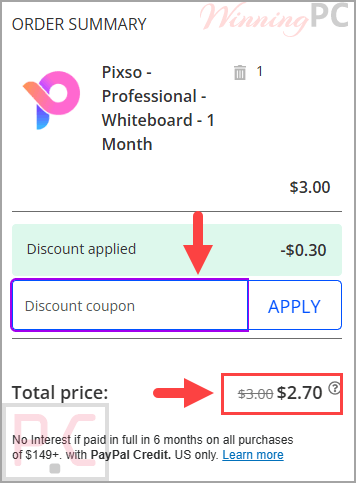
- Click Copy on a plan to copy the code “WINNINGPC10”.
- You will be redirected to Pixso’s official payment channel.
- Confirm that the total has dropped by 10% before completing payment.
- Save the order confirmation and subscription details for your records.
Is the Pixso coupon legit?
Yes. The coupon is intended for use with Pixso’s official plans, but you should always confirm the discount on the final checkout screen before paying.
Official purchase route
Buy through Pixso’s own website rather than an unofficial key reseller or third-party download page.
Payment details stay with the processor
Pixso states that qualified payment processors collect and store payment-instrument information; Pixso does not directly collect card or bank-account numbers.
No crack or modified installer
The offer discounts a legitimate subscription. It does not require patched files, key generators, or repackaged software.
Refund protection has limits
Pixso advertises a 30-day money-back guarantee for qualifying annual subscriptions and lifetime products. Monthly-plan eligibility is not clearly confirmed in the supplied policy.
Pixso Review & Features
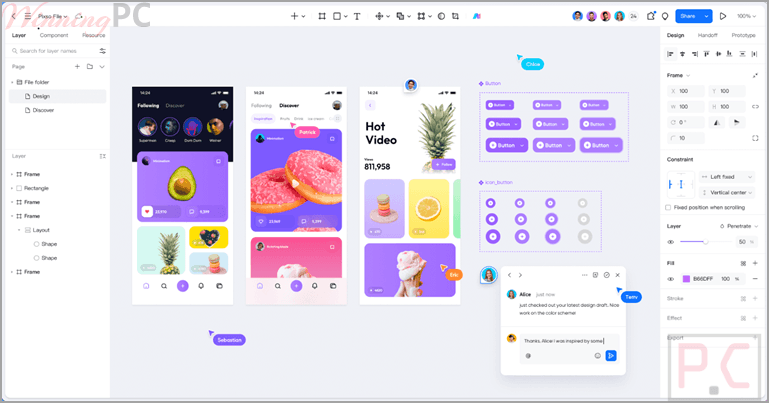
Pixso covers an unusually broad part of the design process, which is useful for teams tired of moving files between whiteboarding, interface design, prototyping, review, and developer-handoff tools. Its strongest idea is continuity: designers can create reusable components and tokens, teammates can comment on the same canvas, and developers can inspect or copy implementation code without waiting for another export.
The catch is that this breadth adds complexity. Teams that only need a lightweight wireframing canvas may not use enough of Pixso Design to justify an Enterprise seat, while organizations adopting its AI tools must also understand that personal, team, and enterprise credits are separate and non-transferable.
Screenshots
Key features
- Real-time collaborative editing: Multiple designers and stakeholders can work in the same project, leave canvas comments, review changes, and see updates without exchanging local files.
- Reusable design systems: Teams can publish components, styles, and design tokens to a shared library, helping designers and developers keep visual standards consistent.
- Responsive layout tools: Auto layout, intelligent object distribution, layers, vector paths, smooth curves, and responsive frames support detailed interface and illustration work.
- Prototype and handoff tools: Interactive animations, prototype flows, developer mode, slices, handoff panels, version history, and ready-to-copy code support the move from concept to implementation.
- Import and code support: Pixso can import Figma, Axure, Sketch, Adobe XD, and SVG files, while its handoff tools support code-oriented outputs including HTML, SwiftUI, React, ArkUI, and Flutter workflows.
What we think
Which Pixso Plan Should You Buy?
Frequently Asked Questions
What is the active Pixso coupon code?
The active code is WINNINGPC10, which reduces the supplied Pixso plan prices by 10%. Confirm the discounted total at checkout before paying.
What is the cheapest Pixso plan with the coupon?
The lowest listed paid option is Professional Whiteboard Monthly at $2.70, reduced from $3.00. For design functionality, Professional Design Monthly costs $6.30 after the discount.
Can I get a refund from Pixso?
Pixso advertises a 30-day money-back guarantee for qualifying annual subscription plans and lifetime products. Refund requests require your name, product and version, order reference, and a specific reason sent to support@pixso.net. Eligibility for monthly plans is not clearly stated in the supplied terms.
Is there a free Pixso version?
Yes. Pixso states that individual users can register and access programs on its website without subscription charges, although trial or free access may limit features or resources. Paid plans unlock the corresponding subscription benefits.
Can Pixso import Figma files?
Yes. Pixso lists Figma among its supported imports, together with Axure, Sketch, Adobe XD, and SVG. Save the source file locally, then drag it into the Pixso workspace or use the workspace import button.
Which platforms support Pixso?
Pixso can be used on Windows and macOS desktops and through web browsers. The supplied information also mentions downloadable versions for Windows, macOS, and Android, although the exact Android feature set is not specified.
System Requirements & Details
| Feature | Specifications |
|---|---|
| Operating System | Windows and macOS desktops; browser access on supported devices; Android download also listed. |
| Recommended browser | Current version of Google Chrome |
| Graphics technology | WebGL |
| Supported input | Figma, Axure, Sketch, Adobe XD, SVG |
| Supported Output | SwiftUI, HTML, React, ArkUI, Flutter and additional supported handoff formats |
| Other requirements | Internet access and a Pixso account are required for online collaboration and cloud-based functions. |