

Scamless Coupons & Pricing
Scamless: AI Scam Detector
2 plans · best save 30%
How to Use the Scamless App Coupon Code
- Click the deal link on this page – the 30% WinningPC discount applies automatically, no code needed.
- Choose your plan (Monthly or Annual) on Scamless’s checkout page.
- Confirm the discounted price is showing before you pay.
- Complete checkout. You’ll receive your account details by email.
Is This Scamless Deal Safe and Legit?
No crack or unofficial build
You install the genuine Scamless app from Google Play. There’s nothing modified, patched, or repackaged – it’s the same app anyone would download from the store.
Official partner pricing
The 30% discount is available through Scamless’s authorized partner program. You’re buying directly through the developer’s checkout, not a grey-market reseller.
Secure checkout
Payment is processed on Scamless’s encrypted checkout page. Your card details never pass through WinningPC.
Cancel anytime
Both plans are subscription-based with no lock-in. You can cancel at any point, and billing stops at the end of your current period.
How well does Scamless actually work?
The core idea is sound: scams happen inside messaging apps, so the protection should too. Scamless uses Android’s Accessibility Service to read what’s on your screen, analyze it with AI, and flag a message before you’ve even finished reading it. That context-aware approach is what separates it from basic spam filters – it looks for urgency language, impersonation patterns, and known phishing link structures rather than just matching against a keyword blacklist. For the family member who keeps nearly clicking on fake FedEx delivery links, that difference matters.
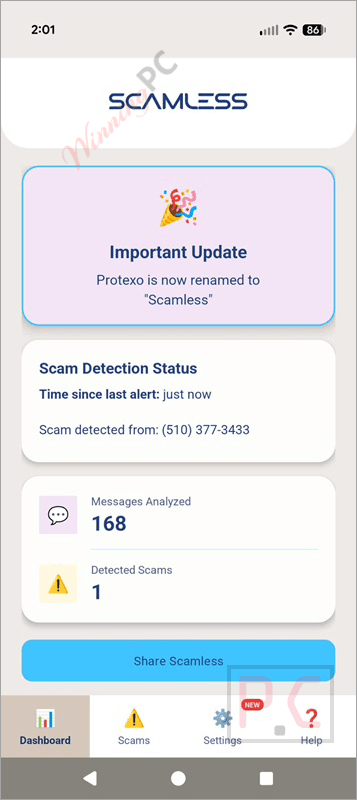
The on-device processing claim is worth noting: Scamless says most message analysis happens locally, with only suspicious messages checked against external servers. That’s a reasonable architecture for a privacy-sensitive product, and it’s more transparent than most apps in this space. The tradeoff is the Accessibility permission itself, which is a broad grant of screen access – understandable for privacy-savvy users to hesitate on, even with the privacy-first framing.
Key features
- Real-time cross-app alerts: scam warnings appear directly on messages inside WhatsApp, SMS, Instagram Messenger, Facebook Messenger, TikTok, and X, with no copy-pasting or app-switching required
- Context-aware AI detection: identifies phishing links, bank and government impersonation, fake delivery notifications, job scams, and investment fraud by analyzing message intent, not just keywords
- On-device AI processing: most message analysis happens locally on your phone; only suspicious content is checked against external threat databases
- Multilingual support: scam detection works across English and multiple international languages
- Always-on, fully automated: no manual scanning needed; protection runs continuously in the background
What we think
Monthly vs Annual: which Scamless plan makes sense?
| Plan | Regular Price | Discounted Price | Effective Monthly Price | Commitment | Best For |
|---|---|---|---|---|---|
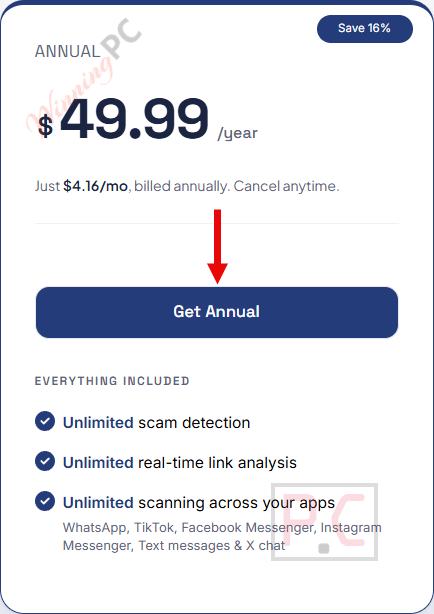
| Monthly | $5.99/mo | No discount | $5.99/mo | 1 month | Trying it out; short-term use |
| Annual | $71.88/yr | $49.99/yr (30% OFF) | $4.17/mo | 12 months | Best value; saves $21.89/year vs monthly |
Bottom line: if you’re committing to long-term protection, the Annual plan costs about 30% less per month than Monthly even before the WinningPC discount. The Monthly plan makes sense if you want to test the app for a month or two before committing.
Scamless vs other scam and spam protection tools
| Tool | Price | What It Detects | Platforms | Best For |
|---|---|---|---|---|
| Scamless | $49.99/yr | AI context-aware: phishing, impersonation, scam links | Android; scans SMS, WhatsApp, Instagram, Facebook Messenger, TikTok, X | Cross-app, real-time message scam detection |
| Bitdefender Premium Security | $64.99/yr/5 devices | AI-powered scams, phishing, malicious websites, scam emails, chat/SMS scams, malware, ransomware | Windows, macOS, Android, iOS | Full security suite with advanced AI scam protection |
| ESET HOME Security Essential | $12/yr | Phishing, suspicious websites/emails, malware, ransomware, spyware and other online threats | Windows, macOS, Android | Antivirus + phishing and safe banking protection |
| Avast Premium Security | $31.20/yr/1 PC | Scam emails, phishing, fake websites, infected attachments, suspicious messages/offers, malware | Windows, macOS, Android, iOS | Scam, email, fake-site + antivirus protection |
| AdGuard Ad Blocker | $17.88/yr/3 devices | Phishing sites, fraudulent/malicious websites, malicious ads, trackers, spyware/adware | Windows, macOS, Android, iOS; browser options also available | Phishing protection + safer, ad-free browsing |
Frequently Asked Questions
Does Scamless actually read my private messages?
Not in the way you might worry about. Scamless uses Android’s Accessibility Service to analyze visible on-screen text for scam patterns. Most analysis happens on-device, and the developer states that message content is never stored or used for advertising. Only messages flagged as suspicious may be checked against external servers for link verification.
Does Scamless work on iPhone?
No. Scamless is Android-only. iOS doesn’t allow the background screen-reading permissions the app needs to work inside other messaging apps, so there’s no iOS version currently available.
How accurate is the scam detection?
Very effective for known scam patterns, but not perfect. The AI catches context-based threats (urgency language, impersonation patterns, phishing link structures) rather than simple keyword lists, which makes it more robust than basic filters. The developer acknowledges false alerts can occur, and the system continues to improve. No automated detection system is 100% accurate.
What does the Accessibility permission actually access?
It allows Scamless to read visible text on your screen so it can display warnings on suspicious messages inside other apps. That’s the full scope of its use. The app states this permission is only used for fraud detection — not for tracking, advertising, or any other purpose. You can review the full privacy policy at scamless.app/privacy-policy.
Can I cancel my subscription anytime?
Yes. Both the Monthly and Annual plans are cancel-anytime subscriptions. Billing stops at the end of your current period.
What you need to run Scamless
| Field | Details |
|---|---|
| Operating System | Android 9 and above |
| Device | Android smartphone or tablet |
| Required Permission | Accessibility Service (mandatory for in-app message scanning) |
| Internet Connection | Required for link verification against threat databases |
| Supported Platforms | WhatsApp, SMS/Text Messages, Instagram Messenger, Facebook Messenger, TikTok, X (Twitter) |
| Desktop/iOS Version | Not available |
| Supported Input Formats | N/A – real-time message scanning app, not a file converter |

