
On this page
SayOnce – Voice Dictation Software Giveaway
SayOnce – Voice Dictation Software
SayOnce voice dictation: talk into any app with a global hotkey, 4x faster than typing.
- Product
- SoftOrbits SayOnce
- Website
- softorbits.net
- License
- Lifetime
- Platform
- Windows 11/10/8.1/8/7 (32/64 bit)
- Usage
- Non-commercial only
- Updates
- No future upgrades
- Support
- No support
- Updated
- October 14, 2026
Get your unique code by email
License key delivered free to your inbox within minutes.
This giveaway ended on .
Protected by Cloudflare Turnstile · Email quality checked by Reoon
All codes have been claimed or the giveaway has closed.
How to Get the SayOnce – Voice Dictation Software License Key for Free
- Enter your email address in the giveaway form on this page. You’ll receive your free download link.
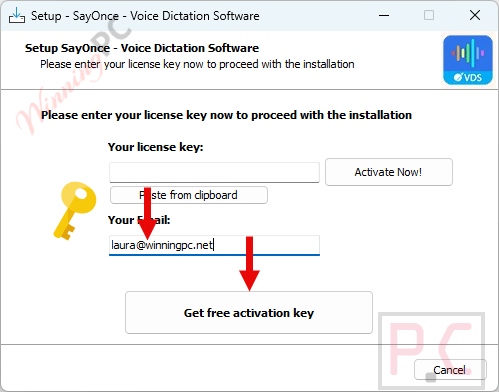
- Run the SayOnce installer. When it asks, type your email address and click Get free registration key.
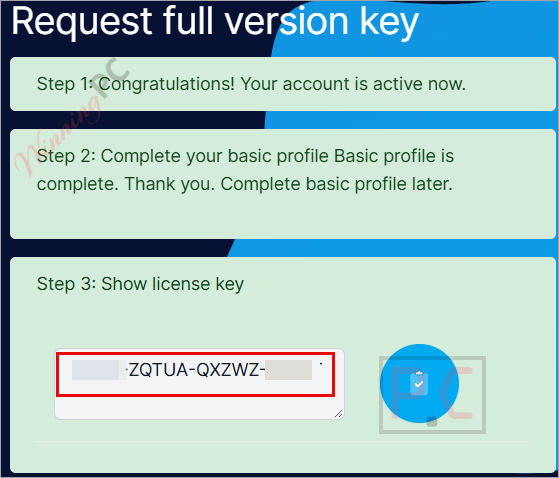
- The installer sends you to the SoftOrbits giveaway page. Fill in your basic profile details to unlock the license.
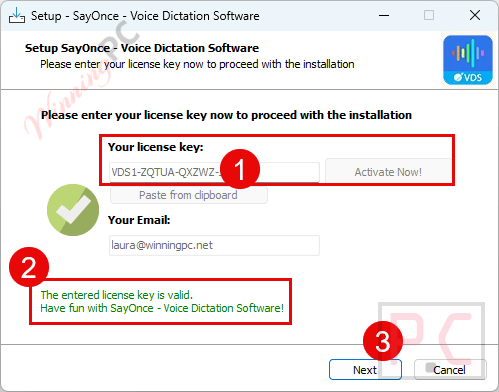
- Copy the license code shown on that SoftOrbits page, switch back to the installation wizard, paste it into the activation field and press Activate Now!
- Once setup finishes, launch SayOnce. If it asks for the code again, paste the same key to complete activation. On first run it downloads the speech model (about 478 MB, one time only), then you’re ready to dictate with Ctrl+Win.
Top Speech to Text Converter Softwares Coupon Code

EaseUS VideFlow - Lifetime Upgrades
One license for 1 PC | Lifetime free upgrades | Free remote assistance
VoiceType AI Lifetime Subscription
Transcribe up to 20,000 words per month | Lifetime access | 30-day money-back guarantee
Notta AI PRO - Annually
1,800 transcription minutes/month | AI summary


EaseText Audio to Text Converter for Windows - Personal
24/7 Tech support | Lifetime Free Updates
Is this SayOnce giveaway safe and legit?
Yes. This is SoftOrbits’ own promotion, and you end up with the official build plus a genuine key.
No crack or keygen
You install SoftOrbits’ official installer and activate it with a key issued on their giveaway page. Nothing is patched or repackaged.
Straight from the publisher
The license comes from SoftOrbits’ registration page, not a reseller or a key-sharing site.
Your voice stays on your PC
Speech and media files are processed locally. Per SoftOrbits, only license activation goes online.
What you hand over
An email address and some basic profile details to unlock the key. No payment, so there’s nothing to refund or cancel.
SayOnce – Voice Dictation Software Review & Features
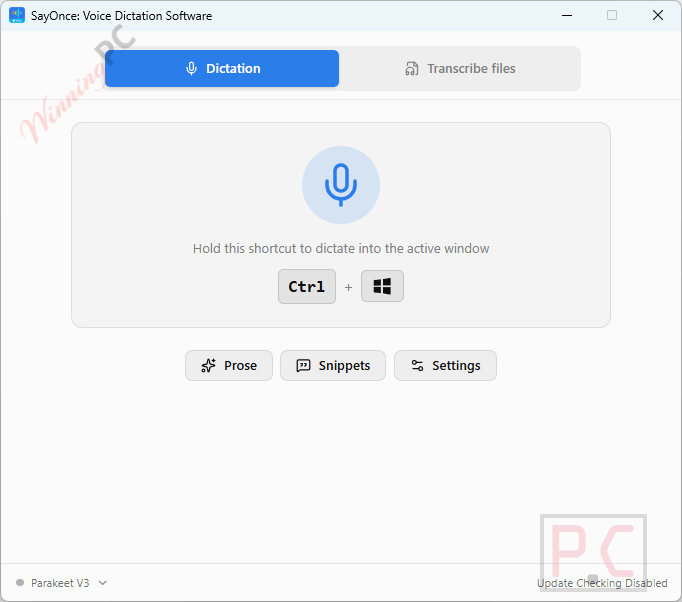
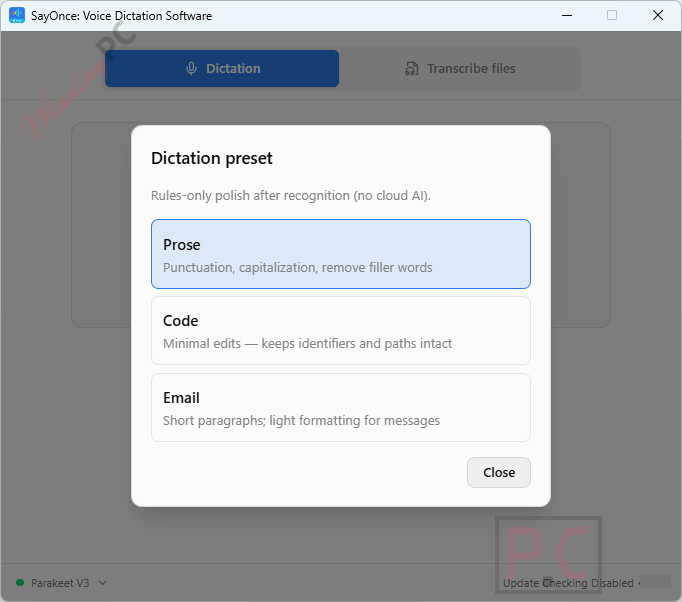
SayOnce – Voice Dictation Software‘s big win is where the work happens. Because the Parakeet V3 model runs on your own CPU, there’s no wait for a server round trip and nothing gets uploaded, which matters if you dictate client emails or code. The presets are a smart touch: Code mode stops the tool from “fixing” your identifiers and symbols, something general-purpose dictation tends to mangle. The catch is language coverage. The interface comes in 20 languages, including Chinese and Japanese, but the default speech model only covers 25 languages (mostly European, plus Russian and Ukrainian). If you want to dictate in an Asian language, you’ll need to download the alternative model first.
Key features
- Hold-to-talk anywhere: hold Ctrl+Win, speak, release, and the text lands at your cursor in Word, Slack, VS Code or a browser field.
- Offline speech engine: a one-time ~478 MB model download, then it works with no internet and no GPU.
- Prose, Code and Email presets: rule-based cleanup of punctuation, capitalization and filler words, no cloud AI involved.
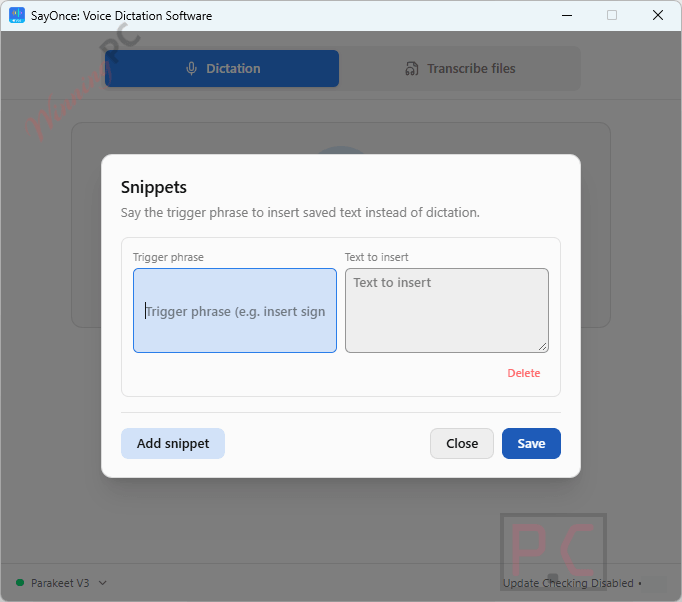
- Snippets and a personal dictionary: say a short trigger to insert a full block of text, and teach it names or jargon it keeps getting wrong.
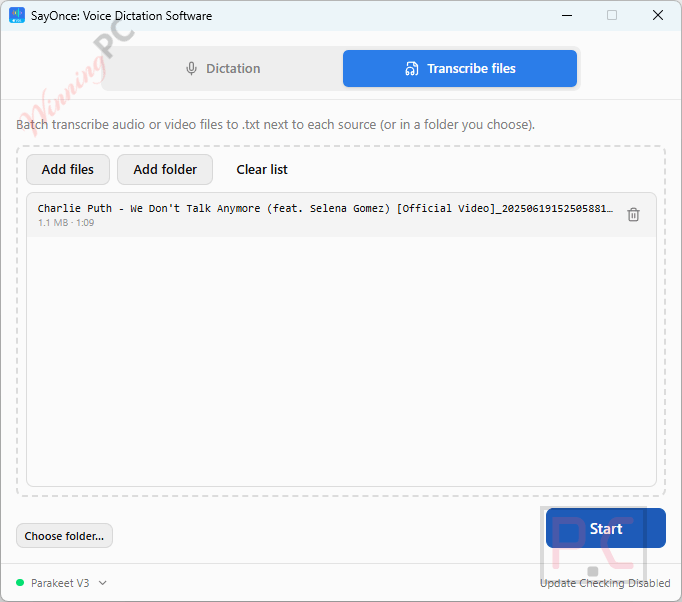
- Batch transcription: queue up audio and video files and get a plain-text transcript for each, with no file limit or per-minute fee.
What we think
Screenshots
Is there a free alternative to SayOnce?
| Tool | Price | Where speech is processed | Types at your cursor | Transcribes files | Best for |
|---|---|---|---|---|---|
| SayOnce (our pick for offline dictation) | $69.99 one-time, free today via giveaway | On your PC | Yes, any app | Yes, batch to .txt, no minute cap | Private everyday dictation plus file transcripts |
| VoiceType AI | $24/lifetime | Cloud, internet required | Yes, any app | No | AI-polished dictation if you don’t mind the cloud |
| Notta AI Pro | $58.79/yr | Cloud | No | Yes, 1,800 min/month on Pro | Meeting recordings, summaries and translated transcripts |
| EaseText Audio to Text Converter | $28.32/yr(Personal) | On your PC | No, transcribes in its own window | Yes, saves as TXT, Word, HTML or PDF | Offline transcripts you want as Word or PDF files |
| Windows Voice Typing (Win+H) | Free, built into Windows | Mostly online | Yes | No | Quick, occasional dictation |
| Buzz (open source) | Free | On your PC | No | Yes | Free offline transcripts of recordings |
If you mostly transcribe meetings, Notta’s summaries and translation do more than SayOnce does. If you only dictate a sentence now and then, Win+H costs nothing. SayOnce makes the most sense when you want both live dictation and file transcripts without anything leaving your PC.
Frequently Asked Questions
Does SayOnce – Voice Dictation Software work without an internet connection?
Yes. After the one-time model download, dictation and file transcription run fully offline. Only license activation needs the network.
Do I need a graphics card to run it?
No. SayOnce runs on an ordinary CPU, and it uses GPU acceleration only if your PC has one.
Can I use the free giveaway license for work?
No. The giveaway license is for non-commercial use only, and so is the paid Personal license. If you dictate for a business, check SoftOrbits’ site for a business license before relying on it.
Will the giveaway version get updates?
No. The giveaway key comes with no future upgrades, so you keep the version you install today. Paid Personal licenses include free upgrades to minor versions.
Which languages can I dictate in?
25 languages out of the box, mainly European languages plus Russian and Ukrainian. You can download an alternative model for 100+ languages. That’s worth knowing if you need Chinese, Japanese or Arabic dictation, because the interface supports those languages but the default speech model doesn’t.
What’s the difference between the free version and the full license?
The free version caps you at 36 successful dictations a day and shows a nag screen 3 times daily. A full license, including this giveaway key, removes those limits.
System Requirements & Details
| Operating system | Windows 11/10/8.1/8/7 (32/64-bit) |
|---|---|
| Processor | Intel i3, AMD Ryzen 5 or above |
| RAM | 4 GB or more |
| Disk space | 1 GB free or more (speech model is about 478 MB) |
| Graphics | Not required for dictation; used for acceleration if available |
| Screen | 1280 × 768, 32-bit color |
| Supported input formats | Audio: MP3, M4A, AAC, FLAC, OGG, OPUS, WAV/WAVE. Video: MP4, MOV, MKV, WEBM |
| Supported output formats | Plain text (.txt) saved next to each file; live dictation types directly into the active window |
| Other requirements | Microphone; internet for the one-time model download and license activation |



100% accurate on a very limited trial, except it didn’t manage Zanzibar.
Have to enable dictation mode- then either (depending on option selected in settings) release key combo to have text transcribed or press the key combo again.
I.e. text doesn’t appear as you talk or just after.
No formatting commands supported apparently (e.g. new paragraph, comma). Punctuation is automatically applied- so you’d need to review the text afterwards and format as required.
Large download- over 478MB.
SO you cannot use it for dictation if you do not know it misidentified words phrases or sentences because it does not show you the transcription in real-time… My guess is it records your voice and when you are finished talking it just feeds the WAV or MP3 or OGG file into an open source whisper AI inference with no control over which whisper AI model is used. Dictation software needs to be real-time so we can tell immediately if it failed to recognise a word or phrase and so we can correct that and continue like windows built in dictation/speech recognition and not this pirated AI tripe we keep getting offered by Chinese pirate software developers trying to sell us their warez because communism without the support of capitalism just does not work!
“…because it does not show you the transcription in real-time… My guess is it records your voice and when you are finished talking it just feeds the WAV or MP3 or OGG file”
That seems to be how it works.
“with no control over which whisper AI model is used”
You select one when installing it.
=============================================
Note that Handy (completely open source, free) behaves identically.
And the GUI is somewhat similar.
Windows’ voice typing (Dictation) had a slight delay before words appeared. That’s entirely reasonable if the transcription is contextual- deriving ‘meaning’ and hence the appropriate word for synonyms e.g.
One thing missing in both the above is any form of formatting command. E.g. punctuation, new paragraph etc.
Don’t forget softorbits force installation into an unprotected folder on the system drive reducing your systems security defences… it’s just using open source AI inferences developed by someone else who’s not given attribution pretending they did the work, which of course they are not capable of.