


Smart File Renamer Giveaway
Smart File Renamer
Bulk file renaming, done in seconds
- Product
- Smart File Renamer
- Product website
- gogrowtools.com
- License
- Lifetime
- Platform
- Windows 10/11
- Usage
- Personnel license (2 PCs)
- Updates
- Free updates and upgrades
- Support
- Free email & chat support
Continue on gogrowtools.com
The publisher handles registration and license delivery on its official website.
The limited-time giveaway!
The free license is no longer available.
Smart File Renamer Coupon Code Oct 2026



ASCOMP F-Rename Professional
Lifelong use | Updates, download & support for 2 years


How to Get the Smart File Renamer License Key for Free
- Click the “Claim The Giveaway” button on the official Smart File Renamer page.
- Fill in your name and email on the registration form, then click “Complete Order” – no payment required.
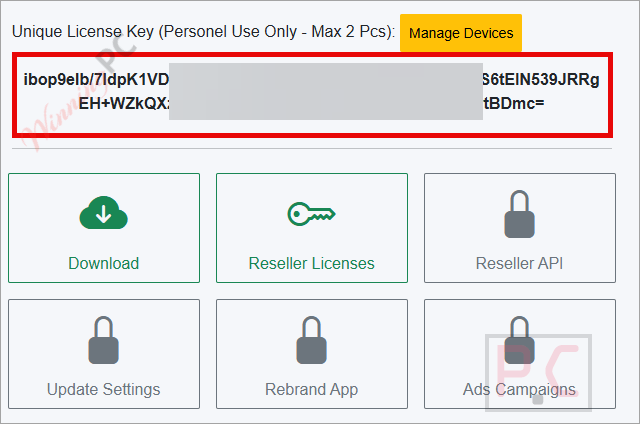
- Smart File Renamer creates your account automatically and activates the Lifetime license. Log in with your registered email to find your license key.
- Download the installer from your account and run it on your Windows PC.
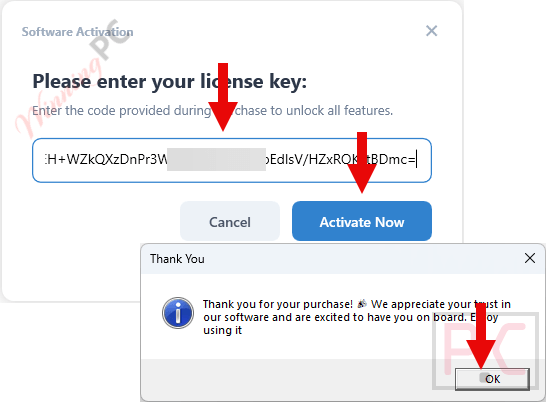
- Enter the license key when prompted and activate. Done – full Lifetime access on up to 2 PCs.

Is the Smart File Renamer giveaway safe and legit?
No crack or keygen
You receive a genuine activation key for the official Smart File Renamer build – nothing is patched, repackaged, or modified.
Official publisher giveaway
Registration and key delivery happen through Smart File Renamer’s own platform, not a grey-market reseller or third-party key site.
Secure checkout for the paid version
If you buy using the coupon instead, payment is processed on the publisher’s encrypted store; no card data touches WinningPC.
30-day money-back guarantee
Applies to paid purchases. The giveaway key is free, so there’s zero financial risk either way.
Hands-on with Smart File Renamer
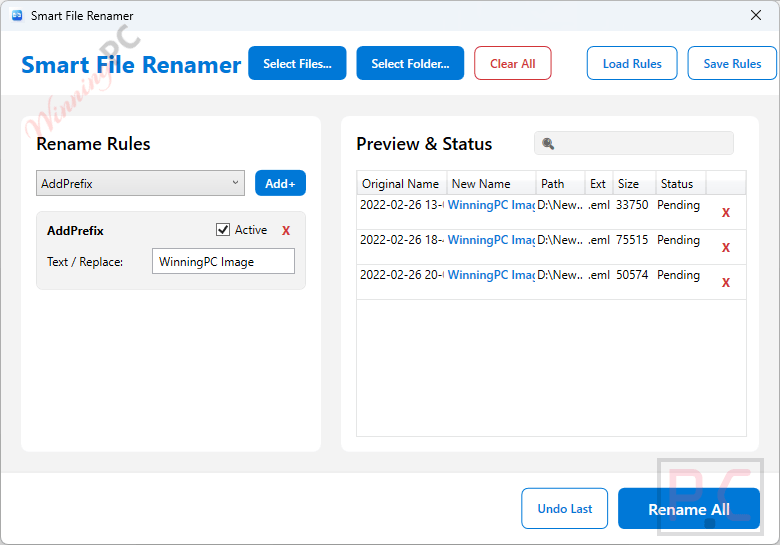
What makes Smart File Renamer stand out from simpler renamers is the multi-rule pipeline. Most tools let you do one operation at a time – replace text, or add a suffix. Here, you stack rules in sequence (strip a prefix, convert to Title Case, append a date), and the live preview updates as you build the chain. That preview isn’t a minor feature; seeing the before-and-after for every file before anything actually changes is the thing that turns bulk renaming from a nerve-wracking task into a routine one. Conflict detection flags duplicate names automatically, and the undo system works from session-based history rather than just a single step back.
The honest limitation: this is a filename editor, not a metadata reader. It can’t pull EXIF data (camera model, GPS coordinates) or ID3 tags into filenames automatically. Photographers who want smart photo naming driven by embedded metadata will need a separate tool for that step.
Key features
- Multi-rule pipeline with live preview: Stack prefix/suffix, text replace, regex patterns, case conversion, date insertion, and sequential numbering in one workflow; preview all changes before committing.
- Safe undo with session history: Restore original filenames instantly; conflict detection prevents duplicate names before they happen.
- Save and load presets: Store rule sets as reusable templates; share configurations across projects to stay consistent.
- Batch subfolder processing: Import full folder trees and rename across nested directories in one pass.
- High-performance engine: Handles 1,000+ files with a non-blocking WPF interface; large batches don’t freeze the app.
What we think
Smart File Renamer vs the Alternatives
| Tool | Price | Platform | Key Strength | Best For |
|---|---|---|---|---|
| Smart File Renamer | Free or $4.2/lifetime | Windows | Multi-rule pipeline + live preview + undo | Fast visual batch renaming |
| Vovsoft Rename Multiple Files | $13.3/lifetime | Windows | Lightweight + CSV renaming | Straightforward bulk renaming |
| ASCOMP F-Rename Professional | $6.96/lifetime | Windows | ID3/tag-based renaming + preview | Photos & music collections |
| RenameKit | $20.96/lifetime | Windows, macOS, Linux | 40+ rules + metadata + full undo | Advanced cross-platform renaming |
| SORCIM Easy File Renamer | $25.49/lifetime | Windows, macOS + Cloud | Metadata + cloud renaming | Music & cloud files |
| Bitwar Renamer | $49/lifetime | Windows | File/folder rename + folder creation | Simple everyday organization |
Frequently Asked Questions
Is the Smart File Renamer giveaway really free – no credit card?
Yes. No payment required. Just a name and email to register, and the Lifetime license (2 PCs) is activated automatically in your new account.
What happens to my license when the giveaway ends?
Nothing – it stays activated. The deadline is to claim the key. Once you have it, the Lifetime license doesn’t expire.
Can I use the giveaway license for commercial client work?
Yes. Commercial use rights are included in the free giveaway key, which is unusual for this type of offer.
Does it work on Windows 11?
Yes. Smart File Renamer officially supports Windows 10 and Windows 11.
How is this different from Bulk Rename Utility, which is also free?
Bulk Rename Utility is free and powerful, but its interface throws everything at you at once – a learning curve most users find steep. Smart File Renamer uses a step-by-step rule builder with a cleaner live preview. For the majority of batch renaming jobs, it’s the faster path to getting the result you want.
What if I miss the giveaway?
Use code winningpc at checkout for 91% off – the Lifetime license drops from $47 to $4.20.
Do I need to know regex to use it?
No. Most jobs – prefixes, text replacement, case conversion, sequential numbering – use simple rule dropdowns. Regex is available for advanced patterns if you want it, but it’s entirely optional.
System Requirements & Details
| Field | Value |
|---|---|
| Operating system | Windows 10, Windows 11 |
| Supported input formats | N/A – works on any file type regardless of format (this is a file renamer, not a converter) |
| Supported output formats | N/A – renames files in place; no format conversion |
| Other requirements | Internet connection to register and retrieve the license key |




