Claim Your Free 12-Month VIP Gift & 85% OFF Today iTop VPN Premium Power BI on Mac made easy - Enjoy 45% off Parallels today coupon code PD45 Malwarebytes Summer Mega Sale 50% Off SUMMER50
Skip to content

Sketch Me! Pro Drops to $0 on Google Play (Normally $0.49)

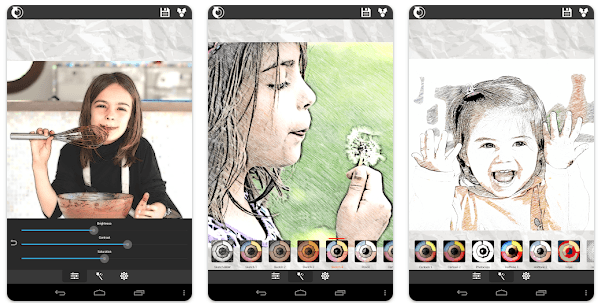
Sketch Me! Pro turns a phone photo into a hand-drawn sketch, cartoon or halftone print with one tap, using the same on-device filters as the free XnSketch app minus the ads. It's aimed at anyone who wants a quick stylized image for social media without opening a full photo editor.

Ad-free pro version No data collected Official Google Play link
Sketch Me! Pro Drops to $0 on Google Play (Normally $0.49)
Chris Bruner Last updated Sep 13, 2026
Normally $0.49 on the US Play Store, Sketch Me! Pro is $0.00. It’s the ad-free pro version of the free XnSketch app, all filters run on-device, and Google’s Data safety panel reports nothing collected. Price checked Sep 13, 2026 by Chris.

Get Sketch Me! Pro free on Google Play →

Check the price reads $0.00 before you tap Install. It goes through as a purchase, so it stays in your Google account library for good. How app giveaways work

Something not working? Leave a comment and we’ll help.

Sketch Me! Pro’s listing, checked line by line

Price & specs
AppSketch Me! Pro
DeveloperXnView (Gougelet Pierre-Emmanuel)
StoreGoogle Play (View all Android giveaway)
Regular price$0.49 (US Play Store)
Price now$0.00 (100% off)
Offer endsn/a
Contains adsNone — developer describes this as the ad-free version of XnSketch
RequiresAndroid 7.0+
Rating4.2 stars from 3.18K reviews
Installs500,000+
Last updatedSep 12, 2026

Sketch Me! Pro nails the retro filter look, less the polish
Review & features
Sketch Me! Pro Android App giveaway

The filters are genuinely instant — tap an effect, adjust edge strength and contrast, and export, with no account wall in the way. The rough edge: multiple reviewers have flagged that the exported image is stamped “MADE BY XnSketch” in the corner, which sits oddly next to the listing’s own claim of “no watermarks, no limitations.” It’s also a single-style-per-image tool — you can’t blend two effects onto one photo, a request that’s shown up in reviews for years without being added.

Key features

  • 10+ effects: pencil sketch, cartoon, halftone, hatching and more
  • Manual sliders for edge strength, contrast, brightness and saturation
  • Share straight to Facebook, Twitter or email
  • No sign-up required, and all processing stays on the device

Good for a quick throwback filter, not for AI-level art

Verdict
7.5Expert Score
Good

Grab it if you want an instant, offline sketch or cartoon effect for one photo at a time and don’t mind picking a single style per image. Skip it if you’re after AI-generated art or several effects blended together, since neither is on offer here.
(Review by Chris – tech writer and software reviewer at WinningPC.)

Functionality
7.8
Ease-of-use
7.7
Privacy & monetization
7.6
Customer Support
7.8
Community Comments (0)

Leave a review or comment

Your email address will not be published. Required fields are marked *

Reader rating (optional)
4.3/5 (6 votes)
Choose 1–5 stars

WinningPC
Logo
Register New Account