On this page
Fonelora iPhone Unlocker Coupons & Pricing
Fonelora iPhone Unlocker for Windows
3 plans · best save 63%
1 Month Subscription ★ Best Deal
1 Windows PC with 5 iOS Devices | Incl. Sales Tax | Free Upgrades During Subscription | 7-Day Refund
1-Year Subscription
1 Windows PC with 5 iOS Devices | Incl. Sales Tax | Free Upgrades During Subscription | 60-Day Refund
One-Time Purchase
1 Windows PC with 5 iOS Devices | Incl. Sales Tax | Lifetime Free Upgrades | 60-Day Refund
Fonelora iPhone Unlocker for Mac
3 plans · best save 63%1 Month Subscription ★ Best Deal
1 Mac with 5 iOS Devices | Incl. Sales Tax | Free Upgrades During Subscription | 7-Day Refund
1-Year Subscription
1 Mac with 5 iOS Devices | Incl. Sales Tax | Free Upgrades During Subscription | 60-Day Refund
One-Time Purchase
1 Mac with 5 iOS Devices | Incl. Sales Tax | Lifetime Free Upgrades | 60-Day Refund
How to Use the Fonelora iPhone Unlocker Coupon Code
Click the “Copy” button in the Coupons & Pricing box above. This copies code WINP***BF and takes you to the official Fonelora iPhone Unlocker store.
Choose your platform (Windows or Mac) and plan: 1 Month Subscription, 1-Year Subscription or One-Time Purchase. Paste the copied code into the coupon field on Fonelora’s checkout and click “Confirm”.
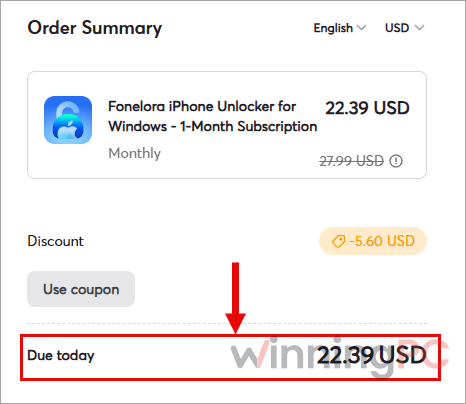
Check that the total has dropped (the 1 Month plan should show $22.39) before you pay.
Complete payment, then download Fonelora iPhone Unlocker and register it with the license details from your order.
Is the Fonelora coupon legit, and is the tool safe?
Yes. WINP***BF is an official discount applied on Fonelora’s own checkout, and the software is a standard licensed desktop app. There’s one rule worth knowing before you buy any unlocker, though.
Official source, no grey-market keys
The code works on Fonelora’s own store, so your license comes straight from the publisher rather than a reseller. Card details are handled on that checkout and never touch WinningPC.
No crack or patched build
You install Fonelora’s official installer and activate it with a genuine license. Nothing is repackaged.
Up to 60-day money-back
If Fonelora fails to unlock your device, you have 60 days to ask for a refund on 1-Year and One-Time plans, or 7 days on the 1-Month plan.
For your own devices only
Activation Lock and MDM exist to protect owners and organizations. Fonelora positions these features for devices you own or are authorized to use, so if an iPad belongs to a school or employer, talk to their IT team first.
How well does Fonelora iPhone Unlocker work?
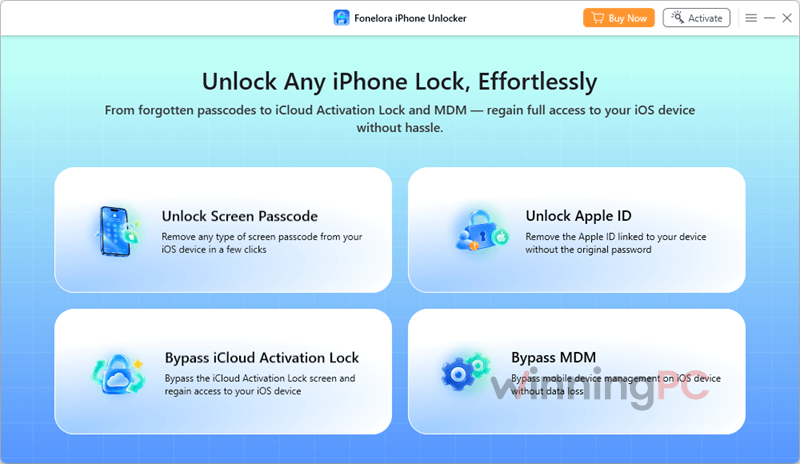
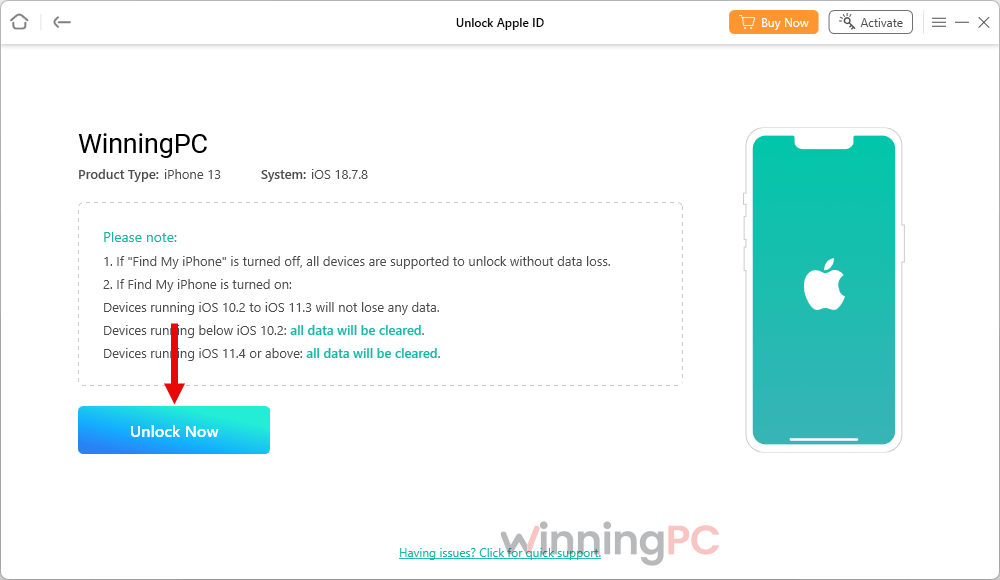
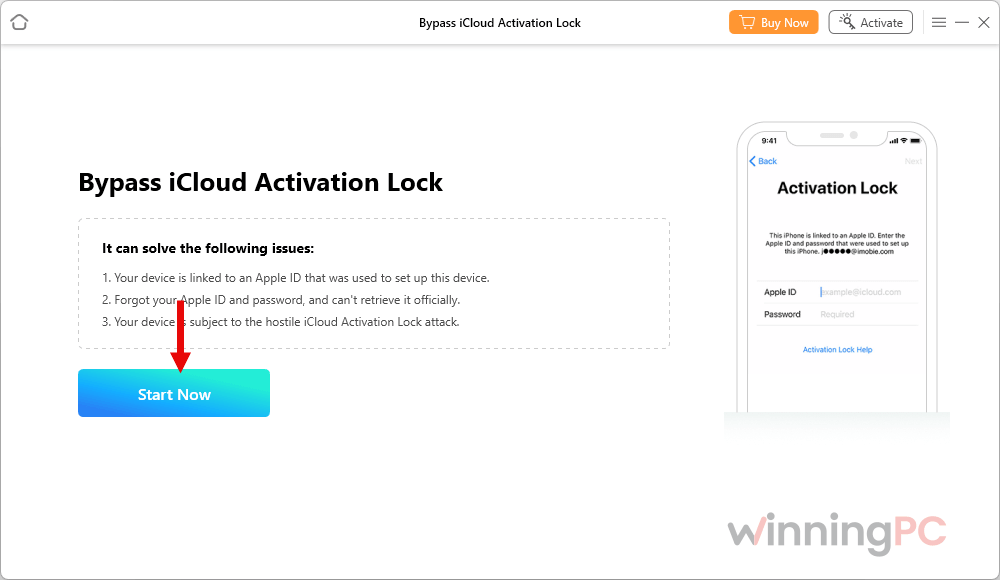
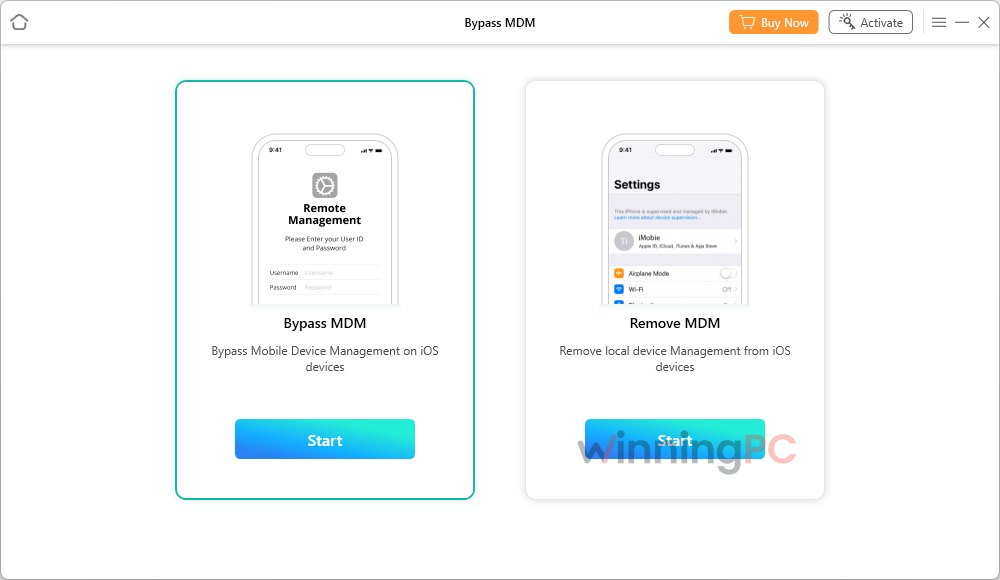
Fonelora iPhone Unlocker‘s real selling point is coverage. Most people shopping for an unlocker don’t know yet whether the problem is a passcode, an old Apple ID or an Activation Lock screen, and Fonelora puts all of those, plus MDM, behind one license. A wrong guess doesn’t mean buying a second tool. The guided flow is simple enough for a non-technical owner: pick the lock type, connect over USB, follow the prompts. What it can’t promise is your data.
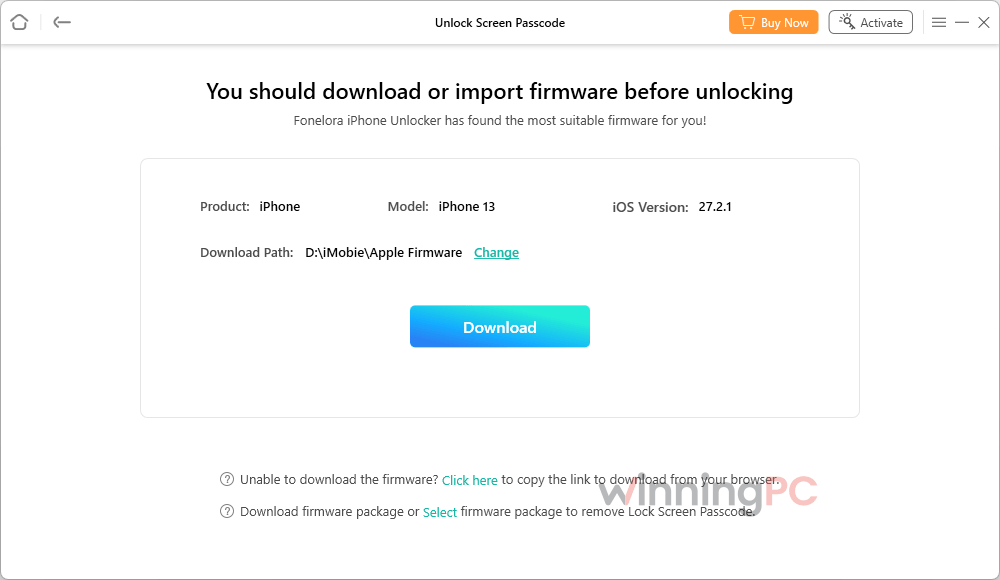
Fonelora’s own FAQ says removing a screen passcode may erase the device, so treat this as a way back into the hardware, not a recovery tool, and back up whatever you still can first. The local MDM profile removal is the welcome exception: Fonelora iPhone Unlocker says it lifts the profile without touching photos or messages, which matters if you’ve been using a formerly managed iPad for months.
Key features
- Screen passcode removal: clears 4-digit, 6-digit and custom passcodes plus Face ID and Touch ID locks, including devices showing “iPhone Unavailable”, Security Lockout or Disabled, and phones with a cracked or unresponsive screen.
- Apple ID removal without the password: takes off the old account so you can sign in with your own and use the App Store, iCloud, iMessage and FaceTime.
- iCloud Activation Lock bypass: lets you continue setup on supported iPhone and iPad models.
- MDM tools: skip the Remote Management screen during setup, or remove a local MDM profile from an activated device, with no management username or password needed.
What we think
More Fonelora iPhone Unlocker Screenshots
Which Fonelora iPhone Unlocker plan makes sense for you?
| Plan | Price with code | Billing | Upgrades | Best for |
|---|---|---|---|---|
| 1 Month | $22.39 | Subscription, cancel anytime | While subscribed | A single unlock job |
| 1-Year | $38.39 | Subscription, cancel anytime | While subscribed | Households that may need it again this year |
| One-Time | $51.19 | Pay once | Lifetime | Keeping it on hand for older family devices |
All three plans cover 1 computer (Windows or Mac—licenses are platform-specific and not cross-platform) and up to 5 iOS devices, with sales tax already included. The One-Time license costs about the same as two and a third months of the monthly plan and—like the 1-Year plan—includes Fonelora’s 60-day money-back guarantee (the 1-Month plan carries a 7-day refund window).
Fonelora iPhone Unlocker vs the alternatives
| Tool | Lock types covered | Activation Lock bypass | Best for |
|---|---|---|---|
| Fonelora iPhone Unlocker | Screen passcode, Apple ID, MDM (Screen Time not listed) | Included (supported devices) | One license for any of the four main lock types |
| PassFab iPhone Unlocker | Screen passcode, Apple ID, MDM, Screen Time | Separate product | Users who also need Screen Time removal |
| iMyFone LockWiper | Screen passcode, Apple ID, MDM, Screen Time | Separate product | A long-established brand with plenty of guides |
| EaseUS MobiUnlock | Screen passcode, Apple ID, Screen Time, MDM | Check current version | Users already on other EaseUS tools |
| FoneTool Unlocker Professional | Screen passcode, Apple ID, Screen Time | Not listed | Basic passcode and Apple ID problems |
| UnlockGo iPhone Unlocker | Screen passcode, Apple ID, MDM, Screen Time | Included | The closest all-in-one match to Fonelora |
| Apple’s own options (free) | Passcode reset via Recovery Mode restore (erases the device), Apple Account recovery | Removal through Apple Support with proof of purchase | Owners who can prove ownership and aren’t in a hurry |
Frequently Asked Questions
Will Fonelora iPhone Unlocker run on an M1, M2 or M3 Mac?
Yes. Fonelora lists both Intel and Apple M-series processors as supported, on macOS 10.13 or later. On Windows, note that only 64-bit systems are supported. Keep in mind that Windows and Mac licenses are sold separately and cannot be used across platforms.
Can I use it on a secondhand iPhone still linked to the seller’s Apple ID?
You can try the Activation Lock bypass if your model and iOS version are supported, but asking the seller is the better fix. When they remove the device from their iCloud account, the lock is gone permanently and every feature works normally. A bypass is the fallback when the seller can’t be reached.
How many iPhones can one license unlock?
Up to 5 iOS devices, used from one computer. That limit is the same on all three plans, so the more expensive plans buy you time and upgrades, not extra devices.
After removing the old Apple ID, can I sign in with my own?
Yes, that’s the point of the feature. Once the old account is gone, you sign in with your own Apple ID and use the App Store, iCloud backups, Apple Music, iMessage and FaceTime as normal.
What if Fonelora doesn’t detect my iPhone or the unlock fails?
Start with the cable: use one that supports data transfer, try another USB port, and confirm your computer sees the device at all. Then check that your model, iOS version and chosen unlock mode are supported. If it still fails, save the error message and send it to Fonelora Support along with your device model. If it can’t be solved, Fonelora’s money-back guarantee applies—60 days for 1-Year and One-Time plans, or 7 days for the 1-Month plan.
System Requirements & Details
| Field | Value |
|---|---|
| Computer OS | Windows 11/10/8/7/Vista (64-bit only); macOS 10.13 or later |
| Processor | Windows: 1 GHz 64-bit or faster; Mac: 1 GHz Intel or Apple M-series |
| RAM | Windows: 256 MB or more (1 GB recommended); Mac: 512 MB or more |
| Storage | At least 500 MB of free space |
| Supported devices | All iPhone models from iPhone 3G to iPhone 18, plus iPad and iPod touch |
| iOS / iPadOS | iOS 5.0 / iPadOS 13 or later, compatible with the latest versions (up to iOS/iPadOS 27) |
| iTunes | All versions, including iTunes 12.10 |
| Interface languages | English, Japanese, German, French, Spanish, Arabic, Italian, Korean, Traditional Chinese, Portuguese, Dutch, Turkish, Russian |
| Other requirements | USB cable that supports data transfer; 1 PC and up to 5 iOS devices per license |