
On this page
XenArmor Giveaway
XenArmor Browser Password Recovery Pro
Instantly recover or remove private website secrets from 140+ popular browsers
- Product
- Browser Password Recovery Pro
- Product website
- xenarmor.com
- License
- 1-Year
- Platform
- Windows Vista/7/8/10/11
- Usage
- Non-commercial only
- Updates
- No future upgrades
- Support
- No support
- Updated
- 2026-10-28
Continue on xenarmor.com
The publisher handles registration and license delivery on its official website.
The free license is no longer available.
How to Get the XenArmor Browser Password Recovery Pro Key Free?
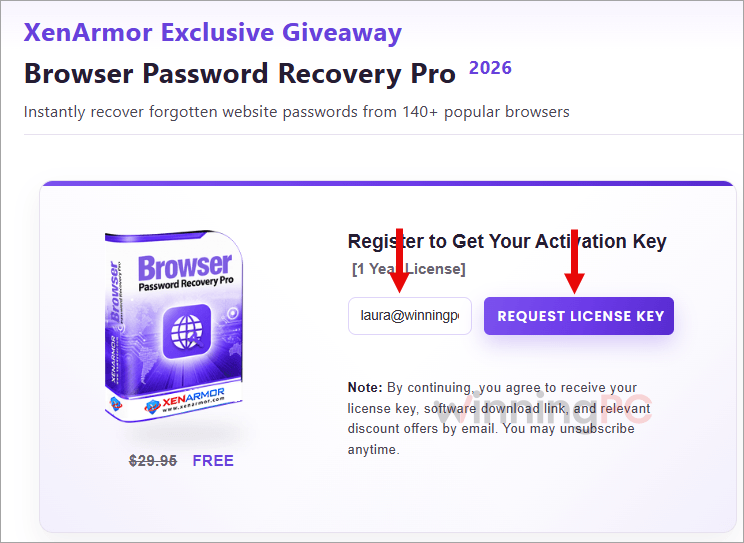
- Open the XenArmor giveaway page linked above and enter your email address.
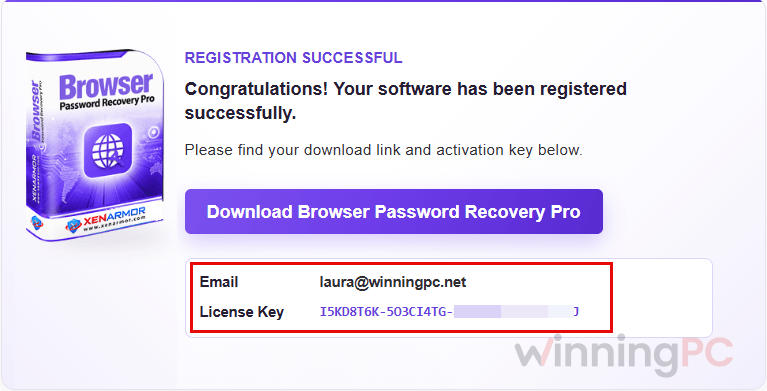
- Wait for the license email. If nothing arrives within 10 to 15 minutes, check your spam folder or the Promotions tab.
- Download the installer from the giveaway download link. Use the giveaway version, not the regular trial build.
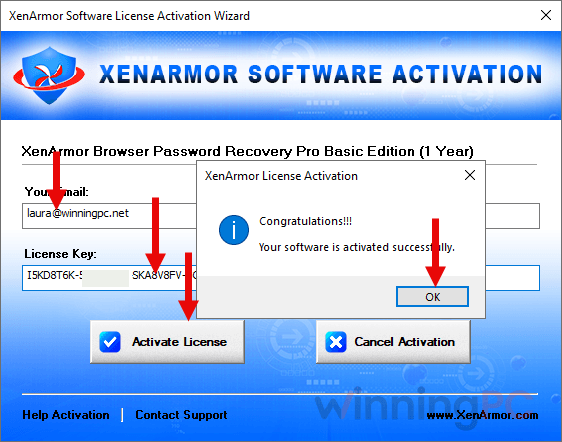
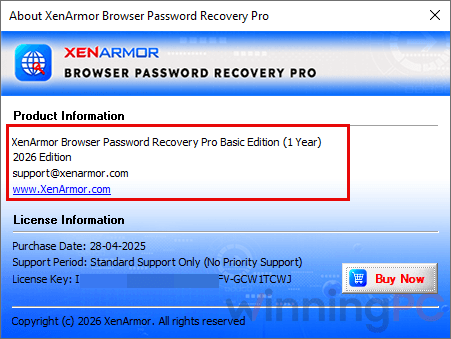
- Install XenArmor Browser Password Recovery Pro, then activate it with your email and the license key. Do this before the expiry date in the email, or the key won’t register.
XenArmor Browser Password Recovery Pro Coupon Code

XenArmor Browser Password Recovery Pro Basic
Lifetime for 1 PC | Priority support for 1 year | 30-day money-back guarantee

XenArmor All-In-One Password Recovery Pro Basic
Lifetime for 1 PC | Priority support for 1 year | 30-day money-back guarantee
XenArmor All-In-One Password Recovery Pro Premium
Lifetime for 5 PCs | Priority support for 1 year | 30-day money-back guarantee
Is this XenArmor giveaway safe to use?
Yes. The key comes from XenArmor’s own giveaway page, and you install the publisher’s signed build, not a patched copy.
Signed, untouched installer
XenArmor signs its software with an Extended Validation code-signing certificate from Sectigo, so you can check the publisher name before running it. Nothing here is cracked or repackaged.
Official source only
The free key is issued by XenArmor itself, and the paid license goes through the publisher’s official store, not a reseller.
Expect an antivirus warning
Password tools often get flagged as “potentially unwanted.” XenArmor treats this as a false positive and suggests whitelisting the app. Only do that for an installer you downloaded from xenarmor.com.
Your own data only
XenArmor states the tool is for recovering your own passwords, client recovery work, IT auditing, forensics and authorized security testing. Unauthorized access can get the license terminated.
Hands-on with XenArmor Browser Password Recovery Pro: what it actually does
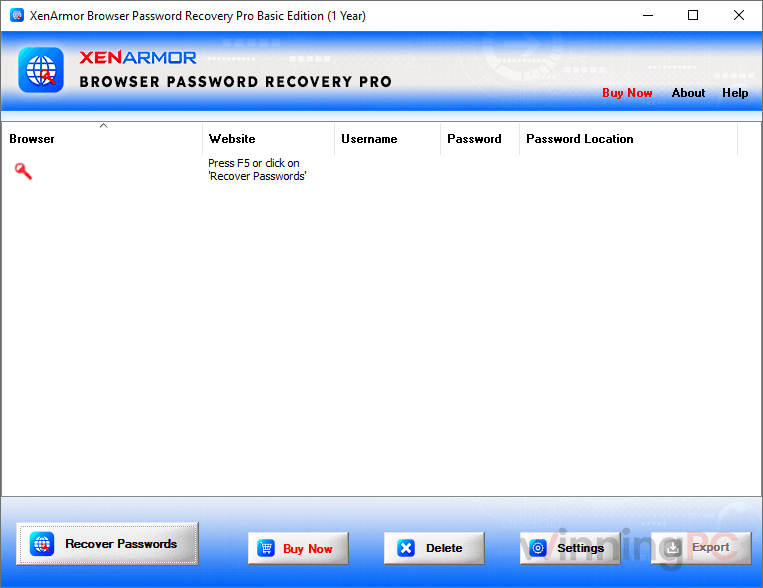
XenArmor Browser Password Recovery Pro‘s appeal here is coverage. The browser list goes well past Chrome, Edge and Firefox into Chromium forks like Brave, Vivaldi and Arc, plus Firefox relatives like Waterfox, LibreWolf and Zen. That matters if you’ve hopped between browsers over the years and the login you need lives in one you no longer touch. Recovery from inactive and even corrupt profiles is the other strong point, since that’s usually where “lost” passwords end up. The limits are real, though. Pointing it at an old drive only works when the passwords aren’t locked by user-specific encryption. And the command-line tools are reserved for Premium and higher editions, so the $24.95 Basic license doesn’t include them.
Key features
- Passwords from 140+ browsers, autofill from 130+. Saved logins plus form data like credit cards, emails, phone numbers and search history.
- Every profile, not just the current one. Active, inactive, corrupt and portable profiles, plus custom folders on external drives.
- Master password support for the Firefox family. Enter it once in Settings and protected Mozilla-based profiles open up.
- A clean-up mode, too. Selectively delete stored passwords and autofill entries if you’re handing a PC on or tightening privacy.
- Six export formats. Save results as HTML, PDF, CSV, XML, JSON or SQLite, which makes moving logins into a password manager much easier.
What we liked, what we didn’t
Questions people ask about XenArmor Browser Password Recovery Pro
Does the free XenArmor license expire?
Yes. The giveaway key is a 1-year license for one PC, for non-commercial use. If you want to keep the tool after that, the Basic Lifetime license is $24.95 with the coupon instead of $199.
Is there a free trial, and what’s limited?
Yes, there are trials for the Basic and Premium editions. They include all features but show only the first 2 characters of each recovered password and disable the command line. That’s still enough to confirm the tool finds your login before you pay.
Can it recover passwords from an old hard drive or another Windows account?
Sometimes. The Custom Location setting lets you point it at a profile folder on an external drive, but it can only recover passwords that aren’t protected by user-specific encryption. For full, automatic recovery from external drives, XenArmor sells a separate product, External Drive Browser Password Recovery Pro.
Does it work with a Firefox master password?
Yes, as long as you know the master password. Enter it under Settings -> Master Password before you start the scan. The same applies to other Mozilla-based apps like Thunderbird and Zen Browser.
Does the giveaway version include the command-line tools?
Not necessarily. Command-line support comes with Premium and higher editions, and the giveaway terms don’t say which edition the free key unlocks. The $24.95 Basic Lifetime license doesn’t include it.
Can I use one license on several PCs?
No. Both the giveaway key and the Basic Lifetime license cover 1 PC. The Unlimited Edition removes that limit and runs fully portable, which is why it’s aimed at technicians and forensic investigators.
What if it doesn’t find the password I need?
Usually one of three things: the browser changed its encryption in a new version, it keeps profiles in a different location, or the password was never saved on that PC. XenArmor’s support team will look into it for free, even for trial users, if you send the browser name, version, profile location and screenshots.
System Requirements & Supported Formats
| Field | Value |
|---|---|
| Operating system | Windows Vista/7/8/10/11 |
| Recovers from | Saved passwords in 140+ browsers and autofill data in 130+, including active, inactive, corrupt, portable and custom-location profiles |
| Export formats | HTML, PDF, CSV, XML, JSON, SQLite |
| Other requirements | Master password needed for protected Mozilla-based profiles; giveaway key covers 1 PC and must be activated before its expiry date |




thank yoou, useful program to get all passwords on the web-browsers.
thank yoou, useful program to get all passwords on the web-browsers.