
 Chris Bruner

Boilsoft Video Splitter is a video cutting tool that splits, trims, or cuts large video files into smaller clips without re-encoding to keep the original quality. It supports AVI, MPEG, RM, ASF, WMV, 3GP, MKV, FLV, and MP4 formats.
You can split videos by time, file size, or keyframes, and preview them with the built-in player for accurate selection. It also extracts video frames and saves them as images. The software includes direct splitting to keep original quality and an encode mode to split videos into different formats.
Boilsoft Video Splitter Plans & Coupon Codes (100% Working)

Boilsoft Video Splitter
65% off coupon code: regular price $34.95, discounted price $12.23
Boilsoft Video Splitter for Mac
65% discount: regular price $34.95, discounted price $12.23

Boilsoft Video Joiner + Video Splitter Bundle
48% coupon: regular price $64.9, discounted price $33.75
Boilsoft Video Splitter Full Free Download
- Product name: Boilsoft Video Splitter 7.02.2
- Website: https://www.boilsoft.com/
- License type: lifetime
- Platform: Windows
- Giveaway link: n/a
- Download:
bs_video_splitter_7.02.2.zip(updated: Jun 25, 2020)
How to get the license key?
Download and install Boilsoft Video Splitter on your computer.
Open it, then register with the following license name and license key for FREE.
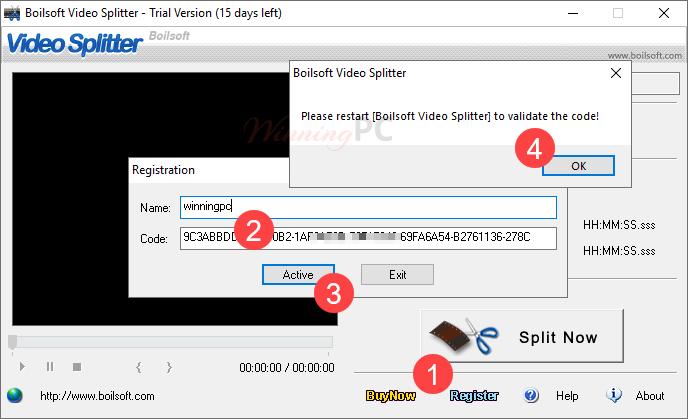
Video Splitter screenshot
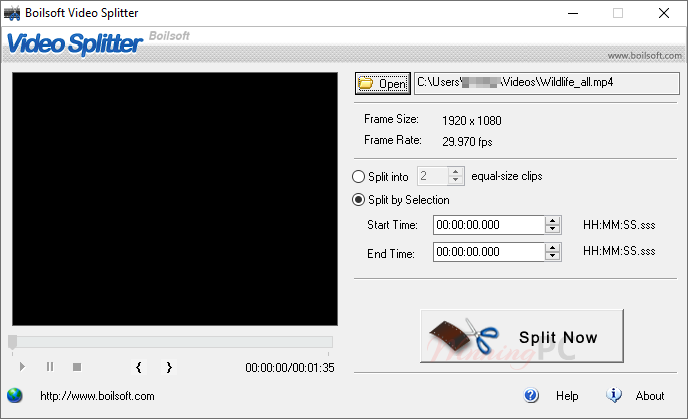

Main Features
- Multiple Format Support: supports a wide range of video formats and lets you choose the output format for compatibility.
- Easy-to-Use Interface: features a simple interface that lets you add files, set split points, and start quickly.
- Fast Splitting Speed: splits large video files quickly using direct stream cut technology without slowing down performance.
- Customizable Settings: allows adjustment of video quality, frame rate, and aspect ratio to match specific requirements.
- Preview Function: lets you review selected segments before saving to confirm accurate cuts and avoid errors.
- Batch Processing: processes multiple video files at once to save time when handling large workloads.
- Direct Stream Cut: splits videos without re-encoding while preserving original audio and video quality.
- Frame-Level Cutting: enables precise frame-by-frame selection of start and end points for accurate splitting.
- Flexible Splitting Options: extracts specific segments or divides videos into equal-size or custom-duration clips.
- Built-In Codec Support: includes all necessary encoders and codecs, supports drag-and-drop, and handles files larger than 2GB.
Frequently Asked Questions
What is Boilsoft Video Splitter?
It’s a tool for cutting, splitting, or trimming large video files into smaller clips without re-encoding, keeping original quality.
Which video formats does it support?
It supports AVI, MPEG, RM, ASF, WMV, 3GP, MKV, FLV, MP4 and more popular formats.
Can I split videos without losing quality?
Yes — direct splitting mode cuts videos without re-encoding so you retain original audio/video quality.
How can I choose where to split my video?
You can select start/end points by time, by frame, or by keyframes.
Does it include a video preview?
Yes — there’s a built-in player to preview clips before splitting.
Can it split videos into equal parts?
Yes — you can divide a video into multiple equal-sized segments.
Will it split very large video files?
Yes — it can handle large files even over 2GB.
What are the split modes available?
There’s Direct Split (lossless) and Encode Split (choose new output format).
Is there help if my file won’t open?
If a file won’t open, installing proper codecs like K-Lite may fix detection issues.
Where can I get Boilsoft Video Splitter and a special deal?
You can buy it from Boilsoft’s site, and WinningPC offers a 65% off coupon code to reduce the price.
Why Choose WinningPC
- Why Trust? We are committed to providing 100% valid and verified coupon codes, so you can always shop with confidence.
- Found an Invalid Coupon or a Better Deal? If you encounter an invalid code or a better offer, please let us know. Our team updates all discount information regularly to ensure accuracy.
- Official Authorization: We only share authentic discounts from trusted software developers.
- No Fake Discounts: Unlike some sites, we never use misleading deals. The final price you see is the true discounted price.
- Secure Purchases: All transactions are processed on the official vendor’s website, ensuring authenticity and data protection.
- Extra Support: If you face order or vendor issues, contact us. We’ll liaise with the vendor to help resolve your problem quickly.
Technical Details
| Language Support | English, Français, Italian, Spanish, Swedish, and more… |
| Money Back Guarantee | 30-Day |
| Operating System | Microsoft Windows 98/ME/2000/XP/2003/ Windows Vista/ Windows 7 |
| Shipping | Full version license code will be sent to you within minutes |
| Subscription | Lifetime |
| Support Services |




thanks, it’worked.