
 WinningPC

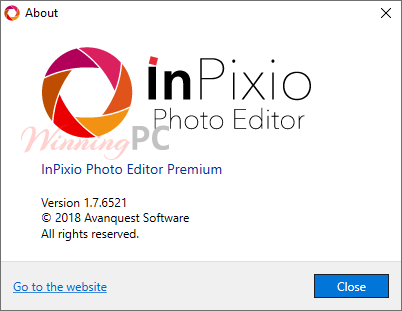
InPixio Photo Editor helps anyone can now produce professional looking photos that you can share on social media or send as postcards to family and friends. The photo editor from InPixio lets you add a wide range of impressive effects quickly and easily.
Top Photo Editor Coupon Codes (100% Working)

HitPaw FotorPea
70% off coupon code: regular price $51.99, discounted price $15.67

Luminar Neo - Perpetual Desktop
80% off coupon code: regular price $417, discounted price $83.30

PhotoWorks Ultimate - Lifetime license
75% discount code: regular price $114, discounted price $28.50
Movavi Photo Editor - Lifetime license
30% coupon code: regular price $74.95, discounted price $52.46

Pixlr Premium - Annual Plan
55% off coupon code: regular price $119.88, discounted price $54.48

Wise ImageX (1 year subscription)
25% discount coupon: regular price $19.95, discounted price $14.95
InPixio Photo Editor Premium Free Key
- Product name: InPixio Photo Editor 1.7
- Website: https://www.inpixio.com/
- License type:
- Platform: Windows
- Giveaway link: click here
- Download:
Online installer –> InPixioPhotoEditor_x86_DM.exe
Offline installer –> InPixioPhotoEditor1.7Premium.zip (Unpack the zip file and run “setup.exe” to install)
How to get the license key?
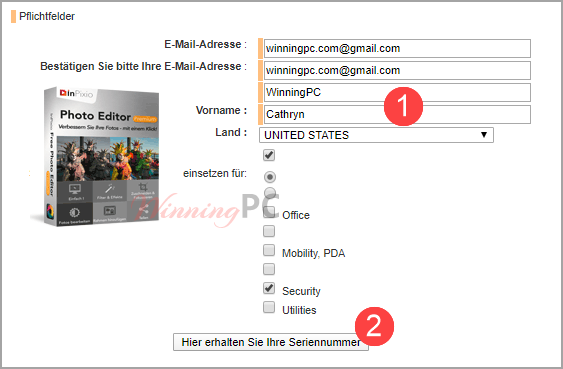
Open the giveaway page, fill the form, and get a license key. You will shortly receive a confirmation of your registration at the email address you provided. There you will find a confirmation link, please click on it.
PLEASE NOTE: Registration is only complete after clicking on the link in the e-mail! They will then send you your serial number. If you should not receive the email, please check your spam filter or junk mail folder.
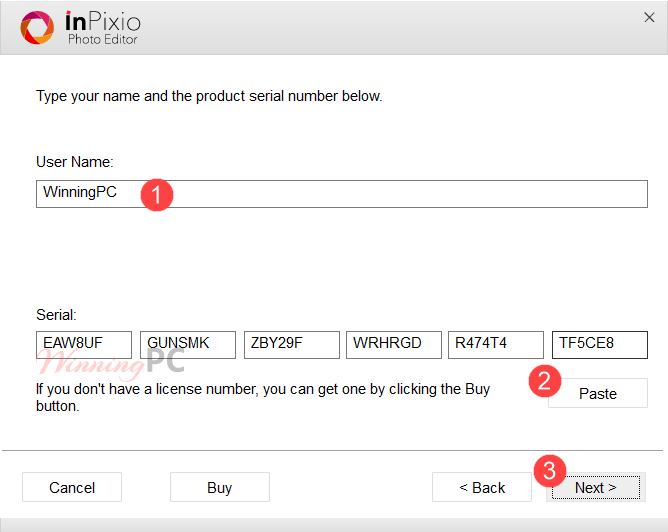
Download the installer and run the “setup.exe” file. Insert the license key during installation.

Main Features
- Add filters & photo effects: warm, black & white, pink lady, negative, sepia, science fiction, vintage…
- Cut & crop: change the focus and size of your photos without being a pro
- Edit your photos: change the color & brightness etc. to get the most out of your favorite shots
Technical Details
| Language Support | English, Français, Italian, Spanish, Swedish, German, Japanese, Chinese, and more… |
| Money Back Guarantee | 60-Day |
| Operating System | Windows |
| Shipping | Full version license code will be sent to you within minutes |
| Subscription | Lifetime |
| Support Services | Email, Live Chat |





After reviewing several blog posts on your site,
We truly appreciate the way your blog works.
We’ve added it to your list of favorite websites, and we’ll be reviewing it soon.
Future. Also, visit my website and tell us what you think.
thanks
Thank you
It looks for a Windows file yet it will not install the Windows file ’cause it is old. This company is not good! Other of its software has the same problem & many complaints in general to inPixio (do your own research) Unable to find vcr-whatever file and it won’t install. Crapware-Crapcompany
You can try inPixio Photo Clip Pro (old version of Photo Studio 10) here: https://winningpc.com/inpixio-photo-clip-pro-free-license-key/
It includes the Photo editor/ eraser and cutter.
I tried ALL software from inPixio & they all have the same problem including older versions.
Oh, sorry about that, you can find other software on our website.
P/s: I’m using Windows Windows 10 Enterprise 2019 LTSC 64bit and this software’s working well.
Unfortunately it doesn’t run in my Windows10 Home because it keeps asking for a file
vcredist_x64 or vcredist_x86 which tells you your computer doesn’t have. These components are installed normally with the program are usually present wherever you install the application. It even tells you to download it automatically. The problem is that Windows 10 does not install it because IT IS OUTDATED . In otherwords Windows 10 already has an updated copy of this component. If you try to place the vcredist_x64 or x86 inside the folder of the application which is were it normally resides the program still does not see it. Many programs have this component within their folder so I see that this is a problem of the poorly made installer of inPixio Photo Studio 10. Program installs BUT DOES NOT RUN.
You can try inPixio Photo Clip Pro (old version of Photo Studio 10) here: https://winningpc.com/inpixio-photo-clip-pro-free-license-key/
It includes the Photo editor/ eraser and cutter. I installed it on my Windows 10 x64 and it’s working well.