Chris Bruner

Stop wasting time manually resizing Safari and Pages windows just to see them side-by-side. macOS has improved its window management, but it’s still clunky. We’ve secured an exclusive discount on Cisdem Window Manager, the tool that actually makes multitasking on a Mac fluid. Whether you want a simple 50/50 split or a complex 10×10 grid, you can now grab a lifetime license for less than the price of a movie ticket.
Status: ✅ Active & Verified
Last Checked: September 2026
Offer: Up to 52% Off Lifetime Licenses

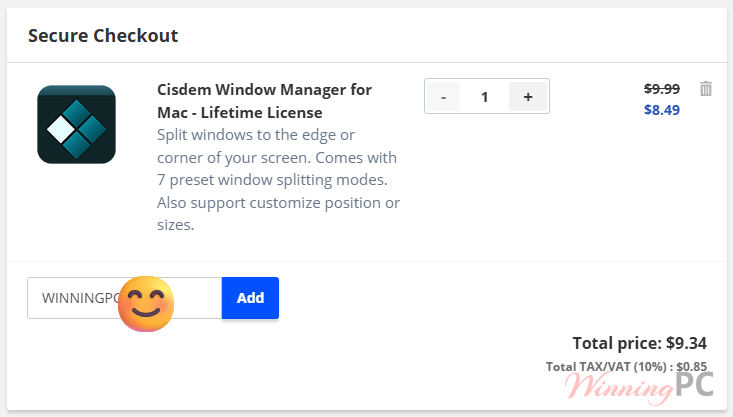
Cisdem Window Manager for Mac - Lifetime License
15% Off: regular price $9.99, discounted price $8.49
Cisdem Window Manager for Mac - Lifetime License for 2 Macs
36% Off: regular price $19.98, discounted price $12.74
Cisdem Window Manager for Mac - Lifetime License for 5 Macs
52% Off: regular price $49.95, discounted price $23.79
Special Offers

Cisdem Unarchiver and Window Manager Bundle for Mac - Lifetime License
40% coupon code: regular price $19.98, discounted price $11.99
Price Comparison Table
| Plan Name | Official Price | WinningPC Price | You Save |
| Lifetime (1 Mac) | $9.99 | $8.49 | 15% ($1.50) |
| Lifetime (2 Macs) | $19.98 | $12.74 | 36% ($7.24) |
| Lifetime (5 Macs) | $49.95 | $23.79 | 52% ($26.16) |
How to Redeem Your Discount
- Choose your preferred license from the coupon section above.
- Click our exclusive link to head to the official Cisdem checkout page.
- The 15% to 52% discount should be visible in your cart immediately.
- Complete your purchase and check your email for the activation key.
What is Cisdem Window Manager?
If you’ve ever used “Snap” on Windows, you know how much macOS is missing. Cisdem Window Manager fills that gap. It’s a lightweight desktop utility designed for power users, researchers, and developers who need to organize multiple apps across a single screen. Instead of dragging corners and guessing sizes, you snap windows into place using the mouse or keyboard.

Why It Beats the Default Mac Features
- The Grid System
While Apple gives you basic split-screen, Cisdem offers a 10×10 grid.
– The Benefit: Total control over “real estate.”
– Use Case: If you have a massive 34-inch ultrawide monitor, a 50/50 split is a waste. With the grid, you can have a thin Slack window on the left, a large coding window in the center, and a browser on the right—all perfectly aligned. - Edge & Corner Snapping
Drag a window to the top to maximize, or to a corner to occupy exactly one-quarter of the screen.
– The Benefit: Speed. No more precise clicking required.
– Use Case: Quickly docking a calculator or a sticky note in the bottom-right corner while keeping your main document centered. - Keyboard Shortcuts for Everything
You can assign global hotkeys to every window position.
– The Benefit: You never have to take your hands off the keyboard.
– Use Case: Hit Cmd + Alt + Left to instantly shove your browser to the left half. It’s a “pro-gamer” workflow for productivity. - Zero Resource Footprint
Cisdem Window Manager built this to be “invisible.” It uses almost zero CPU and minimal RAM.
– The Benefit: It won’t drain your MacBook battery or slow down your renders.
– Use Case: Keeping it running 24/7 on an older MacBook Air without noticing a performance hit.
More screenshots:


Pros & Cons
Technical Specifications
| Processor | Intel or Apple Silicon (M-Series) |
| RAM | 512MB minimum (Works on even the oldest Macs) |
| Storage | 50MB free space |
| OS Support | macOS 10.10 Yosemite all the way up to macOS 15.0 Sequoia |
| Note: You must enable “Accessibility” settings in System Settings for the app to resize windows. |
Frequently Asked Questions
Is this a subscription?
No. These are Lifetime Licenses. You pay once and own that version forever with no monthly fees.
How many Macs can I use this on?
It depends on the plan you buy. We recommend the 2-Mac or 5-Mac bundles as they offer the highest savings (up to 52% off).
Does it work with Chrome and Safari?
Yes. It supports almost all standard window-based apps, including browsers, Microsoft Office, and creative tools like Keynote.
What is the refund policy?
Cisdem typically offers a 30-day money-back guarantee, but since these are heavily discounted through WinningPC, ensure you check the specific checkout terms.