On this page
Abex All to HTML Converter Coupons & Pricing
Abex All to HTML Converter
Single-user license | Free technical support and a lifetime free upgrade.
How to Use the Abex All to HTML Converter Coupon Code
- Click Copy on a plan to copy the code WIN***GPC40.
- Open the official Abex All to HTML Converter product or purchase page on Abexsoft’s website.
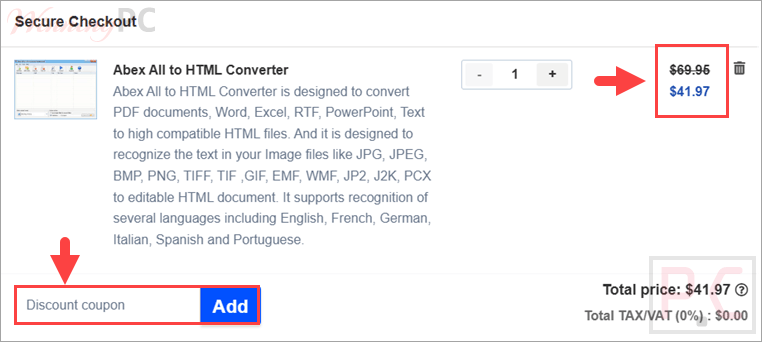
- Continue to the secure checkout page and find the coupon or promotional code field.
- Paste WIN***GPC40 into the field and apply it.
- Confirm the total before submitting payment.
- After the order is approved, check your email for the registration name and license code.
Is the Abex All to HTML Converter Safe and Legit?
Yes. This offer is intended for the official Abexsoft version of Abex All to HTML Converter rather than a modified installer or an unofficial activation method.
No crack or keygen
You download the standard installer and activate it with the registration information supplied after purchase.
Official publisher checkout
The transaction takes place through Abexsoft’s purchase process, not through a grey-market license seller.
Secure payment page
Payment information is entered on the publisher’s encrypted checkout system and is not collected by WinningPC.
30-day refund period
The discounted license is covered by the stated 30-day money-back guarantee.
Abex All to HTML Converter Review & Features
Abex All to HTML Converter turns office files, PDFs, text files, and images into editable HTML. It is mainly for users who need to convert documents in batches to the web while preserving the original page layout as much as possible. The OCR feature supports several listed languages, including English, French, German, Italian, Spanish, and Portuguese.
Key features
- Converts PDF, Word, Excel, PowerPoint, RTF, TXT, HTML/HTM, and image files to HTML.
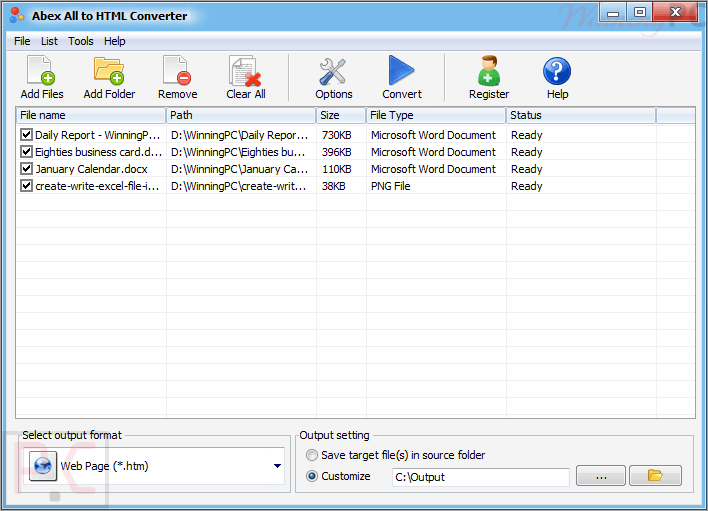
- Supports batch conversion, drag-and-drop importing, whole folders, and subfolders.
- Recognizes text from image files and exports it to editable HTML.
- Retains original document layouts as closely as possible during conversion.
- Works as standalone software without requiring Adobe Acrobat or Reader.
What we think
Screenshots
Frequently Asked Questions
Where can I find the latest Abex All to HTML Converter coupon code?
The latest code provided for this offer is WIN***GPC40, which gives 40% off the product. It reduces the single-user license from $69.95 to $41.97 when entered at checkout.
Is the coupon safe and official?
The coupon should be used through Abexsoft Software’s official checkout, not a third-party crack or keygen site. It says orders are processed by RegNow through a secure connection, so payment details are sent securely to the recipient during purchase.
Does Abex All to HTML Converter work on Windows 11?
Yes, this tool supports Windows 11, along with Windows Vista, Windows 7, Windows 8, and Windows 10. The listed requirements are light: a 1GHz Intel/AMD processor, 256MB RAM, and 100MB of free disk space for installation, at a minimum.
What files can it convert to HTML?
It can convert PDF, Word, Excel, PowerPoint, RTF, TXT, HTML/HTM, and common image formats to HTML. The input list includes DOC/DOCX, XLS/XLSX, PPT/PPTX, JPG, PNG, TIFF, GIF, EMF, WMF, PSD, PCX, JP2, and J2K, among others, for web-ready output files.
Can it recognize text from images?
Yes, it can recognize text from image files and export it as editable HTML.
Does it need Adobe Acrobat or Reader?
No, Adobe Acrobat and Adobe Reader are not required to run Abex All to HTML Converter. It is listed as standalone Windows software, which matters if you need PDF-to-HTML conversion on a PC without installing Adobe’s PDF tools first locally.
How does batch conversion work?
Batch conversion lets you import many document or image files at once, then click Convert to create HTML output. The software can also add whole folders and subfolders, save and load conversion lists, and place separate files in dedicated output directories.
System Requirements & Details
| Feature | Specifications |
|---|---|
| OS Support | Windows Vista, Windows 7/8/10/11 |
| Processor | 1GHz Intel/AMD processor or above |
| Memory | 256MB RAM minimum; 512MB or above recommended |
| Storage | 100MB free disk space for installation |
| Supported inputs | Document: PDF; RTF; TXT; HTML; HTM Word: DOC, DOCX, DOCM Excel: XLS, XLSX, XLSM PowerPoint: PPT, PPTX, PPTM, PPS, PPSX, PPSM image: JPEG, JPG, BMP, PNG, TIFF, TIF, GIF, EMF, WMF, PSD, PCX, JP2, J2K. |
| Supported output format | HTML |