On this page
Abex All to Image Converter Coupons & Pricing
Abex All to Image Converter
Single-user license | Free technical support and a lifetime free upgrade.
How to Use the Abex All to Image Converter Coupon Code
- Click Copy on a plan to copy the code WIN***GPC40.
- Open the official Abex All to Image Converter purchase page.
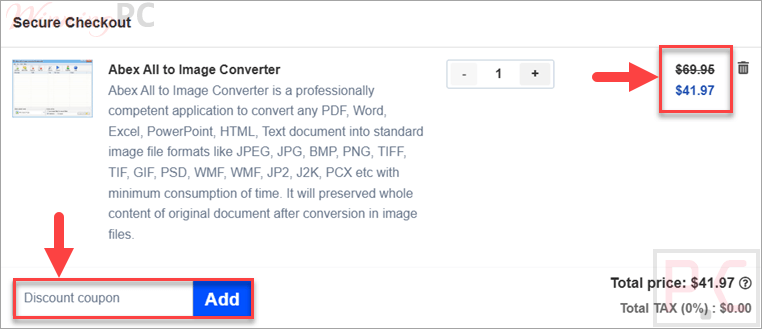
- Select the single-user license priced at $69.95.
- Continue to the secure checkout page.
- Paste the code into the coupon or discount field.
- Confirm that the total is $41.97 before completing payment.
- After the order is validated, check your email for the registration details.
Is the Abex All to Image Converter Safe and Legit?
Official paid license
The discount applies to a standard Abexsoft single-user license. It does not involve a crack, key generator, or modified installer.
Secure ordering
Abexsoft states that payment information is transferred through an SSL-secured checkout process.
License delivery
Registration information is sent by email after the order is successfully validated. Keep the order confirmation in case the code needs to be recovered later.
Refund protection
WinningPC users receive a stated 30-day money-back guarantee with this coupon offer.
Abex All to Image Converter Review & Features
Abex All to Image Converter enables users to turn office documents, PDFs, HTML, text files, and image files into standard image outputs without relying on Adobe Acrobat or Reader. It is especially useful for archiving, sharing, or previewing documents as images rather than editable files. One practical detail stands out: it supports Microsoft Office files from 2003 through 2021.
Key features
- Converts PDF, Word, Excel, PowerPoint, RTF, TXT, HTML/HTM, and image files into standard image formats.
- Supports batch conversion, folder/subfolder importing, and drag-and-drop PDF conversion.
- Creates one image per document page or PowerPoint slide.
- Can output multipage TIFF/TIF files or multiframe GIF files from multipage documents.
- Offers output controls for width, height, frame rate, color depth, resolution, JPEG quality, file naming, and folder handling.
What we think
Screenshots
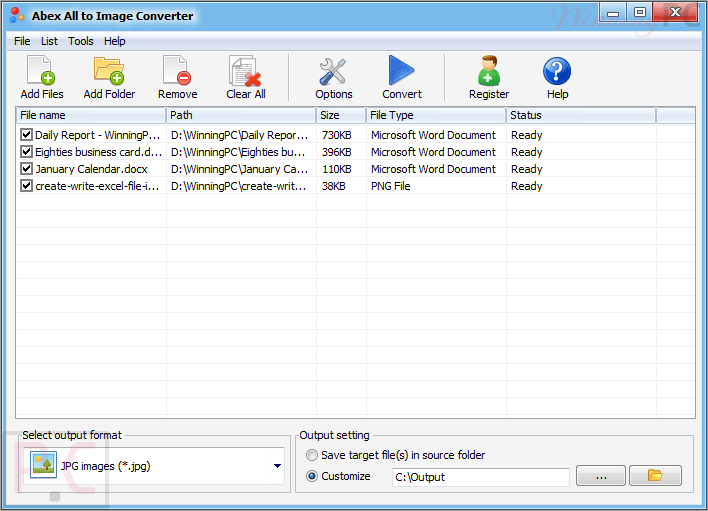
Frequently Asked Questions
What is the latest Abex All to Image Converter coupon code?
The latest supplied coupon code is WIN***GPC40 for 40% off. With this code, the single-user license drops from $69.95 to $41.97. Copy the code, paste it at checkout, and confirm the discount before paying.
Is the Abex All to Image Converter order process secure?
Yes, the publisher states that orders are processed through RegNow using a secure connection. That means payment details such as credit card numbers, addresses, and order information are sent through a protected checkout process. Always make sure the discount appears before completing payment.
Does Abex All to Image Converter work on Windows 11?
Yes, this software lists Windows 11 as supported, along with Windows Vista, Windows 7, Windows 8, and Windows 10. It supports both 32-bit and 64-bit systems, which helps if you manage older Windows computers.
What files can Abex All to Image Converter convert to images?
This software can convert PDF, Word, Excel, PowerPoint, RTF, TXT, HTML/HTM, and existing image files to image formats. It also supports Microsoft Office files from 2003 through 2021, including DOCX, XLSX, PPTX, and related macro-enabled formats.
Can Abex All to Image Converter batch convert folders?
Yes, it supports batch conversion and can add an entire folder, including subfolders. That is useful when you need to convert dozens of documents or images in one run instead of opening each file individually and exporting them one by one.
What output image formats does Abex All to Image Converter support?
The listed output formats include JPEG/JPG, BMP, PNG, TIFF/TIF, GIF, EMF, WMF, PSD, PCX, JP2, J2K, and ICO. It can also create single-page image files or multipage formats such as multipage TIFF/TIF and multiframe GIF for longer documents.
Can Abex All to Image Converter convert password-protected PDFs?
Yes, the supplied feature list says Abex All to Image Converter can convert password-protected PDF files. It also lets you convert all PDF pages or selected page ranges into image files, which is helpful when you only need part of a long document.
System Requirements & Details
| Feature | Specifications |
|---|---|
| Operating system | Windows Vista, Windows 7/8/10/11 |
| Processor | 1GHz Intel/AMD processor or above |
| RAM | 256MB RAM; 512MB or above recommended |
| Free hard disk space | 100MB for installation |
| System type | 32-bit and 64-bit systems supported |
| Supported input formats | Documents: PDF, RTF, TXT, HTML, HTM Word: DOC, DOCX, DOCM Excel: XLS, XLSX, XLSM PowerPoint: PPT, PPTX, PPTM, PPS, PPSX, PPSM Images: JPEG, JPG, BMP, PNG, TIFF, TIF, GIF, EMF, WMF, PSD, PCX, JP2, J2K |
| Supported output formats | JPEG, JPG, BMP, PNG, TIFF, TIF, GIF, EMF, WMF, PSD, PCX, JP2, J2K, ICO. |