
Advanced TCP/IP Data Logger prices with the code
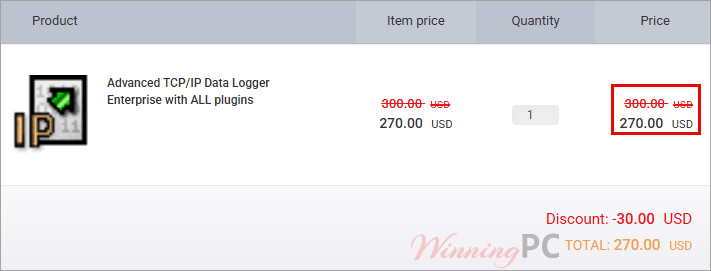
How to use the Advanced TCP/IP Data Logger coupon code
- Copy the code WinningPC from the button above.
- That hands you over to PayProGlobal, AGG Software‘s authorized reseller.
- Paste WinningPC into the coupon or discount field and apply it.
- Check the total before paying. Complete payment. The activation key arrives by email, and you install the same build regardless of edition.
Is this Advanced TCP/IP Data Logger deal safe to use?
Yes. Nothing here involves a key generator or a patched build, and the money never touches WinningPC.
A genuine license, not a crack
You download the standard installer from aggsoft.com and unlock it with a key tied to your order. The same installer serves every edition, so there is no modified build in circulation to worry about.
One official checkout
The buy links go to AGG Software’s own store, handled by PayProGlobal, which the vendor names as its authorized reseller in its published refund policy. You are not buying a resold or grey-market key.
Try it before you pay
A free trial is on the vendor’s download page. If the software cannot talk to your device, you will know that before spending anything, which matters here more than usual because the refund terms are narrow.
Refunds exist but are conditional
AGG Software offers 14 days, and it applies to software that does not work correctly on your PC after you have contacted support.
How well does Advanced TCP/IP Data Logger actually work?
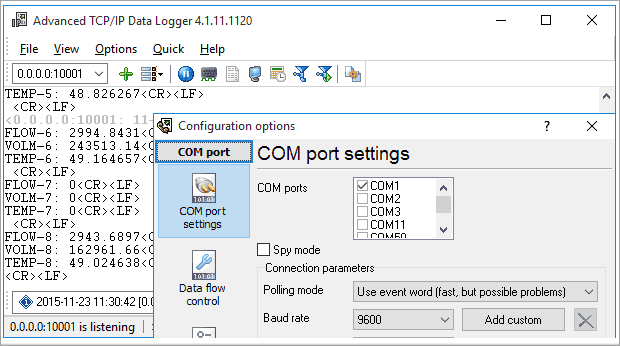
Pulling bytes off a TCP port is easy. Turning a messy stream from a terminal server into named columns in a SQL table, every few seconds, unattended, for years, is not. That is what the parser plugins do, and it is where your configuration time goes. Budget an afternoon with the regular-expression parser before your first clean export. The payoff is service mode: once it runs as a Windows service it starts before anyone logs in and keeps writing through reboots and user sessions, which is the whole reason industrial buyers pick this over a homegrown script. The Advanced TCP/IP Data Logger interface looks like it was drawn in 2008 and the online help reads like a manual rather than a guide, though both are thorough.
Key features
- Log several ports at once: One instance can watch multiple TCP and UDP ports, so a rack of terminal servers lands in one place instead of five.
- Client or server mode: Connect out to a device that listens, or sit and wait for devices that push data to you.
- Parsers that produce columns, not blobs: Fixed positions, delimiters or regular expressions turn a raw stream into named variables you can store and query.
- Export targets that already exist in your stack: ODBC and SQL databases, cloud databases including Azure, PostgreSQL and MongoDB, Excel, Google Sheets, plus OPC DA/UA and DDE for SCADA clients.
- Runs as a Windows service: Logging starts with the operating system and survives logoff, with no user session required.
What we liked, what we didn’t
Frequently Asked Questions
What is the cheapest edition that can export to a database?
Advanced TCP/IP Data Logger Professional, at $153 with the code. Standard costs $90 but cannot load plugins at all, and every database, Excel and OPC export in this program is a plugin. Home also runs two plugins at once for $90, but its license is non-commercial only, so it is not an option for work.
Is this a subscription or a one-time payment?
One-time. The license is perpetual and never expires, but free updates and new versions stop after 12 months.
Can I get a refund if I change my mind?
Probably not. The 14-day guarantee covers software that does not work correctly on your PC, and only after you have contacted technical support and followed their instructions. Buying by mistake, buying the wrong tool for the job, or having already used the activation code are all listed as grounds for declining. Approved refunds also require a signed Letter of Destruction. Use the trial first.
Is there a free trial?
Yes, from the vendor’s download page. Advanced TCP/IP Data Logger runs the full feature set but stops after 30 minutes and has to be restarted, and it will not save your work. That is enough to check your device connects and your parser rules match. It is not enough to test a week of unattended logging.
How many computers does one license cover?
One. AGG Software licenses per computer or server, not per site or per company. A second machine needs a second license, though quantity pricing lowers the unit cost, and an unlimited site license is listed at $2,000 before the code.
Does it run on Windows 11 and Windows Server?
Yes. The vendor lists Windows 2000 through Windows 11 (2022), including Server editions, in both x86 and x64.
What you need to run it
| Operating system | Windows 2000 through Windows 11 (2022), including Server editions, x86 and x64 |
| Processor / RAM / disk | Not specified by the publisher |
| Supported inputs | TCP, UDP and HTTP connections in client or server mode; text, ASCII, raw and binary data |
| Supported outputs | Plain log files, ODBC and SQL databases, cloud databases (Azure, MySQL, PostgreSQL, MariaDB, MongoDB, Amazon Aurora, Amazon Redshift), Excel, OpenOffice and LibreOffice Calc, Google Sheets, OPC DA, OPC UA, DDE, CSV, XML, HTML, RTF, PDF, plain text, Windows clipboard, plus email, HTTP POST, FTP and SFTP |
| Other requirements | One license per computer or server; OPC Core Components Redistributable needed for the built-in OPC server; latest version 5.1.6, July 2026 |